Jim Groom, edtech guru, has been conducting interviews about writing at ReclaimTV. Many of the guests have been blogging for decades, and are very familiar to me from my years teaching at a distance, such as Bryan Alexander and Audrey Watters.
One of the most interesting interviews was Kate Bowles, who hasn’t blogged for years but influenced all of us when she did and now posts on Mastadon. In a broad ranging conversation, she discussed her own public writing, including her efforts to get back into it. She and Jim talked about how things have changed, the conversations that no longer take place on blogs, the echo chambers created by closed communities, and what survives with the prevalence of AI.
I am late to the term “fediverse”, and the more I learn about this idea of global, open, interconnected and independent sharing, the more it sounds like the World Wide Web when it was the Wild West. I wrote about that open web, and worried about losing it, in 2011 and 2012. Free, open, share — these are words from the late 1990s and early 2000s, when I became an online educator and participant.
Historians, of course, look backward all the time. The web became closed in the same way as the American frontier, through privileging commercialism and private gain. As we talk about writing publicly, we tend to want to go back to when blogging was long-form communication with call-and-response, a way to thoroughly hash through various subjects by learning about various viewponts, and writing about them. We groan about how this world has been taken over by places that are either closed (Discord) or plagued with bad actors and focused on selling things (Facebook, Instagram, X).
Taking a broader cultural perspective on the present, above and beyond the complaints of writers themselves, doesn’t help. We see long-form writing in general going out of fashion (just ask those of us who write and try to sell our novels), AI normalizing bad bland prose, and a strong desire for less junk and more meaning.
Perhaps it is best to celebrate the fact that intellectual and poetic writing is vintage. Many of the objects I value, such as record albums and landline phones, were once popular forms but are now niche. Blogging, and indeed long-form writing in general, may occupy such a place historically. We mourn this and rage, because without long-form writing it is impossible to posit a convincing argument, present evidence of an outlandish thesis, or tell a full and meaningful story.
It doesn’t really matter where we do it, and if the fediverse* is the place for it, I’m in.
(*NB: for the record, I think that term is awful – I much prefer open web)
It’s all about annotation, and I’ve been comparing Kami and Hypothes.is. Last semester, I used Kami ($50 for no ads) for students to annotate text with my History of Technology class. I had some success, but I was not happy with its limitations, so this summer I tried Hypothes.is instead.
The students were offered a video tutorial on how to use it. I made a group just for them. The assignment was extra credit — for each of the three classes I uploaded an article for them to read and annotate, replying to each other. Sample instructions:
I had been concerned that they would automatically post in Public instead of in the Test Group, because I could find no way to limit that or point them directly to the group page – the choice is made only via a drop-down menu in the upper right corner. Sure enough, several students posted in Public and missed the discussion going on in the group. I will have to add this to the instructions as well as in the tutorial.
I had thought that analysis and counting their contributions would be made easier by the brilliantly conceived Hypothesis Collector, created by John Stewart. It worked great last night. Unfortunately, when I tried it this morning, it only gave me the posts that had been made as of last night. I simply couldn’t get it to work and had to manually count annotations to assign points. I have been contacted by Jeremy Dean of Hypothes.is for ways to integrate with Canvas – this might be a huge help next year.
I am considering providing my next class textbook, The American Yawp, with my own annotations. The book, an open textbook, has a number of faults and omissions that would make for great learning opportunities for students. My own annotations would be like mini-lecture commentary, glossing on the text. But for some of the summer articles (one out of three of mine) in Hypothes.is, the section one highlights is quoted in the annotation without spaces, which is ugly. Also, there is little color or design in the annotation box to alert the student to the presence or unique character of an annotation.
I think Kami looks better for this, and then I will export my pages as PDF for the students.
I had originally thought I could use The American Yawp’s own affordances as an updated online text, but just got an announcement that, ironically, their current update will be integrating Hypothes.is. Each page served by them will then come up with an invitation to annotate publicly. While this might or might not help students with the text, it provides an additional way for students to go wrong beside the Public or Group problem, so I don’t think I’ll be working off the Yawp html pages regardless.
Don’t get me wrong – the business model of Hypothes.is is wonderful. They make a real effort to reach out, adapt and update. In fact, that’s one of the reasons for this post – to provide input that I hope will continue its improvement as an open source product made by people who really understand the value of text annotation.
As you know, I’ve been mourning the disappearance of two key technologies: the slidecast function in Slideshare (which could sync an audio file to a slidestack) and the annotation function in Flickr (which enabled mouseover notes on an image).
Then Alan Levine posted that he’d found a slidecast working in an embedded version.
At first I had trouble finding a Slidecast I’d embedded somewhere. Then I looked at some of my slideshows in Slideshare and peered at the truncated URLs of where they’d been embedded. Most were in other people’s LMSs (kind of ironic, actually) but some referred back to sites I control.
lisamlane.blogspot? I have a Blogspot blog? So I typed http://lisamlane.blogspot.com into my browser, and … oh! I didn’t find my slidecast, but I did find my annotated Flickr image of a medieval manor.
Imagine my excitement! No, wait, imagine me up several late nights for hours with Dreamweaver and 33 tabs open trying desperately to figure out how to create hotspots and make an imitation of my annotated Flicker image of a medieval manor, when I didn’t keep a copy of my notes. NOW imagine my excitement!
So I posted and Alan, being his wonderful self, figured out that Mbedr was doing the heavy lifting, and he posted about his found treasures. (Mbedr is a utility I discovered and played with in 2010, thanks to – guess who – Alan – and yes, that image still has its notes too!) And because Alan had talked about View Source in another tweet about Slideshare, I viewed the source and found my notes in the code, so I can recreate the image at 2 in the morning once I figure out the hotspots. I have my text!
Then I remembered that I had embedded a whole class of history lecture slidecasts, one at a time, onto web pages, so I could couple them with their audio transcriptions. Sixteen lectures saved!
So embedding preserved our goodies. When Flickr combined the image and the notes, and when a slidecast got embedded in a blog or page, it created something more permanent. It doesn’t solve all our problems, of course – we still can’t get these artifacts out in their original form. But access to anything we embedded seems to be restored!
Not that long ago, there were exciting new things to try in ed tech. It was easy to get enthusiastic about not only new products but the way the web was going, and to encourage faculty to jump in.
But in the last few years, the web has gone stagnant. Certain models of development, and certain tools, have become dominant, and online teaching has become far less excitiing.
1. Education is seen as a market.
Education, as Apple has known since 1981, is a market. But instead of marketing products toward innovative faculty, now products become “enterprise” and are marketed to administrators. This is a larger version of the problem I wrote about six years ago. Then, the Learning Management System, particularly the dominance of Blackboard, stifled innovative pedagogy, especially for novices who just plugged things in to the system. Now we have that writ large. We limit what’s available because restriction is seen as the only way to offer “support” (which faculty now desperately need – see #7). Educators are no longer seen as having special standing as users, with full-featured accounts offered for fee — we are just a target market like every other “consumer”.
2. The web isn’t as friendly anymore.
A couple of years ago, I got a note from an irate blogger because I was using her education blog to try out a feed aggregation plugin for WordPress. She thought I was making money off her work. Last week, I received a notice from Zoho, because my last post linked specifically to their LiveDesk page. They asked me to change my link. The link in my post. In my blog. Apparently linking to anywhere in a website other than the main page adversely affects their Google SEO standings.
We have pulled people away from the idea of creating their own web spaces, because it’s so much more convenient to just use Facebook or Google. In addition to the stalkers and evil net users we’ve always been afraid of, commercial entities like Apple and Google now collect, use, and sell our personal information and web use habits. We are watched, tracked, bought, sold, folded, stapled and mutilated on the web. It’s gone from playground to panopticon.
3. Tentative faculty were right.
When faculty were afraid to work with web 2.0 tools, we used to talk about the possible creativity. When they worried that they might work hard on something only to have it disappear, we’d talk about the transience of everything on the web, or how much benefit their work would have for students. But they’ve been right. Even though I’ve preached for years not to keep your important stuff on the web (even this post is backed up in plain text), I have been affected by the loss of tools like Posterous and the audio feature in Slideshare. Colleagues have been impacted by price hikes for Ning. Things that we created learning objects in for free now charge $49/month.
4. Nothing new is out there.
This is true pedagogically and technologically. When the new exciting thing is Haiku Deck (yet another simple tool for making what is essentially PowerPoint slides online), we’re in trouble. Tools that really do something new, like Prezi and Blabberize, are becoming very rare. This is despite the institutionalization of open source as a viable alternative to proprietary development. Now the purpose of development is to Beta a product, then monetize as quickly as possible. Almost every tool I’ve used has either disappeared or gone “freemium”, with the free version (think Blogger) being almost useless for any sort of innovative teaching. The IPO for Twitter is more than economic news — it’s emblematic of the move to commercialism in a way that creates stagnation within the product. All development will now be aimed at monetization.
And the tools themselves just perpetuate the same ways of doing things. We have failed to move beyond PowerPoint. Although we are better at designing slides (huge slides of text are now the exception), it’s still the same idea. Slideshows with audio were not exactly innovative (they duplicated the teacher talking through a filmstrip, if you remember those), but they were at least useful until Slideshare did away with the soundtrack (my last post tried Thinglink and Soundcloud to do something similar). The emphasis, unless you are a professional web developer or video-maker buying big products, is on easy sharing. Pinterest, the most recent “new” way of doing things, is just an easier version of CoolIris, which is just an easier version of posting images on a web page. Blogging plugins are aimed at monetization and search standings. And none of it ever got easier – wikis are still as hard to use as they always were. Sure, we can shrink-a-dink stuff for mobile. But I see little that is new (my online colleagues tell me gaming has seen all the innovations).
5. Online teaching has institutionalized in the wrong direction.
There were initially two models for online teaching. One was the DIY, faculty-driven, creative, early adopter, free development model. The other was the enterprise system, LMS-for-sale, cookie-cutter classes model. The latter featured scalability via automated grading and servers that could handle hundreds of students. When MOOCs became popular about five years ago, both models were in use. In adopting the standardized model as an answer to high college expenses, and promoting it in the best universities, the standardized, commercial model has won. When big universities other than its originator (Stanford) become commercial partners in Coursera, for example, that’s pretty clear.
6. The field has professionalized, also in the wrong direction.
cc BK at Flickr
Instead of faculty becoming experts in educational technology as part of a creative process, and being supported by their employers to get certificates and degrees to teach others, educational technology and online course administration are now their own fields with their own PhDs. This means that individuals who have never been teachers and have very little experience create small-sample studies and get degrees that net them jobs administrating experiences for faculty. The entire process promotes the idea that ed tech is too complex for ordinary faculty, promoting dependence and lack of agency.
7. Creativity is being outsourced.
A correlary to this trend is that the fun part (or second most fun part, depending on how much you like students) is being done by others. Creativity in teaching online comes in three places: course design, course materials development, and interactions with students. Most online teachers have great potential for developing good techniques for the latter, especially if they have teaching experience in other settings. But the creative fire, and the development of ones own online pedagogy, is being outsourced to “course developers” and “teams” who take the “burden” of creating courses off overworked faculty.
What seems to be advancement, then, has stifled online teaching.
Lessons of technology
I am a historian of technology – it’s what I do. In discussing some of the above disillusionment with my colleague Scott Johnson, he mentioned how prepping an online course is seen like housework – an ongoing process that people need relief from. Back in the 1980s, historian Ruth Schwartz Cohen wrote a book called More Work for Mother. It was about the changes in domestic technology at the turn of the last century (washing machines, vaccuum cleaners) and the way they were supposed to save labor. But instead, they caused a change in standards for cleanliness that increased their necessity. In addition, they put more of the burden on women, since they no longer needed help beating rugs and hauling laundry tubs.
The promise of technology for improving learning has been realized to a certain extent on the learner end – it is now much easier for the self-motivated, research-oriented students of information and perspectives to save, share and innovate within their own learning experience. But for teachers it’s “more work for mother”, as technologies, instead of relieving a burden, place too many demands on our time for too little return. That not only leaves teachers tired and willing to give up their pedagogical freedom to the nearest ed tech PhD, it leaves the students who need a lot of guidance out in the cold.
A silver lining
There are a number of ways to deal with all this. Most involve some pruning, and even a return to previous ways of thinking.
Select the right tools
When we create something on the web, we should only do so in places where we can download a copy in a typical format, like mp4. Otherwise, we should avoid the product.
Focus on one technology that works
Online courses could be simplified. Select one technology (video, audio, slides) and make that your own. And by “own” I mean created in a way where you can save a copy before uploading to YouTube.
Return to basics
If the technology is turning into a time-suck, return to the more personal way of doing things, like assignments and feedback by email.
Use the technology when it truly saves labor
An automated gradebook where students can log in and see their grades saves labor. Automated grading for multiple-choice or formative assessment saves labor. Other aspects of technology (internal messaging systems, clunky captioning tools, things you have to spend 15 hours learning) may not be good time investments.
Outsource the things you hate
Take advantage of whatever systems or people are provided to you for free, and learn the features or tasks they provide that make these tasks easier. But prioritize first based on what you like – if you love course design, keep it for yourself.
Play with a purpose
It used to be we’d play with the newest gadgets and apps so that we could build permanent things, but this doesn’t work. So play with the intention of learning about technologies in general. All the skills can be transferred to other web technologies.
Go to where you are
If you love your LMS, stay there and learn to use it well. If you prefer WordPress, learn all about it. If you’re a Google fan, become proficient. Don’t worry about going to where other people are (Facebook or mobile apps) if that’s not your thing.
When technology causes loss, or bad changes, instead of improving our lives, we should evolve. I got rid of my dishwasher because it was a continual source of disappointment – it didn’t get dishes very clean, and it got to the point where I was pretty much washing them by hand anyway. So I bought a bigger dish drainer, removed the dishwasher, and gained some badly needed kitchen space. But before that happened I wasted a lot of time and effort working with the machine’s inadequacies, because after all it was supposed to save me time and trouble.
Sometimes it’s hard to recognize when technology is controlling us instead of the other way around. If the web isn’t providing exciting options anymore, it’s time to adapt and get some of our space back.
I thought, that’s a nice picture of her. And the audio is playing over it. Would it be possible to make that a set of images that changed? After all, I’m still smarting from Slideshare’s cavalier decision to delete all my carefully synced audio lectures from my slide sets. So I put “soundcloud images” into DuckDuckGo, and somehow ended up at this page saying how you could add SoundCloud audio to an image in ThingLink, which I’ve never used. So I got a ThingLink account, uploaded an image, tagged it “LACMA”. Then I went into SoundCloud, used its new Record feature to record an audio test, then went back to ThingLink.
I added another tag and put in the URL for my SoundCloud audio, and changed the link image to a play button. Then I clicked Share to get the embed code to put it all here. Here’s what happened (mouse over if you don’t see the link buttons):
Starting a new year means starting a new semester, and this time it will start a week early.
The issue today was IM. My classes are in Moodle, but I’ve always used a status button so students can communicate with me instantly if I’m online.
Moodle has something called Messages. Back in version 1.x, I couldn’t tell which class a student was in when they Messaged me. Instead of fixing this in 2.x, they made it worse by removing all user information outside the courses completely, making it not only impossible to tell which class a student was in, but impossible to get back to where you were working in your course site.
I used to use Google Talk Chatback Badge instead. It didn’t tell me which class a student was in, but at least it was easy to let them know I was available, and they didn’t have to have a Google account or log in. That’s gone. The option now is Hangouts and other stuff where they have to join Googleland. I can’t be responsible for making someone violate their own privacy that way.
Then it was Plupper, which I routed through iChat. It’s been down all week. I don’t know if it’s coming back, but all week isn’t OK, so I went hunting again.
I was getting miffed that I couldn’t find what I wanted. I was running all over the web trying to find a free service. I began to realize I didn’t really need “chat”, but some sort of help-desky thing. I was at first delighted to find Zoho LiveDesk (link removed at request of Zoho) which I could adapt. i could even create different badges for different classes. Then I discovered that this multi-button feature was only available on paid accounts – it turned out I had somehow entered a 30 trial that would expire. So much for that.
Then it occurred to me. I rent my own server space – I wondered what open source stuff was hanging out there? I found Mibew, and installed it. It even built its own database (though I had to go in and tweak a bit).
Their button was not exactly what I needed (I won’t be turning blonde and I’ve never looked that happy):
So I got into GIMP and made my own:
Then I made one for offline:
After installing Mibew, I was able to set up each class as a “group”, then create button code for each group, so I can see which class they’re coming from! A unique button went onto each class site – I tested them and they work.
I used the Localization feature (which was highly customizable) to change “Live Support” to “For My History Students”, my designation as “operator” to “teacher”, and the language of client and user to student.
It may not be perfect. It may fail. It may crash. Keep in mind, I don’t code. I just know enough to change other people’s code.
But as I was doing this today, I suddenly realized I was Reclaiming the Web, a goal of many smart people for 2014. Happy New Year!
To take students through the text of a historical document, I downloaded a sample UK voice called Peter from Infovox (free for 30 days, then $20 for the one voice). It works through my Mac’s Universal Access system. It’s quite awkward to have it read just text, since even at high-threshold settings it wants to read aloud all the computer commands and window changes. By putting the Magna Carta into a TextEdit document and recording with Snapz Pro, I did this:
What if I could give a bit of history lecture “on location”?
Continuing with looking at animation, I downloaded Tellagami (which I first read about on Greg Kulowiec’s blog) to my iPod Touch and was able to do this:
It saves as mp4 to the Tellegami website, and their Share button gives embed code. Or I suppose one could download it using one of those sneaky browser extensions.
The limitations were that I had to upload photos to the iPod, and that the audio was a little dicey – I had to make sure the Touch was a couple of feet away from me to not get static. Oh, and it’s limited to 30 seconds!
I don’t have an iPad so it hadn’t occurred to me to look at apps, but now I will.
And next I hope to borrow an iPad to try Explain Everything, the other app from Greg’s post.
I spent almost two hours the other day trying to embed a Skype status button into Moodle.
First, I copied the code wrong on Skype’s page for making the button . It didn’t have the </div> tag at the end. Until I figured that out, I kept thinking it was Moodle not letting me add the Javascript, so I spend time on the Moodle forums trying to figure out how to trick Moodle into allowing it. It was important, for example, to turn off the HTML Editor in my profile.
So then I finally get the button added, and it looks like this:
I log into Skype. It looks like that. I log out of Skype. It still looks like that. Why isn’t it indicating my status? I go to Skype’s website again (it made me log in every time I opened a tab and went to the page).
Apparently the “new” button does not indicate your status. I can’t imagine the usefulness of putting a Skype button on your webpage that doesn’t indicate whether you are available or not. But search the support forums and follow the trail and there it is:
It only works if you have the OLD button? So I start thinking – how do I get the code for the old button? I keep searching around the forums, and found someone had posted some old code that they couldn’t get to work, with a “mystatus.skype.com” URL so I used that as a search in the forums, but no joy. I even tried to reconstruct his sample with my parameters.
Then I remembered – I keep a file with code snippets. I’ve got bits like how to write <object> and html, and the code for making a YouTube video play at a certain spot, and how to zip a folder in ZipIt, and all the other stuff I was afraid I’d forget.
The software is Plotagon, which is free and in beta. It was shared with me by Tom Hodgers, a member of the POT Cert class, because I was looking for a replacement for the now defunct Xtranormal. I ran it on Mac OS 10.6 even though it requires 10.7. Then I uploaded to Vimeo, until I realized they (still) don’t have captions. So I uploaded to YouTube, put in the script for the new transcribing service, and then used a special embed code (cc_load_policy=1) to force the captions to show.
OK, so pedagogy. Students have trouble understanding the old poems and epics, unless translated in a way that makes them distinctly unpoetic. For one of my major topics in early Western Civilzation, heroic narratives, they need to encounter Gilgamesh, The Odyssey, and Beowulf (so they can work on – like last week’s class, epics like Star Wars, Shrek, and Forrest Gump – yes, that’s what they chose).
Short of spending weeks in Second Life, I don’t have an easy way to create characters in settings that would portray the text, and I’m not sure I want that. There’s something more pure about a reading rather than a performance for these epics, which were, after all, in the oral tradition. In this program I can create a “reading” instead of a show, like one might see at the reading of a play. No costumes, sets or production values. This imitates that, and I confess I came at all this backward after playing with the program, which I could not at first find a use for. So now all the people who will say, “That’s not pedagogy first! That’s technology first!” will feel vindicated. And I should probably double-post to ds106.
Yes, it’s supposed to be to share pinboards, like a edu-Pinterest. But that’s not what I need. I need a presentation tool.
Trouble is, I’m not very linear anymore when it comes to lecturing. I used to be. I used to have outlines, both on the overhead projector (my specialty is medieval technology) and on my notes (notes? what are notes?).
But over the years I’ve become less linear. But I’ve also become more visual. Powerpoints don’t do the trick – they’re linear too. I don’t like going back five slides, or keeping to multi-slide view open so I can see where to go next.
I tried CoolIris for this a year or two back. It was kind of OK, but clunky. Had to be installed on my classroom computer, which has the RAM of a small treadle sewing machine. I tried installing it on my own server. But then I had to download and upload folders and, well, those little tiles were kinda hard to see unless you moved the mouse just right to see down the…line.
So, pinboards! This is great, I thought, when I first saw Pinterest. So I tried it, but it compressed the images, and when you clicked on them it didn’t make them that big, not in good enough resolution for that big screen at the front of the classroom.
Along comes Educlipper, and that’s working better. I can add not only images from wherever on the web, but pdf files (the homework and documents) and video clips (don’t want to miss that cool Darmok episode where Picard does Gilgamesh).
It happened all of a sudden. The feed from one POT Cert Class participant just wasn’t coming into the Pedagogy First aggregated blog. I spent hours trying to figure out why not – the feed finder screen would just go blank on only her feed. I Googled, I pounded, I went through what there is of FeedWordpress documentation. Mostly I wished I were Alan Levine or Tim Owens.
I have mentioned before that technologies known for doing some really cool things are becoming unreasonably complicated. This particular technological problem rests on a self-hosted installation of the software WordPress (built and maintained by a wonderful community) and the FeedWordpress plugin (built and maintained by a wonderful coding person). When one gets updated, it often doesn’t play nice with the other. And I can’t fix it. I say again unto you, I am not a coder. I find code, I steal code, I envy code, but I do not code.
I finally asked that a new blog be created for this participant, and it seems to be feeding. For now. Of course, the other one had fed too, all of the first semester. Given my own significant limitations, we will not be able to do this again this way next year.
The recipe at the moment is this. Start with recent adventures with self-hosted Moodle, add this new self-hosted WordPress crisis, mix with a dash of cloud failure (Google abandoning Reader, Posterous closing shop, and SeesmicWeb being bought and killed by the inferior HootSuite ). Stir and cook with a big dollop of my recent participation in reviewing a publisher-created program for grading student essays, and you have the kind of disillusionment you get by realizing you have already been devoured by the whale but didn’t know it.
The monsters (big proprietary systems, cloud-based sites, self-hosting) appeared to be separate, but were actually all parts of the same beast.
Self-hosting, a domain of ones own, the path of ds106 and the noble D’Arcy Norman – this has been the antidote to the bullying tactics of the LMS and publisher-created content. I have held it up as the way to avoid both big proprietary monsters and the vagaries of the disappearing web apps and fly-by-night cloud offerings. I have scoffed (quietly) at those who said they could not run their own blog, it was too hard. While I have not been guilty of encouraging anyone to run their own Moodle installation, I have persisted in doing it myself as a bulwark against Moodlling ignorance and exterally-run systems.
All this begins to seem like folly, a folly based on desire. An example: I want nested discussion forums where students can post multimedia, so I have Moodle. I find out today that (cloud-based) Schoology has nested forums! Yay! No! Wait! They are touted around the web as a “start up” of four years or so who use proprietary code (cue John Williams’ Empire Strikes Back music). I will have a free class, but never be able to access it otherwise, years down the line.
Fact is, none of these options are perfect, or even sufficient. The big LMS systems (including Moodle) upgrade and you can’t restore old courses and actually view student work – they say you can, but in fact it doesn’t work. I have all my courses backed up as Moodle .zip files, but now they’ve changed to .mbz. Out in the cloud, I can export my Posterous as they close down, but when I import it into WordPress a bunch of stuff is wrong or missing or ugly. These things weren’t built to be transferrable, or to cater to the archiving tendencies of the mere customer. Whether proprietary and exorbitantly priced, or open source and impossible to run without an IT degreee, none of the options have a sense of history, only a blindered vision of a future fulfilled by profits, market share, or geeky street cred.
Perhaps I am dissembling now to be running a class encouraging faculty to plunge into explorations of web tools and new technologies. I cannot in good conscience suggest anyone build a course around any of them. My colleague Todd Conaway says that it’s better to learn from creating, to meet the challenge of the occasional failure, to engage the technologies and learn from them even if they’re transient. I know that is true. But if you spend too much time in the belly of the beast (whether self-hosted, cloud-based, or LMSed) , things start to smell fishy.
I do lecture in class. (Read on when you’re done moaning. I’m not addicted to lecturing. I can stop any time I want…)
Although I have used slides many times, I do not appreciate the linearity of a slideshow. In addition to reminding me of film strips from the 1960s, slideshows force a particular order. Either that or you have to find the slide. If I’m talking about slide 2, and a student asks a question about something that will come up on slide 13, I want to bring up slide 13. Now. Not after paging through 11 slides or zooming out or changing to creator mode to find the damn thing.
Over the years, I’ve tried a few things other than slideshows. Prezi is OK, but it takes a while to create, and I can’t use a path or it messes up the whole idea. So I have to zoom out in between slides to see where I am. I like cooliris, but it requires a process where you either run it locally with local slides (that I have to carry on a thumb drive or load into a location accessible from my classroom computer) or be able to code it into your site, which is a bitch.
Last night I was playing with Pinterest as a possible way to store artworks or have students post primary sources (I am always seeking a step away from the LMS). This morning I decided to try it with my Roman Empire lecture.
The first issue was that it puts your images in by reverse order, so I had to load them all, then open a new Pinterest board, then repin them all to get the right order. No big deal, although it does imply a necessary order. But that’s OK – it’s still not a list – I can see about a dozen items without scrolling. Unfortunately, some of them came in duplicated. And when I brought up an image during my lecture, two things happened.
The first was that it didn’t fill the screen (unlike Prezi or cooliris, which open images to full screen automatically).
The second was when I was done with the slide, I had to click to get back to the board – I couldn’t just close it.
The image quality was not as good as it should have been, even when I linked to larger res images, but it was OK.
So today’s experiment was pretty much a fail. But the historian who follows me in the same classroom, Josh Lieser, pointed out that the students must like it that I do all these experiments. I hope so.
The Google Talk chatback badge has been important to a number of us faculty. We are frequently logged into Gmail anyway, and the badge let us put a bit of html on any webpage and students could click and IM with us without logging in to anything. Well, now it’s gone – Google has stopped supporting it and it doesn’t work anymore. They made no announcement (except a single post in a Google Group) and the badges still look like they work, but they don’t. I found out when Pilar Hernández, my esteemed colleague, had students screaming they couldn’t reach her.
I also have featured the badge on all my course pages and my home page for years. I recently made a tutorial on how to use them.
We can discuss why Google did this, and why Google doesn’t care, but I’m confident it’s because they don’t like the anonymity of it. They want everyone in Google Plus, which requires a Google account so they can track you. Given my concerns, I’m not comfortable forcing students into Google-dom just so they can chat with me.
Pilar and I spent all afternoon today trying alternatives. Finding a replacement for Google chatback isn’t easy – it was a seamless and simple service. It wasn’t a shoutbox and it could be put anywhere, and on many different pages. Using this resource, we tried anything that was free. Meebo Messenger, Pilar’s backup, is also shutting down as of July 11, so we had to go elsewhere.
Here’s what we tried. (Note: we discovered that none of the below worked with the Google Talk feature enabled – it’s obvious Google has gotten rid of that support also.)
Plugoo – commercial looking, big, didn’t work with some browsers
Olark – insisted I allow it to access all my Google contacts, and I had to email them to close the account
Zoho chat – can log in, but only puts shout box on one page
Chatbadge.com – when we tested it, we couldn’t get the messages to actually get to their destination – it seemed like the best but we couldn’t get it to work
Online Chat Centers – serious overkill, obviously for major helpdesks, had to log in directly and answer the phone, had a major New Delhi feel to it
Yahoo Messenger Pingbox – not visible in all browsers, must log into Yahoo Messenger, doesn’t relay nickname properly
Our best choice was Plupper. It looked good, and has an open API. We were able to get it working by following the instructions for iChat for Mac, and Miranda for PC.
It does mean more work, since you have to have the IM client open and be logged in. Nowhere near as convenient for us, but just as convenient for students, which is what we needed.
I’ve been inspired by Scott Lockman to head back into Second Life to do some recording (and he appreciated it!). Fact is, some days I don’t want to worry about fixing my hair and setting up my background for some talking head video, but I do want students to hear me in a not-so-disembodied way. Also, as I note the perpetuation of text communication on the web, I want to mitigate that in my own work despite text being my preferred form.
Or maybe I want to mitigate it because text is my preferred form, along the lines of using those non-preferred learning styles in order to strengthen them. And when I participate like I have been in the creative insanity of ds106, I start to think more in terms of visuals, video and audio.
I tried a Blabber for my first week of class. It was problematic in Moodle, and some people couldn’t see it when I posted it at my ds106 Posterous, but here goes (it’s here if it doesn’t embed properly):
I was contacted recently by 3C Media, who does the media work for the California Community Colleges at the Chancellor’s Office. They let me know that my presentation for the POT Certificate Class from last February, Control and Freedom in Online Classes, was being converted and uploaded to YouTube. They asked me to help them apply a description, attributions, etc. Two things struck me about this. The first was that I used their Collaborate system for the presentation, and although I have no problem with this presentation being posted in public, I have used their system before for meetings and office hours that I would not want public. I had no idea they even looked at our meetings.
But I find another aspect even more interesting. When I went to fill out their form to help out, the only option for Creative Commons was the BY (Attribution) restriction, with reuse allowed. Or I could use the YouTube Creative Commons license which is, guess what, only Attribution also, reuse allowed.
A little while back, the controversy over the design of Curtis Bonk’s class led to some interesting comments from those involved in Blackboard/Coursesite, including here on my blog. In response to that and to Audrey Watter’s commentary , Jarl Jonas wrote that:
“once the course concludes, we will publish the package as an OER as a Blackboard and Common Cartridge package with a CC-BY license”
The term OER (Open Educational Resource) is used to distinguish it from a course cartridge that you may use only if you force your students to buy a textbook, or one that only works in one LMS.
I am seeing this more and more: CC-BY as proof of openness, a passport to the world of the trendy edupunks and transparency in education. But it’s not that simple.
Basic Attribution (CC-BY) doesn’t do much for open learning, or even sharing. It’s the NC (non-commercial) and SA (share-alike) aspects of Creative Commons licensing that makes for openness. Attribution simply means anyone can use the work so long as they attribute it, as part a Cartridge package or inside a website, but with no obligation to openness at all. They can take the package, close it off in a system, and charge for access to that system.
So we are confusing my presentation as posted on YouTube, or a free LMS course cartridge of Bonk’s class, with free, open (attributed, non-commercial, shared back) use of our work.
Much of the content of Yale’s and MIT’s open courses are Attribution-NonCommercial-ShareAlike, and they are very specific that you can’t package and resell their stuff . But the companies that used to be creators of software for holding “content” are now hosts of learning platforms and providers of services (witness Blackboard’s aquisition of vendor Moodlerooms). They lose nothing by freely distributing the work of other people. Without a Non-Commercial clause, they can profit from it directly. Without a ShareAilke clause, they need not create and share anything of their own.
And they can use other people’s stuff to sell “community”. Information can be collected on hundreds or thousands of students coming to take a free course. These are future “customers”, and the information gathered may help future customers signing up for services. These companies will handle all that tough technology stuff — you just hand over your content, all CC-BY licensed so they can use it later.
Doesn’t sound like a good deal, or a very open one, to me.
No, I am not a big fan of the James Cameron film, mostly because of the awful script and the inability of the two leads to rise above it.
I have also not been a big fan of tweeting “history”, in historical reinactments done via Twitter. I critiqued the approach heartily almost exactly two years ago.
However, I have now been to two museum exhibits of artifacts from the Titanic (including the current one in San Diego), and tonight I sit here watching Twitter as the Carpathian steams in to pick up survivors, and I have to say, it’s ridiculously riveting to watch the disaster unfold on Twitter.
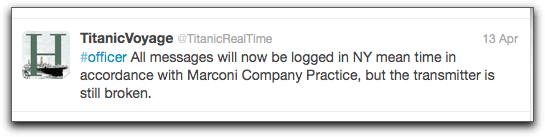
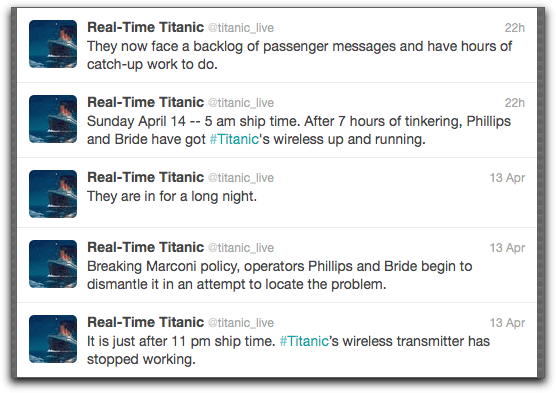
I have followed both Real-Time Titanic and TitanicVoyage out of the UK publishing house The History Press for the last couple of days. Both have done a great job in creating a suspenseful account of what professional historians like to call (often disdainfully), “popular” history, Real-Time Titanic using a third-person, journalistic style and TitanicVoyage marking posts by the type of tweeter (#captain, #crew, #thirdclass) for an even more harrowing first-person tone.
As with most of the popular history I’ve enjoyed, I was drawn to a single aspect of the subject, in this case the problem with the Marconi wireless radio just a day before they hit the iceberg.
Even if only parts of the stories are true, it is possible that a couple of young men took apart a radio against some sort of policy to make sure it transmitted, and if they hadn’t then a day later when Titanic hit an iceberg they might not have been able to send the distress call.
Conclusions can thus be made about the value of mechanical tinkering, and not being afraid to break the rules, and professional pressure to do your job (hundreds of passenger-sent messages were sent from the ship by radio).
It’s harder to explain, though, the emotional impact of watching it unfold, in “real time” 100 years later, as if it were happening now and we could hear the screams of the people freezing to death yards from the lifeboats. There was a certain War of the Worlds aspect to it, even though Twitter is not really the radio and one couldn’t unknowingly follow the Twitter stream the same way people unknowingly tuned in to Welles’ show.
And again this odd use of Twitter makes me rethink the role of stories and history and the enthusiasts who put it all together, and I’m filled with nothing but respect for their work.
My stuff is stashed in a few main places on the web that aren’t hosted by me: Slideshare, YouTube, and Flickr are the main sites where I “publish”, plus I have stuff at Screencast, Screenr, MindMeister where I create things. I have this blog, and a Posterous blog for ds106 and separate blogs for other classes, etc.
So the big three are places where I am really trying to share. I upload many tutorials to YouTube (if they still look ok when they’re compressed that much). I post all my presentations, often with audio, at Slideshare as slidecasts. And Flickr has lots of my pics. Well, 173 pics. Which brings me to the issue.
Flickr has decided that when I reach 200 pics, they want to charge me $25/year. To get analytics and remove ads, I have to pay Slideshare the educational price of $144/year (certainly an educational price, since it is educating me rapidly). If I want more space on Screencast (they tell me I’m almost full up), I’d have to pay them.
No, I do not think everything on the web is or should be free. But these are not sites where I’m marketing my products, selling my photos, or making my career. Nothing I post there makes me any money, and by posting I am contributing to everyone else. Everything I have up is Creative Commons licensed as Attribution-NonCommercial-ShareAlike.
So, for example, all my photos on Flickr can be used, for free, by anyone. I post them there for that reason.
But these services want me to pay to share. I don’t think that’s right.
The business model for these sites relies on ads, and thus lots of eyeballs coming to their site. Users who post add value to the website – in fact, they are the website. If those of us who shouldn’t pay remove our stuff, then the only stuff will be from people who can afford it or are trying to sell things.
Why not charge the nominal fee to the people who treat their work as copyrighted, who demand that people pay to use it, or who post it to sell it? If the purpose of the content is commercial, charge a bit. If it’s just for free sharing, keep it free.
In the beginning, although I was not interested in what you had for breakfast, I was interested in what you thought about things. And you told me, in tweets and blogs and comments on my blog. Things were good.
But as time has passed, you have turned to posting links, often without comment. Sometimes these links are very interesting, but I can’t know until I click on them, and either way I’m not getting anything from you except the link. And when I create a link-less post in Twitter, I don’t often get much response.
Now I understand that I am supposed to consider you as nodes in my network and as filters for my information. But to me, you were so much more. And now you blog less, if at all, and instead give me lots of links to works by other people. If you read my blog anymore (and the numbers indicate you don’t) you rarely comment. If I comment on yours, little conversation ensues unless you are a very big name with many people commenting to each other.
I don’t know how to tell you this, but I don’t want just links. I want you, your thoughts and dreams, your frustrations and successes. And I want that just as much from those of you who are big social media stars in educational technology as I do from my more intimate connections. And you all scroll by so fast these days, with all those links; it’s hard to find the comments you do make.
So I’ve been hanging less and less around our old haunts. Twitter is occasional rather than daily. I moved all my RSS feeds to Netvibes to get away from Reader, so I see your posts better now. Some of them are just RSS feeds of links. I was going to spend more time with you in Google +, where there seemed to be some Buzz-like conversation at first. But even there now it’s mostly links. And Facebook? We made a little corner for ourselves, where people feel comfortable to … post a lot of links.
In light of behemoth Google’s new privacy policies, which go into effect March 1, I have some decisions to make. Most of the info about what’s happening is available here if you don’t want to read through the Google-ese.
The YouTube connection I’ve seen coming for some time. It is already impossible to sign in to YouTube without a Google account connected. This can lead to multiple Google accounts. Really, anything can. Which means that to prevent every-Google-thing you have from hooking up with every-other-Google-thing you have, multiple accounts would seem to be the way to go. But would it work?
One could seem to have a professional account that you only use for work, one for fun, one for something else. However, I wonder whether this is really possible. I have several different Google accounts. I’ve noticed that Gmail, mysteriously, seems to know about all of them. I’m not sure why, and that makes me suspect multiple accounts may not be a long term solution.
So I’m thinking: what do I use right now that’s Google?
YouTube. With multiple accounts, I can use Favorites and/or Channels to connect anything I actually want together. Eventually I assume, however, that you won’t be able to sustain any account that has a non-Gmail email address as the contact. This will likely be a problem with anything Google has eaten. If Gmail somehow knows about other Gmail accounts, the only solution will be to use YouTube only for professional stuff, and save my personal Favorites as lists of links in a text file on my hard drive.
Docs. I could separate the kind of Docs with different accounts, but don’t think this will work given the above. Most are professional anyway. For this one, I think I just need to clean up and delete things.
Hangouts, Calendar, Reader. Professional anyway, so no problem.
Picasa. I can take down whatever I don’t want there.
Android. No phone, no problem.
Looking through everything, I realize that all of it I’m using for professional or teaching only anyway, except that other accounts I have feed into Gmail with POP or IMAP. So that’s the security gap for me. I will remove those accounts, and use a different mail reader.
Then there’s Chrome. No one is talking about Chrome. Search is Google’s main service; it defines the company. Chrome is already not possible to use anonymously. I am quite sure that will be the case here – it will be a hub connecting everything you do. In all the stories about the privacy change, “search” is in lower case, like it isn’t as important as the other programs. But it’s the heart of the matter, and Chrome is its henchman. It’s too bad, since Chrome works well. But I’ll be heading back to Firefox.
I guess I’m good then till they Engulf and Devour the other services I use, like Diigo, Vimeo, Livestream and Slideshare. I have always lived by the premise that nothing you put on the web is truly private anyway, so I’ve used it mostly for teaching and professional use, and relying primarily on my hard drive for anything personal. I am now very, very glad I’ve done that.
I recommend that everyone using Google (and who isn’t?) engage in this kind of analysis and decide what you want to do.
Having abandoned my search for an easy way to save pdfs to Diigo, it happened accidentally by just using Chrome. Chrome opens pdfs inside a browser tab, where my Diigolet works comfortably. However, there are some problems.
The biggest is that I cannot highlight. So I can save but not annotate. When I try, this happens:
Also, it can’t grab the title of the work, so I have to title it manually.
Today a group of us met in Google Plus Hangout. Everyone from the Program for Online Teaching Certificate Class and Facebook Group is always invited, and it’s an open session. Today we had Todd, me, Walter, Norm, Maha, and Ted from POT Cert, and we were joined by Zack and Scott (that’s geographic representation from Arizona, northern and southern California, Dubai, New York, Alabama, and Japan).
Run by our Captain of Synchronous Sessions, Todd Conaway, the sessions have fallen into a Thursday pattern. Although originally envisioned as question and answer sessions for POT Cert Class participants, or maybe even a training or how-to opportunity, the fact that more experienced people tend to join has transformed the format into something more exploratory. The past few times people have shared sites they’re working with, in particular those focused on collaboration, mirroring what we’re doing in the sessions. As a result, we have spent several hour-long sessions following each other into various collaborative environments and trying things out together in real time.
Image cc E. Chris Lynch on Flickr
But sometimes we’re awfully silly. Maybe it’s the Google Hangout moustaches, or the way we all go into somewhere and one (always one) of us can’t get the damn thing to work, or the serendipitous arrival of people we’ve heard of but never met. Maybe it’s how I can say, “I don’t know if this works on a smart phone” and everyone whips out their phones to try. We all have our little foibles (Ted won’t do anything Facebook; I won’t do anything that costs money). Anyhow, it’s quite fun.
Other failed ideas included: FERPA t-shirts that say “It’s OK – I am not doing this in records maintained by the school”, having everyone pitch in for one Livescribe pen and mail it around, and actually reading instructions on a $6 bar of salted chocolate. We were enchanted by Scott’s use of a fancy radio microphone that made him sound wonderful despite the early hour in Japan, and he contributed a site for transcribing mp3 for captioning if used in Chrome.
We’ll do it again — all our distributed activities like this are posted on the … Distributed Activities page at the class site. The class is open, the synchronous sessions are open — won’t you join us?
We’ve been working at finding places for synchronous meetings of various kinds for the POT Certificate Class. Sure, we can do the usual things, like meet up in Collaborate/Elluminate (we have installations at several of our jobs), but we kinda like free and we kinda like different so lately we’ve been looking at:
The advantage is that many people already are in Google for something, and it’s pretty easy to find Plus now, and everyone can now access it since it’s out of alpha stage. Great video and audio quality, and the camera can automatically shift to whoever is speaking, putting them in the main frame. But the maximum is 10 for talking – anyone after 10 can only watch. We liked it especially for quick meetings, kind of like Google Talk with video. One interesting thing is that if it’s public, anyone may drop by. The “with extras” option slows down the system, but lets you add viewing a YouTube together (this didn’t always work) or embedding a collaborative Google Doc, which would make presentations possible.
Kind of like Collaborate Lite, this one let us be on camera with microphones, but we had to have headsets upon entering the room or we got awful audio feedback. We only had four cameras on at once, but quality was good. All panels (participants, individual cameras, whiteboard) were in separate frames that could be resized. A presentation ppt could be loaded, and the presenter could zoom in or mark on it with simple drawing tools (line, box). Only one person could present at a time, and a newly uploaded presentation replaced the old one. Sessions cannot be archived with a free account.
We began with just Facebook group chat, which is only text chat, but then decided to try this. Hoot is an FB application that you add, and the idea is to allow students to meet up together with video and audio. We tried it with five or six people, and as we were talking the creator of the app came in and spoke with us. Spooky but cool. Created by students for students.
Here you need a “place” in SL to meet, so it’s like Collaborate only in that sense, and there are colleges and various organizations that will let you use their space. Audio is kind of new, and the application is pretty heavy (Cris Crissman pointed me to a different viewer, called Phoenix, that worked better than the new SL viewer). Learning curve is high, but the learning experience is rich because of the simulation of an actual meeting in a simulated space. Hard to explain unless you’ve done it.
The idea here is that the presenter schedule a session where s/he can show him/herself on video and audio while touring through a slideshare slideshow, and you can see who is attending with their icons, and they can text chat during the session. Looks like you need a Pro account to do audio conferencing.
We meet inside a Google Doc just by putting some text in a Doc, then making it public and letting everyone know the URL. No audio, but real time edits and chat once you open the side window, plus you can annotate. If you were logged in to Google, sometimes it would still show you in the room as Anonymous, which was annoying. The other problem is that the synchronous chat isn’t saved. But it was a great way to create a document in real time.
I’ve heard Etherpad is good for this too, but it’s been bought by Google anyway; Crocodoc is also good for annotating together.
Hall.com
We recently also tried hall.com, which sets up a room where you can do polls, to do lists, and instant message chat — it seemed to work very well.
Like Google docs, but better in a way because you can change your name from anonymous instantly, and everyone’s contributions are instantly highlighted in a different color.
Shut up and collaborate
You don’t always need to be able to see and/or hear and/or text chat with each other — sometimes you just need to work at the same time. The collaborative documents can do this, and so can:
Video collaboration, but we haven’t tried it in real time, though it says it can. 500 MB free. Lets you add clips, transitions, do cuts, etc. A little slow in rendering. Another recent option is wevideo, which we’ll try also, although it only lets 5 people work on one project in its free version.
We haven’t yet tried it, but you can meet in Prezi to collaborate on making a presentation. Icons represent each participant, and move around showing who’s editing what.
Watch a video together
Not quite ready for prime time, or at least not any better than putting a link in a chat and telling people to go watch.
We tried YouTube itself, which now has a link in the Share options that sets up a Google hangout for watching — we have tried to watch videos together in Google Hangout and it doesn’t usually work. We often all get bounced to a generic YouTube page instead of whatever the participant is trying to load in.
We also tried Chill.com (you have to use Facebook for this), and Synchtube, which didn’t really. We were all able to watch the same video, but speed varied widely. One of our members called it “Asynchtube”. Watchittoo.com made you pay.
Your question: where and when are you guys testing all this? more in the next post!
I am intrigued and delighted with an approach I see as middle ground between the Web 1.0/closed classes/LMS/hard tech/group focus and the Web 2.0/open education/network/connectivism focus.
For the former, the model seems to be formal groups of people, such as a class, using closed but comfortable ways to learn online in a manner prescribed by an instructor, with the result being a grade.
For the latter, we have the open ideas of networks, learning taking place in weak and strong connections, with softer technologies that provide for more creative work. Looser forms of assessment (such as badges and feedback) follow this model as well.
In the middle of this dichotomy is what Dron and Anderson call Web 1.5, and what they refer to as “sets”, unintentional collectives of people who learn within a shared interest. Thus there is a middle ground between the horribly limited, walled garden system and the wild, diffuse, scary openness of networks.
These discussions are especially timely in light of my own efforts to find such a balance between closed/open, safe/scary, hard/soft in designing my online classes for next semester, where the unscary stuff (my own work, such as lectures, information, readings) is completely open, but the scary stuff (anything graded, such as student forums, quizzes, and essays) is closed in the Moodle LMS.
It is not, as I’ve noted, an ideal balance or compromise, because unlike the Elgg VLE used by these authors, I do not have granularity of permissions where students may choose exactly what elements of their work are open or closed.
I had thought that creating a broader “group” in Facebook (of all my students, not just those enrolled in one class) would design some openness for them, but of course I have been reminded that Facebook is closed too. It’s just an LMS with advertising, and a flat social space. On the other hand, at least there isn’t any hierarchy, and perhaps there is comfort there within a more open way of communicating, if not a more open role.
As much as I love the far out, wild west, final frontier elements of open web-based learning for my own use, I do not think my students are ready to the extent that I could handle helping 240 of them manage it. At the same time, the limitations of LMS-based education drive me crazy. So it’s productive to envision Web 1.5 pedagogies that could, in Jon’s Goldilocks analogy, get to a point of “just right”.


 The monsters (big proprietary systems, cloud-based sites, self-hosting) appeared to be separate, but were actually all parts of the same beast.
 Although I have used slides many times, I do not appreciate the linearity of a slideshow. In addition to reminding me of film strips from the 1960s, slideshows force a particular order. Either that or you have to find the slide. If I’m talking about slide 2, and a student asks a question about something that will come up on slide 13, I want to bring up slide 13. Now. Not after paging through 11 slides or zooming out or changing to creator mode to find the damn thing.




 YouTube. With multiple accounts, I can use Favorites and/or Channels to connect anything I actually want together. Eventually I assume, however, that you won’t be able to sustain any account that has a non-Gmail email address as the contact. This will likely be a problem with anything Google has eaten. If Gmail somehow knows about other Gmail accounts, the only solution will be to use YouTube only for professional stuff, and save my personal Favorites as lists of links in a text file on my hard drive.
 Then there’s Chrome. No one is talking about Chrome. Search is Google’s main service; it defines the company. Chrome is already not possible to use anonymously. I am quite sure that will be the case here – it will be a hub connecting everything you do. In all the stories about the privacy change, “search” is in lower case, like it isn’t as important as the other programs. But it’s the heart of the matter, and Chrome is its henchman. It’s too bad, since Chrome works well. But I’ll be heading back to Firefox.