Guilt and 240 students

As I examine the various ways I could configure my classes for next semester, my knowledge of the many choices means I really am thinking about everything. But the central feeling ends up being guilt instead of anticipation.

I know all the wonderful options to make classes more exciting, more student-led, more exploratory. I’ve even done some of them (I recall the semester the students did the textbook exams but everything else was their own guided projects). And I did design Pedagogy First! for the POT Certificate Class, which is open and guided in what I think is a great balance. Surely I could do something like that?

Well, for the first time ever, I’ll be teaching six classes in spring instead of five, with 40 students in each (minimum). I have scheduled two new hybrids, one for Western Civ II and one for U.S. History II. I have four online classes, one for Western Civ II, two for U.S. History II, and one for History of England. So that’s three preps, as they say (a prep is a class different enough that it requires its own resources, structure, retooling). Except it feels like five preps, since hybrids aren’t the same as online classes.

My guilt is from the realization that I can’t manage 240 students in a free-form, MOOC-y way. Yes, we do it with Pedagogy First! and 90 “students”, but the assessments there can be much looser, the objectives much broader, and the content much more diverse. The faculty learning there are highly motivated. And although I’m not stuck in K-12 land with its concrete standards, I do have content outlines (so very 1990) that I am supposed to follow to make the classes transfer to university, and student learning outcomes. The outcomes don’t worry me, because I wrote them for the most part, and they are all about skills that historians need to demonstrate anyway. The content I’ll hit one way or the other. So really, I have the enviable freedom to structure these classes however I want.

I could use blogs and wikis instead of Moodle, and a central blog and Engrade again for the on-site (now hybrid) classes. I could have them blog and collaborate in documents and work in teams and use WordPress and make videos and … oh my god, 240 students?

That number keeps popping into my head, in creepy neon light like the Bates Motel sign (cue Bernard Hermann music here).

Only a couple of things keep me from feeling like a failure as I “tentatively” set up the four online classes in Moodle, willing myself to believe they are just drafts, backups for the upcoming blogs, and the PB wiki, and the Canvas Instructure (actually, that’s just an LMS you can’t edit well), and the Flickr group I want to make but probably won’t.

A week or two ago, Dave Cormier gave a presentation for Alec Couros’ EC&I831 (I sit in when I can, which isn’t often enough). He spoke about rhizomatic learning and nomadic learning and other cool and inspiring stuff, and I wanted to move on with my work but felt stuck. Then one of Alec’s students, Chelsi, wrote a post that reminded me what Dave had said in response to a question about dealing with standards, that he said you do this stuff when you can.

Well, I do a lot of cool stuff. I’m really proud of the design of my discussion forums, where students select and post their own sources based on their interests, and craft historical theses. I want to see that happen again. I want to add a weekly synchronous session based on a skill set, with each week a different skill, where all my students can come and benefit, not just one class. Some direct instruction and, I hope, discussion in real-time. I’ve never done that. I want more peer evaluating, and fewer graded essays so there’s more chance to practice. I want to switch to weekly, instantly-graded reading quizzes so they have instant feedback. I want to run two of these with no textbook. I love the broadcasting I can do from the classroom to students at home, and the online students could view it too.

I also want everything open, but if I use Moodle to manage the gruntwork (exam -> gradebook, track forum posts, etc) it’s closed (though I could allow guests, of course). I can piece together my own grunts (Engrade, for example) but that’s a lot of clicks for six classes. The lack of connection between their tasks and the gradebook seems like the Grand Canyon with this many students.

I know, excuses, excuses! I talk the talk but won’t walk the walk. But do I really need to prove anything to anyone?

So I’m just going to say this: for this one overloaded semester, I might have to sacrifice some of the external openness in favor of internal openness, some real-time contact with my students, and some time spent giving feedback in the forums. Because that’s when (and where) I can do it. And I’m quite sure that by the end of the semester, I will have written an article justifying the approach as being that LMS/opened balance I read about all the time. Or not.

Over 90% of faculty use social media professionally? Define “use”.

A study by Pearson and Babson Research, published in April 2011, declares that “over 90% of all faculty are using social media in courses they’re teaching or for their professional careers outside class” in the Executive Summary, so I looked closely at the study. I’m spending a lot of time in the appendix. I am not at all interested in personal use, only professional and use with students.

My concern is that the study proclaims massive use of “social media” by faculty. It seems to imply that college faculty are actively participating in social media. I’m looking closer and it doesn’t seem to be true.

I think the problem is the word “using”. 61% of faculty surveyed have “used” online video. This could just mean they’ve shown a YouTube video in class now and again. Only 21% of faculty “posted” online video, and I wonder whether some of these were the videos included in publisher’s packets, such as those provided by Pearson — am I being too cynical here? The statistics for how valuable faculty think these sites are could all be about presentation, not anything social at all.

They have defined social media by site (Facebook, YouTube, Twitter) rather than by use (creating slideshows, posting original video, participating in a discussion). The statistics for Figure 15 seem to me the most telling: the numbers are very, very low for using any of these sites to have students post anything.

So to me the “social” part of social media use, particularly in the classroom, is extremely low, and indicates a reluctance of faculty to use social media for anything except presentation.

Is this a case of a study making false conclusions? or is it just advertising? or am I being way too picky?

Embedding stuff: the missing manual

We’ve had some assignments at Pedagogy First! lately where we asked people to embed stuff, but didn’t tell them how! 8-0

Sooo….Here is a YouTube video on embedding a Slideshare slidecast into Blackboard, Moodle and WordPress:

[youtube=http://www.youtube.com/watch?v=Um6qfT_gpbU&w=533&h=301]

Here is another, on embedding a Jing video from Screencast.com into Blackboard, Moodle and WordPress:

[youtube=http://www.youtube.com/watch?v=sTmJwtTBBFM&w=524&h=296]

And here is one on embedding a YouTube video (like these) into a WordPress post:

[youtube=http://www.youtube.com/watch?v=wVSMHyANdLY&w=527&h=297]

Embed, feed and tag: the bare minimum

We’ve been having trouble with the task for this week at Pedagogy First!, the aggregated blog of the POT Certificate Class. I posted a task that asked participants to create a Slidecast (PPT -> Slideshare -> plus audio) or a Jing (usually uploaded to Screencast.com), then embed it into this week’s blog post.

But oh! Trouble ensued because the current free versions of Edublogs and WordPress.com make embedding these items difficult or impossible. While those of us running our own blogs on our own or rented servers can control our WordPress blogs, these vendors have the control. The free Edublog (built on WordPress) won’t actually accept the Jing embed code, and blog posts saying it will lead us astray. It won’t accept the Slideshare embed code either. They tell you that you can embed media in an Edublog, but the fine print says maybe not if it’s a free account. The free WordPress.com blog will accept the Slideshare shortcode, but not the Jing embed code, even when one is very careful. This post says that you can use Vodpod, but one of our participants tried it and it failed. Some participants got around this by downloading the mp4 of their Jing and uploading it to YouTube so they could embed it. I tried downloading the swf version of a Jing to try this tip, but I could only seem to download mp4. So Jing isn’t even trying to help (they want you dependent on Screencast.com, where if your Jings have too many viewers they insist you have a paid account).

We need a new standard for the basic functions of blogs and other social webware. And once I read Martin Weller’s post from 2008, I realized that these are the basics:

1. Embed

A blog or social webware of any kind is useless without embed. . If you cannot share right from your space, if people must click away using a link, the implication is that the media is not yours. It “belongs” to Slideshare or Screencast. YouTube and Vimeo balance this issue, by allowing embed but branding the player. That makes more sense. (BTW, those mysterious embed codes they “give” you are just basic object and embed HTML, which have been around for over a decade — everywhere should accept them.)

2. Feed

Any site that gets updated, but does not have the RSS feed obviously available is similarly useless. Readers need to be able to aggregate all the things they read, create their own newspaper, if you will. Some of the themes in WordPress (including many available through Edublogs and WordPress.com) don’t have an obvious RSS button available, so unless you know how their feed is structured, you can’t put it in an aggregator. And how is it possible that the RSS for Comments is still separate from the Posts? How can there be no progress with this?

3. Tag

We’re still confused by tags, since Twitter needs a hashtag, while blogs use either Tags or Categories, which are difficult to distinguish. Still, most of the save-and-share technologies get the tag idea. Nevertheless, if everyone is using an agreed upon tag on their blogs, there is no way to find these across the entire web. The closest we’ve found is to search for the tag in Google Blog Search, but it’s very delayed and misses many of them, tending to favor those who put the tag in their post title.  For my purposes, if people use our potcert11 tag outside the class, I have trouble aggregating these into a blog or widget, or reading them myself.

It’s incredibly stupid that we can’t do these things for free. They are basic. If you want to pull us in to have us pay for premium features, you need to understand which features are basic rather than optional.

This is serious enough to have me rethinking our recommendations for newbies to use Edublogs or WordPress.com. Posterous and Tumblr are now being seen as being better for this kind of thing. Maybe they are, and we should focus less on full blogging platforms and more on embed, feed and tag.


Those crazy comments

The purpose of having multiple blogs in a class is two-fold: have people control their own space by running their own blogs, and have discussion take place in those spaces. We do the discussion part by posting comments on other people’s blogs.

But once we comment, we leave. Then what if the person answers our comment? How do we know? How can conversation happen if we don’t know the other person is talking?

Some blogs have a “subscribe to this post” button or a “Notify me of follow-up comments via email”. That’s handy. But what if that option isn’t available?

This is where a comment tracking service can come in handy. I used to use Cocomment (I even foolishly posted a tutorial on it), but on my Mac OS 10.5, it broke. So I’ve switched to co.comments, which works more easily.

In co.comments, you sign up, go to Tools/Settings, then drag a “bookmarklet” or “menulet” (just a piece of code that says “Track co.mments”) to the bar of your browser (for some reason, the one for Internet Explorer works for Chrome). When you go to someone’s blog to leave a comment, you can click “Track co.mments” and it follows that page from then on, letting you know (if you click Recheck) when there are new comments after yours. And it shows them all right there.

This way I can try to follow all the wonderful conversations!

A funny thing happened on the way to the…

We don’t have a forum at our POT Certificate Class SMOOC (Small-to-Medium Open Online Class). Nor a Google Group (though that’s been suggested and may appear), nor a Moodle forum, nor a Ning.

When I took EC&I 831 from Alec Couros last fall, I felt we needed a forum, and he and I looked for one we liked, but nothing we found had the particular combination we wanted (no ads, free, nested comments and the ability to post multimedia), so we gave it up. On his current page for this semester, he’s listed many types of communication, but not a forum.

And now I notice that the Change MOOC, co-hosted by George Siemens, Stephen Downes, and Dave Cormier, has a forum, but it’s kinda awkward. Not like a full-featured thing at all. On the main page, there are three Participating links for blogs, two for the newsletter, one for the backchannel, and one for threads. The class starts tomorrow and there are three posts for a class of hundreds.

And yet, all my college history classes feature forums as the heart of the action. I couldn’t do without them.

So why no forums for these classes? I think because the idea of distributed communication has become something we’re all taking seriously.

If we’re going to focus on the wonders of learning on the web as our topic, it makes sense that our participants should be communicating there rather than in a central location. We not only want them communicating via blogs, wikis and Facebook, but we also want them creating their own places and spaces (which is why the potcert11 class may yet have a Google Group, because the participants may be creating it — and they’re starting the Twitter thing, not me).

chart
From Rick Schwier’s Pursuing the elusive metaphor
of community in e-learning environments

I also think there’s more staying power to a distributed community. If you have one space, as we all know from using learning management systems, the course seems finite. Even if the space is available after the class is over, the feeling is still that the class is over. But if the conversation is distributed (our class has a very active Facebook group, which surprised the heck out me), there’s a feeling of perpetuity. The river continues and you step in and out when you wish.

As Rick Schwier has noted, informal communities have higher levels of engagement over time. I wonder whether de-emphasizing a formal location for conversation makes these classes lean more toward informal learning, even though they are organized as classes, with set timeframes.

So come on, hit me with the research. Do distributed communities last longer? Are we right to “force” them instead of offering a rich place for a single discussion?

WP posts gone, but still in database?

This is one of those posts that I hope will help others, and help me remember what happened.

I went to show my History 104 class blog to a colleague, but was horrified to see that all the posts and pages were gone. But when I checked the database, everything was still there. (This isn’t always the case — and there’s nothing to be done if they’re not in the database unless you backed up your database.)

First, I used phpAdmin to repair and optimize the database. Then I went into the WP settings.

When I looked at Posts, there were none. Then I noticed there were 44 in the trash. These were my posts, so I selected all of them for a bulk Restore.

Then they were there but in Draft mode. I selected all of them and did bulk Edit to publish.

Now everything is back the way it was before.

And no, I don’t know why it happened.

Parts of a Blog

As part of my sabbatical, I’m trying to build things that also might be useful to the Program for Online Teaching Certificate Class.

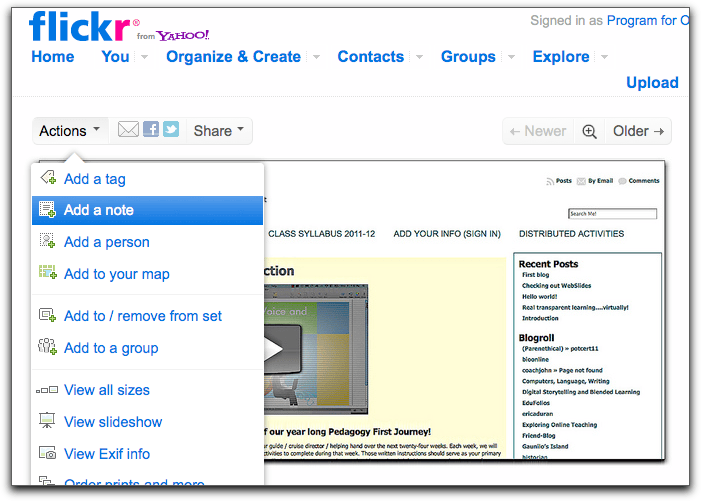
As people begin blogging for the first time, I wonder whether this annotated Flickr image might be useful? (click on the image for a slightly bigger version)

Technique (it’s always good to say how you did something):

Annotated in Flickr by taking a screenshot, uploading to our POT Flickr account, then using the “Add Note” feature .

But that way you can only see the annotations if you’re at Flickr. To embed the image with annotations into my blog, I used this simple tool: Mbedr. In Mbedr, WordPress liked the “iframe” code better than the “object” code to embed it here in my blog.


Glogster & Moodle: good idea, poor execution

For extra credit in my online classes, I usually have students make a slideshow detailing a historical theme they’ve created.

Don’t tell, shhhhh, but: I despise slideshows. They take too long to grade, because they are hard to skim. Worse than audio.

All on one page, that’s my ticket.

So students in my 8-week summer Western Civ class asked for some extra credit, and one mentioned a poster (he also mentioned slideshow, but I’m ignoring that). So I went to Glogster, which I’ve never used for any sort of assignment, and created one as an example.

Then came the embed horror. Since speed is my goal, I want these suckers embedded firmly in a simple forum post, so they’re all one one screen and can be marked easily with a ratings drop-down.

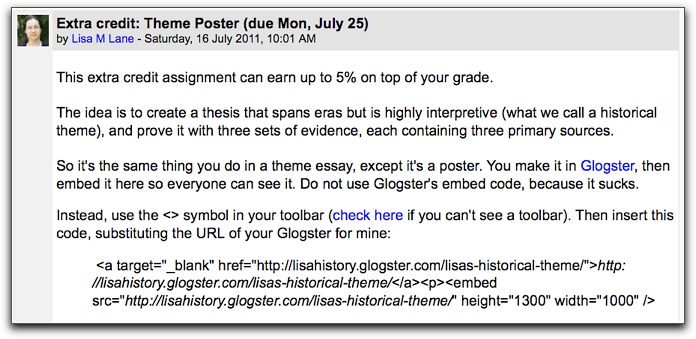
Well, Glogster’s embed code sucks, and Moodle’s forum helpfully strips it to completely useless. And if you used Glogster’s “embed this poster” embed code instead (which is iframes-based), Moodle’s forum strips it all. So I tried to include special instructions as part of the extra credit assignment itself:

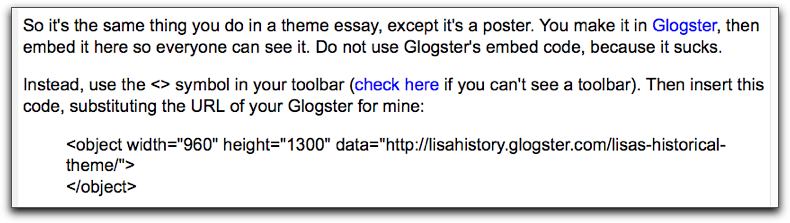
Then I looked at my cleverly embeded poster, and it wasn’t there. My own Firefox said I needed a plugin, but my Shockwave Flash is up to date. I looked and Safari sees the embed just fine. Naturally, I was contacted by a student almost instantly saying they couldn’t see the sample poster. I worked on it all morning, and finally had to use this Moodle hack, which creates a database. Took about a dozen tries but now students should be able to do this:

Of course, in WordPress this isn’t an issue.

http://www.glogster.com/flash/flash_loader.swf?ver=1309172180

Google/Diigo workaround to highlight pdfs

Yes, I know you can download free apps that will allow this, but I’m using Google to search for things and Diigo to highlight things, and it’s always frustrated me that Diigo still won’t let you mark up pdfs.

I searched for NMC Horizon Report 2011. The resulting Google search URL was:

http://www.google.com/search?q=nmc+horizon+report+2011+html&ie=utf-8&oe=utf-8&aq=t&rls=org.mozilla:en-US:official&client=firefox-a

I looked for one that was pdf, but with the Quick View option. The URL for that was:

http://docs.google.com/viewer?a=v&q=cache:bz_PDAcnkQ8J:net.educause.edu/ir/library/pdf/HR2011.pdf+nmc+horizon+report+2011+html&hl=en&gl=us&pid=bl&srcid=ADGEESiDNnONwc-iuJ61-sf0yeXUU5QXuPjnzgyO9prY0U9yxS9GoyXcjqNdS2aiYsFAA-Zv985AuDDuc3FlI0JMu9qVdg-Jj39ArKpw15oa7oAqssneMugWYzYp5II2d8Ngaaz0tQ8H&sig=AHIEtbQwI0jC6BG87Sp7qdQN0fUNGsukRg

I then removed the search terms from the URL (+nmc+horizon+report+2011) so I had a clean copy without Google’s highlighting the search terms.

Then I saved it in Diigo and can now highlight it, make notes, etc., just like on a web page (because it is one now). If I open it to everyone, others can highlight and comment too. Under Diigo’s Share/Email window, I even get the URL that has the annotations included (http://diigo.com/0icg9).

Am I doing this the hard way?

The LMS and the adolescence of web learning

I am noting this semester that although our surveys still show a substantial preference among students for Moodle over Blackboard, more students than before are whining and saying they want just Blackboard.

The main reasons are that they’d prefer having all their classes in one system (convenience), and they don’t want to be confused by using a new system (ease).

I am concerned because I sense that the “one LMS to rule them all” viewpoint is getting more and more traction, and that the new argument (as opposed to administrative, top-down, management arguments) is going to be that students prefer it. Diploma mills like to standardize their LMS configuration for all their classes to control content and teaching, but they justify it by saying that it’s easier (read: better) for the students. This thinking is bleeding into public education.

While I understand the desire for convenience, I have long argued that when students take classes online, they are learning not only the subject matter but technology skills. Being exposed to more than one system means they are learning transferrability of those skills, which I think is important in the workplace. And it’s more important than the inconvenience of using a second log-in (which they do anyway because they have Facebook open at the same time).

On the issue of ease, there may be levels of web learning maturation at work here:

Childhood: people who are very new to using the web for learning tend to accept what is given to them, because they don’t really know what the options are. When online learning with the LMS was new, most people were in this category.

Adulthood: people who use the web a great deal and in varied ways tend to do better in online classes, and assess the worth of the LMS (or any tool) based on how well it works for the course.

Adolescence: in between are the adolescents. They know just enough to be dangerous. They have enough experience to want convenience and not enough to understand the larger issues of pedagogy, including the restrictiveness of an LMS on what the instructor wants to do. They can drive but have no sense of how traffic works.

And they haven’t been exposed to enough good online classes, or enough online classes that customize the system sufficiently. If you take five classes in Blackboard, and in each one the instructor has left the course menu items pretty much intact, than that is what you think a Bb class looks like. You know where all the buttons are.  The students don’t know this, but the way I would use Bb, my class could look just like it does in Moodle:

Well, pretty close anyway.

Why it’s important to deal now with the “teen angst” of web-adolescence:

1. Not customizing the LMS to suit your pedagogy implies that we all teach the same way. If we all teach the same way, then a computer can do our work instead. (I’ve been reading Daniel Pink’s A Whole New Mind – he’s pretty clear that if a computer can do your job, eventually it will.)

2. Instructors should use the tools that best create the environment they want, and that increasingly means web applications that require multiple log-ins. Students should get accustomed to using separate tools for separate tasks, just like in the real world.

3. Acknowledging the teen view means taking it seriously, but it doesn’t mean developing policy around it. Just as parents try to mitigate the excesses of the teen diet and habits, we owe students our wisdom in creating the learning experience that is most appropriate. (Oh dear, I’m starting to sound like Edmund Burke again.)

In a world dominated by look-alike online classes, the tendency will be to assume all classes should be that way.

In a world featuring variety and creativity, the tendency will be to assume these as part of learning online.

I’d much prefer to both learn and teach in the latter.

Where’s the door? LMS or web/social media?

Maybe it’s not really about a choice between an LMS and web/social media.

First, I found it interesting that Kelly Trainor (Yavapai College, Arizona) said in his faculty showcase that he uses a great WordPress blog for his class, but still uses Blackboard for the gradebook.

[youtube=http://www.youtube.com/watch?v=4RF_duVyt0c&w=433&h=270]

Then, I discovered this cool resource of online teaching videos from the University of New South Wales, and watched this one:

[youtube=http://www.youtube.com/watch?v=2PjtX8EEx1Q&w=444&h=277]

And what occurred to me was that the issue is this:

And the question is: Where’s the door?

cc WordRidden at Flickr

If you want to take advantage of the affordances of both venues, where do you want students to enter your class? From the web or a social media site (Flickr, YouTube, Ning, Facebook, a WordPress blog) or through a Learning Management System (Blackboard, Ning)?

The front door is important. Ask any real estate agent.

With the door in the LMS, you can link out to open web sites or social media (or use course menu buttons to make things appear to be inside the LMS).

With the door on the web or at a social media site, you can provide a link to the LMS for whatever needs to be done there.

The choice here sets up different kind of hierarchies, implies differences in pedagogy, and creates different kinds of opportunities for learning.

Starting in an LMS implies:

  • closer connection with the college and its structures
  • greater concern for issues like security, privacy, homogeneity of systems
  • a similarity in importance put on tasks (if using a course menu)

Depending on how it’s used, it could also imply:

  • emphasis on presentation and content over interactivity and community
  • a teacher-centric model

Starting on the open web or in a social media site implies:

  • a greater connection with the outside world
  • greater emphasis on communication and creation
  • a supposition of diversity in tasks and approaches

Depending on how it’s used, it could also imply:

  • an emphasis on community over content
  • a more constructivist (or even connectivist) pedagogy
  • a more learner-centric model

I think it’s important to know what we’re saying to our students, not only with the “inside” of the course design, but with how you enter the space in the first place.

Trouble in Diigo-land

My students have been searching for primary sources for weekly discussion, and I have a small collection of websites that have them. So I put those sites in Diigo, tagged them by class (i.e. “hist104resources”) then used the rss feed from my account to post them in an Remote RSS block in Moodle.

No problem.

But a couple of weeks ago I decided to offer extra credit if students found similar sites full of sources, and posted them in Diigo. The I would take the public feed of all bookmarks tagged “hist104resources”, and the Moodle block would show everyone’s contributions.

My policy is if I’m trying something new, it’s for extra credit, in case it doesn’t work.

It didn’t work.

it should look like this

Two students tried right away, in two different classes. They found sites, bookmarked them, tagged them “hist104resources” and “hist111resources”. They never showed up in the Moodle RSS block. They also didn’t show up in a search for either tag at the Diigo website (I saved 10 bookmarks with the tag hist104resources – the site shows one).The students were frustrated. So was I.

So I read up a bit at the Diigo forums, and the workaround seemed to be to form a group, except that folks said that groups plus tags don’t work. I tried it, with a group “mcchistory” then using the tags. Pasted the rss feed. No go.

So I made three groups, one for each class. Forget the tags, students, just share to the Hist111 group or the Hist104 group.

This seems to be working better, although my first student tried to resave her bookmarks and Diigo made me moderate them (without emailing me, and despite the settings that say anyone can join and add things, and despite me having “immediate alert” set – I wouldn’t have found it if I hadn’t been writing this blog post).

We’ll see how it goes but this seems bizarre to me. I’ve used Diigo for years (I switched from Delicious, though I have it set up to save there too). I love the annotation feature. But once I tried to turn the social bookmarking truly social, bad things happened. And no response to my @diigo tweets, either.

So Alexandra Pickett, who runs a class in teaching online at SUNY (which I didn’t know about and looks great judging from the website and bookmarks!), wondered why I was unhappy with Diigo. This is why. But her interest and success with it encourages me to give it another chance.

My bit of bookshelf

Inspired by Steve Wheeler’s photograph of some of his books, I did a little online shopping and ordered some of the books he’s read that I’ve been wanting to read for awhile (Smart Mobs, Here Comes Everybody, and Tribes). Then I took a photo of a bit of my own shelf. I’d love it if a bunch of people I read (both online and in books) would do this!

We won’t get into how much neater his shelf is than mine, right?

var _gaq = _gaq || [];
_gaq.push([‘_setAccount’, ‘UA-1565385-2’]);
_gaq.push([‘_trackPageview’]);

(function() {
var ga = document.createElement(‘script’); ga.type = ‘text/javascript’; ga.async = true;
ga.src = (‘https:’ == document.location.protocol ? ‘https://ssl’ : ‘http://www’) + ‘.google-analytics.com/ga.js’;
var s = document.getElementsByTagName(‘script’)[0]; s.parentNode.insertBefore(ga, s);
})();

Qualities of innnovation in online instructors

I am considering what experiences and qualities make faculty members “innovative” when it comes to online teaching.

I’m thinking what’s necessary is:

1. Openness in their work — sharing class materials on the open web, using the materials of others, appreciating Creative Commons, blogging ideas.

2. Theory or research – A theoretical background, through reading or education or networking, in learning and how it’s done online. The ability to explore the research and come to ones own philosophy about applying it to ones own work.

3. Membership or activity in groups, learning communities and organizations that promote innovation in online education, such as the The New Media Consortium, Classroom 2.0, EdTechTalk, the Connectivism and Connective Knowledge open courses, and ones own personal learning network through social media.

4. Publication – by blogging and/or in journals promoting innovation, such as in education, IRRODL , EDUCAUSE Quarterly, and many other excellent open access journals.

5. Creation – use of open web applications and emerging technologies for creating materials, and a desire to create ones own materials that are engaging and meet learning goals.

6. Technicality – Some kind of backstage experience: writing HTML, programming, etc.

7. An understanding that online teaching is its own discipline.

Some of the things that I think that show lack of innovation are:

1. Closed work – where everything is behind a password and copyrighted.

2. Degrees from and teaching at institutions that require a “team” approach to course design instead of individual instructors designing their own classes (examples: National, Argosy, Ashford, University of Pheonix, Rio Salado, and anywhere under investigation by the federal government for False Claims).

3. Membership or activity in groups or organizations particular to ones discipline, but not engaged with online innovation, or in groups that say they are innovative but are primarily business oriented, with lots of sponsors from #4 and #5 below (this includes the League for Innovation in the Community College, EDUCAUSE, CUE, and any other group that seems to have strayed from its roots or charges $995 in conference registration fees).

4, Publication in journals that keep everything behind a paywall and charge high prices ($35/article) for viewing, such as journals published by Springer, Taylor & Francis, etc.

5. Extensive experience with traditional Course Management Systems (e-College, Blackboard, Moodle) using all the internal tools but nothing open, sometimes accompanied by full use of publisher course cartridges.

6. Use of exclusively high-level, high-cost, proprietary tools from major vendors (Adobe, Apple) for creating materials, which are then loaded into a CMS.

7. Strictly “front office” experience, always implementing someone else’s idea.

8. A perception that online teaching is a mode of instruction, a venue, an alternative, the future, or a field of knowledge that begins with technology instead of pedagogy.

Eyejot in Moodle for quick video message

http://www.eyejot.com/flash/embed_player.swf?m=2DA8DD11116C6C00006698BD58

It adds instructor presence to a course to have video of yourself, so I started the semester with a quick video message. I recorded it in iTunes and had to use Quicktime to get it the right side, then embed it in a Moodle HTML block. Not very “user friendly”, though.

So today I tried Eyejot, which had been recommended to me by my colleague Pilar Hernàndez. It was super quick. I recorded the video, then had it emailed to myself. Following the link brought me to the page where I found the Embed code, which I then pasted into a Moodle HTML block. I sized it down in the block to 200 X 200 (their default size is too big).

This block is located at the top, and it looks different so I hope they see it as new. The quick (under 60 second) video plays in the block, situating me in the “classroom”.

I cannot tell so far whether this will help prevent the private emailed questions to me, most of which are already answered in the FAQ and are driving me crazy. There seem to be more than usual this semester, as well as students telling me the reason they’re having trouble is because they “don’t know anything about computers”. But it can’t hurt!

Got MOOC?

I have now been an enrolled student in two classes being referred to as MOOCs (Massively Open Online Classes). I attended a discussion today that was offered by George Siemens in his blog post “What’s wrong with (M)OOCs?“. I commented there on some challenges to MOOCs in traditional disciplines, but I am also formulating some ideas regarding the possible different types and formats of MOOCs as I adapt my own thinking in a way that will help me design a History MOOC.

The advantages of MOOCs are many. They open up both content and instruction, and allow people from all over to participate in a class. But even after only a handful of offerings have been attempted, it is clear that there is a spectrum of course design for MOOCs.

The Open-Open MOOC

At one end is what I’ll call the open-open MOOC, where the scaffolding for the course is minimal. There might be one or several “instructors”, but there are no lectures or required assignments. Any synchronous meetings are purely optional. Guidance might consist of weekly topics, perhaps phrased as suggestions. The course environment might be set up in a central location for part of the class (for example, an instructor’s blog or a Moodle installation), but the use of it is de-emphasized. Instead, course activity is distributed as widely as possible. For today’s web technologies, that usually means each student creating his/her own Personal Learning Environment through blogs, wikis, and RSS aggregated feeds. No one’s work is truly “assessed” (as in graded) but may be featured through distributive means such as retweeting or linking from ones own blog. The course may have start and end dates, or it may be so open as to really constitute a form of guided community instead.

An example of an Open-Open MOOC would be the recent PLENK course, taught by George Siemens, Stephen Downes, and Dave Cormier.

The Open-Closed MOOC

In the middle is what I’ll call the Open-Closed MOOC, where the root of the course is a for-credit class (usually offered via university or university extension). The start and end dates are set, usually by the sponsoring institution. The “core” students are there to earn a grade, so their work is assessed. The technologies used may be identical to an open-open MOOC, and those who are not officially enrolled (but may have “registered” somehow so they are known) have an active role to play. Their work and activities may be indistiguishable for those who are enrolled, or they may be given a separate role, such as mentor or contributor.

An example of this format might be EC&I 831, taught by Alec Couros.

The Closed-Closed MOOC

A Closed-Closed MOOC (I realize that seems to contradict the world “open” in MOOC) would simply be a large course, offered on-site or online, where only the materials/content, and perhaps commenting in a connected community, is open to the web. The instructor would not monitor the non-enrolled student activity, but rather allow it to contribute to the closed class, and vice versa. In a very closed version, student activity could reside in a course management system or other controlled/semi-private space, and the world outside the course could be connected via blogging, RSS feeds or other technologies. Some student work might be private, and some public.

A number of courses may fit this model, including standard on-site or online courses which access the larger world in various ways via the web.

The pedagogy used for each model is heavily influenced by the nature of web-based communications and source-gathering. The more heavily these are used, the more learner-controlled focus is likely. In the Open-Open model, the model itself forces a decentralized, learner-directed approach. In the Open-Closed and Closed-Closed models, the pedagogy for enrolled students can range from more instructor-directed work to more student-centered activity, so long as such activity can be shown to match course outcomes as determined by the institution.

My distinctions might provide for a way to discuss such courses in a way to encourage greater openness and variety of pedagogical approaches. As I noted on George’s blog, the challenge of offering a MOOC may be about larger issues, such as instructor workload, institutional restrictions, and lack of resources. But the fact is that each MOOC so far has been taught by a particular kind of tech-savvy instructor teaching a subject already suited to (and dependent on for meta-referential research purposes) the Open-Open framework. Perhaps we can consider now massaging the possible frameworks to enable other kinds of instructors to see where their work would fit.

Blogs and wikis in a CMS?

Because of their popularity, the makers of course management systems (pretty soon we’ll just say “Blackboard” like we say “Kleenex” to mean all CMSs) have added social networking tools. These blogs and wikis, are, of course, inside the courses, which are inside the system.

When these “Web 2.0” tools first appeared in CMSs, I actually considered using them, but by then I had moved to Moodle to get away from Blackboard’s horrible threaded discussion forums. The nested forums in Moodle were much better, but the blogs there were tied to the students profiles. In other words, you’d click on a student’s name somewhere in the class, and go to a separate page to read their blog. Clunk, clunk, no thanks.

If I were going to use blogs with students, I would think I had two choices. I could have one big blog and make all of them authors (my English prof colleague Jim Sullivan does that very successfully) or I could have each student make their own blog, then have RSS feeds aggregated somewhere (Netvibes, maybe, as Michael Wesch does) so I could follow them more easily. I would do this because my goal would be students feeling they have ownership of their work, and their own space. It would also be good if they got input from the outside, although there can be other issues with that, of course. Also, if they wanted to continue blogging, it would be easy for them.

This last, the perpetuity of their work, is important as a default. As a student, I used to save all my returned papers. But students in an online class lose all their work unless they’ve saved it themselves, and that only works for written stuff before there’s any feedback. Or they have to copy and paste everything. So a blog inside a CMS would defeat pretty much everything I’d want students using blogs for!

Wikis are a different matter, because essentially to me a wiki is one of two things. It can be a website space like a blog, controlled and updated primarily by one person, usually the instructor. Or it can be a collaborative document, like a Google Doc. (I will say I don’t see much in between, having repeatedly witnessed wikis set up by one or two people fail as collaborative websites, with the originators begging in vain for participation form other people — there is still a fear of editing someone else’s “place”.)

A collaborative document can be totally appropriate for the internal dynamics of a course. A few years ago, I used a wiki (PB Wiki, now PB Works) to have students create the class quizzes together. I could see who was participating, and have quiz questions written by the students themselves. That wouldn’t need to be public or perpetual.

But such transient work is likely the exception — in general, I think that adding social networking tools to course management systems undermines the broader learning goals of those tools, which tend to be more public (i.e. “social”). Social takes time, and there is at most a semester in a course environment. In addition, I’m not sure students understand the limitation of doing things like this inside a CMS — they may assume, like Facebook users, that’s it’s all out there forever. I notice very few college students understanding the basics of internet architecture….but that’s a whole other post!

Virtual Attendance, Part II

Purpose: Have a student at home view me lecturing in real time
Tools: Tinychat, computer with webcam

I did not expect this to become a series, but I keep trying new things. My students at San Elijo are wonderfully willing to help out with ways for their sick-at-home colleagues to participate in class, so we’re experimenting.

Last time, we used Chatterous and Skype to have two students participate with their group.

Today was a lecture day, and a student wrote to say she had a yucky cold (I have a firm policy against students attending when sick). I had already planned to record the lecture with my mp3 player and post it with the slides (Slideshare’s audio sync is now working again). But she mentioned she’d be available online all through class time, just like on a lab day. I thought, why not let her attend in real time?

I asked about Skype, but she didn’t use Skype (she replied from her iPhone). I remembered that Tinychat has something broadcast-y with audio and video — we had tried it just as a chat room once in class. I opened that Tinychat room I’d created before, surprised it was still there. I tested it briefly in my office, but couldn’t tell whether you needed to log in or not. (Students in the room last time told me some couldn’t enable their camera unless they were somehow logged in.)  Then there was the issue of sound. I wanted to use a real microphone, since the classroom’s computer is about 15 feet away from where I pace and speak at the front of the room. I grabbed the big microphone on my desk and my mp3 player and went to class a few minutes early.

In the classroom, I plugged in my fancy schmancy Snowball microphone into the iMac, opened Tinychat, and just entered the chat room as me without logging in. I clicked Broadcast. It showed me, very clearly, with the front of the room, also clear, behind me. My student was there, and typed that she could see.

I needed to test the sound so I looked around and one of my students was using his laptop. I asked if he’d mind coming into the chat and check if he could hear me. He came into the room, his camera coming on instantly. He couldn’t hear me, but the student at home said she could. WTF? It turned out my voice was coming to her through his computer – we couldn’t get the Snowball to work, even though I quickly tried all three settings. The whole time, another student helped us test, having me turn off the room audio to prevent feedback, etc. Everyone was very laid back and it was  no big deal. At 5 minutes after the hour, I wrote to the at-home student we needed to start. She could just use the slide links I posted and she could hear through her colleagues’ in-class computer.

But instead, the student with the laptop got up and put it on a desk at the front of the room facing me. Now the student at home could see me, see the slides, and hear me too. I went ahead with the lecture. At about 40 minutes, my mp3 player died (low battery). When my students were in groups working, I unplugged the Snowball and tested sound with my at-home student by using the iMac’s internal mic. She could hear me from 15 feet away, no problem.

So this is what we could do next time. If I don’t have someone with a laptop (I could bring mine), I can open Tinychat on the class computer and use its internal microphone, clicking broadcast. If I do have a laptop, we can do the same thing with a laptop in front of me.

And this Snowball is going out to pasture.

Attribution Matters

As I noted in today’s blog post for EC&I831 class, I’ve been reading Jaron Lanier. And doing that makes me think about attribution. At the very least, I would like to attribute as much of the stuff I find on the web as possible, particularly stuff that is created “from scratch”, both textual and visual.

So today I followed a link from Rodd Lucier in Twitter: http://twitpic.com/31l7sc. It’s the image you see on the left. I noticed that Rodd wrote a query at the bottom for Badd_moon, the person who posted the image, about whether the images were licensed for sharing. With Lanier on the brain, I tried to track it down. On Badd_moon’s Twitpic page, karohemd said:

This led me here so I tweeted that the artist was Scott Beale (laughingsquid in Twitter) and his FAQ said the images were licensed for Creative Commons, so I tweeted that. But then I scrolled down the page and found the real attribution:

Sao Paulo ad agency Moma Propaganda created a wondeful series of retro future ads for Facebook, YouTube and Skype as part of the “Everything Ages Fast” ad campaign for Maximidia Seminars.

and the update saying high-res images could be downloaded from Maximidia.

This seemed like a lot of work to find out who made an image, but I was glad I did it (and not just because Rodd mentioned me on his blog). I somehow felt better knowing that whoever made these (I still don’t have an artist’s name) was paid for his work. By someone. Somewhere in Brazil. I think.

Virtual Attendance: “Here!”

To see the weirdness of this story, first keep one thing in mind: I have no attendance policy. What I have is 10% of the final grade as “Contribution”. I changed it from “Participation”. That’s it. I indicated they were free to come and go, and I only occasionally take roll.

This semester, students are bringing laptops for “lab day”, when each group posts a thesis with supporting visuals at my new WordPress-based class website. They work for about half an hour together, then each group’s work is put up on the screen and they get up and talk about what they did. I use the reports to construct essay questions for tests.

Last time we had “lab”, two students emailed me they’d be missing class. I suggested they come to their group’s website workspace during class time from home, and see if they could watch what was being posted and maybe contribute a picture or two.

These workspaces are asynchronous, just a category page for each group with comments enabled. Some groups have one person write their thesis and post images in a single reply, while other students go out on the web finding images or help construct the thesis. Both students were from the same group, so I told them to post a reply saying they were there. That seemed slow. So I opened a chat room in Chatterous (I couldn’t remember Stinto, which is better). They posted in the replies to come to the chat room, and eventually both students did. That was cool.

Today was more cool. Three students couldn’t come, but only one emailed me. I opened a Stinto chat room immediately (this was an hour before class, and Stinto rooms stay open for a couple of hours if not used) and sent her the URL. I also posted it on the syllabus. The other two students, it turned out, found their way there, and before long several groups were in the chat.

But we had time to work — wouldn’t it be better to see and hear the student who had emailed? I asked how we could do that. One student said we could use Skype. I asked, “do you have Skype on her computer?” She said, “We all have Skype”. So she opened Skype and told the student in the chat room her Skype name, and the student could hear and see her group.

It was pretty thrilling to call roll (well, I did it today) and automatically call her name, not thinking, and hear a resounding “Here!” from the laptop. The other two students were fine with Stinto chat or just helping in the workspace: one provided just the picture Group 6 needed of the Pantheon and couldn’t find.

What’s all the participation about? Are we having fun building things and working together? My only goal was to make the collection, processing and reporting of resources easier, but students seem to care about being there to the point where they’ll be there, wherever they are. “Here!” indeed!

Google Calendar Adventure

Late in July I set up Google Calendars for all my online classes, with reminders of posting and quiz dates. I said I’d see how it worked. The button was this:

Apparently it doesn’t work, at least not the way it was set up. A student contacted me a couple of days ago saying it wouldn’t go into her calendar. I sent her the direct link to the calendar, though, and it worked fine.

The URL for that was:

https://www.google.com/calendar/render?cid=dXE0cW5hYTFhZmxlMjFsYWJxNml2M2M5c2dAZ3JvdXAuY2FsZW5kYXIuZ29vZ2xlLmNvbQ

So now I’m going to go back, and using Google’s button image, but not its code. Instead, I’ll just link the image directly to the calendar. I tested it by logging out of Google, logging in under a different address, and adding it to my new calendar. Seems to work, but I’ll check with the students…

OK, so a little joy now!

I had another post started, saying I failed to get WordPress to do what I want, and attributing my failure to trying to force an egg-beater to be a spatula — in other words, forcing one technology (a blog) to be another technology (a social network). I was prepared to return to Moodle with my tail between my legs, just to avoid advertising and paying anyone money (well, you know me). Let’s admit it, I don’t know code. I ain’t no educational technologist. I’m a history teacher.

Then I discovered a theme called Atahualpa. It looked clean at first glance, and claimed zillions of customizable options. The first thing I noticed was that when I added a page, it appeared above the header image, like tabs. There were my static pages. The categories appeared right below the header image, which I realize is to help blog navigation but it also looks like tabs. So I began working with them as if they were the community (posting areas) instead of like blog categories.

I made a category called Groups, and then a post for each Group number, as a workspace. I made a category called “Post Theses Here”, then 14 subcategories, one for each Homework assignment. In order for the categories to display, I needed a post for each group and each homework, to which students can comment to add material.

I already had two plug-ins to enable them to use images in comments.

The problem was that the main page showed all the posts, for all the homeworks and groups and everything — what a mess. So I removed the Home tab, but clicking on the name of the blog, or going directly to its URL, still brought up the massive list of posts. Still yucky. But this theme really did have a zillion ways to customize. I was able to set the front page to display a static page instead of posts.

Right now I have it on the syllabus, but I’ll make a special web page introducing students to the class.

Replacing the rotating images with things more suitable too my class was a total cinch.

Things are definitely looking up! You can see it for now here, but I may close it soon for the class. Still thinking about that one…

WordPress/Buddypress: No Joy Yet as Ning Replacement

What I want to do:

Create a website with a few static pages linked as URLs (syllabus, grading policies, Engrade) preferrably in iframes, a forum with a series of topics (Week 1, Week 2) for students to post their thesesand a place where each of six groups has a forum/place where they can post text and images for display as they present.

Trouble I’m having:

In trying both Buddypress and other WordPress themes, there seems no way to have different groups where they can post images easily (preferably URL-based with resizing).

The plug-in Comment-Images Comment Image Embedder allows images to be embedded from URL only, but only in Comments on the main posts, not as replies in forums.

embed

The plug-in Comment Image creates a box for upload, but again, only for Comments on the main post, and only jpg.

browse

The plug-in Forum Attachments for Buddypress allows images to be added, but only from the hard drive, in forum replies.

attachment

Obviously I am trying to replicate Ning, which let me create six groups easily, and have each of them be able to add images using either URL or upload and then resize them by dragging the corners.

I have tried three different Buddypress themes and two regular WordPress themes. I have a week to put my class somewhere.

Helping students get txt reminders

I have often thought I’d like a system to txt students reminders of deadlines in online classes, but all the methods I’ve explored over the last half dozen years or so involved too much work on my part, collecting cell phone numbers and such. So I’m going to try this semester to let Google Calendar do the heavy lifting.

I put all my deadlines for each class into its own Google Calendar. This was relatively simple, since I could duplicate entries and move them easily. Since Google insists on both start and end times, I just made them within a minute: something due at midnight runs 11:59pm-12:00am, for example. It took me about 90 minutes to do three full classes.

I then followed the instructions at the Google Calendar page for letting people save all the events on a calendar. I wanted a button that students could click to load my calendar into theirs. Next to this button I put a link to instructions on how to get Google Calendar to send you txt message notifications. It looks like this, pasted into an HTML block in Moodle:


We’ll see if it works.

Notes from Sloan-C’s Emerging Techs

Notes from Sloan-C’s Emerging Technologies for Online Learning Symposium, which I attended as a live virtual participant:

From Social Media and Enterprise 2.0 as a 21st-century LMS with Linda Wallace of Pepperdine: Idea of Google Apps as a mid-point between an LMS and a PLE was briefly mentioned but I think was a valuable perspective.

From Engaging online dialogue: The pedagogy of annotation-enhanced discussion forums with Cindy Xin of Simon Fraser University, Canada: need to try Marginalia in Moodle, which allows students to add comments and annotations to each other’s forum posts.

From eScholars: Encouraging the Use of Emerging Educational Technologies Through a Collaborative Faculty Development Program, the idea that everyone offering cool faculty development tracks gives stipends to faculty participants and are run by instructional designers instead of faculty. Very depressing.

From Enhancing Moodle to Engage Students; Powerful Teaching that Makes Moodle More Effective, a combination of tools embedded in Moodle for interaction, including free tools like VoiceThread and Xtranormal (and paid-to-adapt WizIQ, AuthorLive) in a great web page to demo these.

From How 2 Lrn W Ur iPod: Using a fully online Moodle course to teach students how to be better learners with technology with the brilliant Kevin Kelly of SFSU: the idea of an “online flex hybrid” where students can choose whether to come to on-site class and participate or view the class live or recorded online and participate asynchronously.

From MERLOT classic award winners on Brief Hybrid Workshops: University of North Carolina, support for the idea we are already developing at POT for faculty development of creating brief under-5-minute learning objects (oh, that term!) surrounded by support materials and synchronous or asynchronous community discussion for various topics. Excellent webpage resource as an example.

From Beyond Grades—Comprehensive Student Assessment Using Common Desktop Tools with Rebecca Peet of UCSC: the old-style workaround gradebook: using Microsoft Excel as a rubric-styled gradebook with a template to fill in the blanks, and Word’s Mail Merge to send individual grade reports to students via email.

Buzzwords and jargon were rampant! This bingo card would have been useful. Also I kept hearing turn key. But some jargon was helpful. Somewhere I picked up the concept/jargon of “iterative development” — I think we need to consider this perspective for both Blackboard and Moodle instead of just “buying” them.

From Educational Networking: Building Models for Social Networking in Education with Steve Hargadon: Social networking + LMS + live collaboration is his future model. Hargadon seemed somewhat enamored of Blackboard’s recent aquisition of Elluminate as fulfilling this model. I don’t like social networking tools (blogs, wikis) inside closed systems that disappear when the class is over — I think this undermines the broader learning goals of those tools. Instead of seeing social networking under an educational umbrella, I’m seeing education happening under a social networking umbrella. Let’s deal with that.

From Where’s My Stuff? Are your students content with your content? with Sherry Lindquist: techniques to control what students see. I agreed with this in terms of preventing confusion and having students feel overwhelmed. I did not agree in terms of controlling release of forum responses until a student has responded. If you have to do that, you’re writing a lousy prompt. Disconnected students will drop if forced to put themselves forward like that. Connected students will contact each other in Facebook. I’d rather see them learn!

My biggest disappointment was the fact that few (if any) emergent technologies were introduced (Voicethread is not at all new), and virtual participants had to rely on Twitter (hashtag #et4online) to participate in real time becauase Mediasite’s commenting was not really that synchronous. Also, many of the cool techniques were based on individualized activities and feedback impossible for me to implement with 200 students each semester.

Connections were great, though. My favorite co-participants included Kelvin Thompson, with whom I hope to be writing an article called “Linking Out and Widgeting In: Leveraging Your LMS with a Crowbar”.

I don’t feel dirty, but I would like an edupunk virtual conference to clear my palate…