The Fiendish Moodle 2

manualgradingWorking with Moodle 2 (currently 2.3 on my own and MiraCosta College’s server) has caused a lot of the angst you’ve been reading about here on my blog, as the LMS again comes back to bite me. At first, in the early days, it was a good relationship. Moodle wowed me with nested discussion forums, and handled all those pesky household tasks, like adding up grades and helping with communication via pop-up Messages. Now, I can’t even get it to take out the garbage.

When will I learn?

Anyway, here’s a brief guide to the top ten demonic aspects of Moodle 2.

1. Contextual Menus

I’ve blogged about it before  and they are no less infernal now. Pay attention to those docked menus (you can dock and undock them – undocked they end up in your narrow column).

Here’s one horrid example. I like the Manual Grading feature, where I can grade everyone’s essay on one screen, or 10 at a time. I just clicked on the assignment -> attempts -> Manual Grading (3 clicks).

In M2, when I go to the assignment, I don’t see anywhere I can do that. I have to go to the main page, and turn Editing on for the whole course first. Then I can go to the assignment, click on the total attempts, and I must add the Navigation block onto that page. Then I must follow the lentils: My home -> My courses -> course name -> particular week dates -> Quiz -> Results -> Manual grading (7 clicks).

Sometimes I get the bends coming back up.

2. Deep sea diving for student records

Twice each semester I have students create a self-evaluation I call the Contribution Assessment. To do it, they (and then I) must be able to see their logs and activity reports. In Moodle 1.9 this was Participants -> Student name and their profile had tabs for all the information at the top. Two clicks back to return to the participants list.

In Moodle 2, you need oxygen tanks.

moodle2settingsmenu moodle2navimenu


The Settings menu (left) has settings (which are contextual – they change depending which page you’re on, so you often have to “back out” to the main page).

The Navigation menu (right) has things we would used to think of as settings, or at least items in the Admin menu.

The student information is in the Navigation menu, buried deep.  To actually view the chart of activity completion with all students, the path is : Navigation > Courses > My course > Reports > Activity completion.

3. Things not turned on

Moodle 2 diabolically puts more things under administrative control than before. Student permissions have to be set so you can access them (and often admins won’t allow this). You actually need an admin setting changed to allow students to see their own activity reports. Here’s some of the things I had to request our admin to enable (you can skip this if the back end isn’t your thing):

– Appearance – Themes – Enable course themes
– Appearance – HTML settings – uncheck box to allow html in labels
– Appearance – AJAX and Javascript – Enable Ajax
– Advanced – Enable Outcomes, Stats, RSS feeds, completion tracking, conditional access, plagiarism- Permissions – Course – Log in as other users must be enabled for faculty- Assign roles – override permissions – Manage files – allow
– plugins – activity modules – url -> uncheck Require activity description, Available display options select all, customize popups (800×600), customize frame height (100)
– Plugins – Activity modules – Forum – uncheck “Use email address in reply”, change “Read after days” to 160, “Enable RSS feeds” change to Yes
– Plugins – Activity modules – Page – uncheck “Require activity description”
– Plugins – Filters – Manage filters – turn off everything not using, enable only activity names auto-linking and multimedia plugins applied to content- Plugins – Blcoks – Manage blocks – make invisible what you nevewr use
– Plugins – Message outputs – Email (uses php default in Moodle to send mail, might need to change to SMTP)
– Plugins – Message outputs – Default message outputs – change Personal messages between users – check Online also so comes to your email also even if logged in – may have to turn off a lot of these or students see strange things in their – – Messages about their grade being changed every time an assignment is graded
– Users–>Permissions–>User policies -> Show User Identity -> uncheck email if it’s checked
– Location – Location settings – set these locally
– Grades – General settings – “Recover grades default” – check box
– Grades – General settings – “Navigation method” – tabs
– Courses – Course default settings – “number of week/topics” change to 18, news items = 3 , checkbox to “Show activity reports”, Completion tracking change to Enabled
– Courses – Backups – Active change to Enabled, schedule them
– Security – Site policies – Allow EMBED and OBJECT tags check box, Max time to edit posts change to 60 minutes, Password policy- Security – Site policies – Enable Trusted Content

4. Activity tracking 

activitycompletionThis one is only partly evil.

Let’s say you don’t want to go deep sea diving to see how each student is doing on work, graded and ungraded, in the class. You can set each and every item on the main page to be tracked. You add a URL page to Wikipedia – you can set it to mark a student has completed it when they open it. You add a quiz – you can set the quiz to mark it completed only when it’s graded. You add a forum – you can set it to be marked as completed only when the student has posted twice.

BUT (the evil part) you must do it for each and every thing you want tracked one at a time. There’s no way to set everything as Student must view or Student must receive a grade. Each item, each forum, one at a time.

And (more evil), if you change the Scale or any text in a forum after it’s in action, Moodle won’t save it properly until you delete everyone’s activity tracking. Which, of course, it warns you not to do. This isn’t anywhere in any documentation. (See #6, below, on weird tricks.)

5. Bye bye those bits of HTML 

Moodle 2, despite its TinyMCE toolbar for everything, doesn’t actually like HTML. It likes CSS. So when I wrote my own professorial post in a forum, I used to indicate it was mine by putting a horizontal orange line at the top and bottom of my post.

<hr size=6 color=orange>

Now I have to use:

<hr style=”border-color: orange; height:6px” />

I speak fluent HTML, but I don’t speak CSS. I have to copy and paste this every time.

6. You need to know weird tricks. 

Can’t add your code from somewhere in a post, even with the html turned on? A trick is needed: turn off the editor in your own Profile.

Sick of the huge blank column on the left of everything, making it so you can’t see a full window for the gradebook or page? Go back to the main page and turn off Editing.

Doesn’t seem intuitive? Too bad. Bwaah hah hah.

7. It tries to help, but the result is sometimes odd.

Take having students post images and videos in forums. Moodle now tries to be helpful.

On every post page, you can drag-and-drop files now. This means the big drag-and-drop window has to load every time. What if you don’t want students using that window to upload things, but would rather they link? Then you have to turn the number of attachments to “0” for each forum. Site admin -> Plugins -> Filters -> Multimedia plugins has an option “Enable auto-embedding of linked images”. So if a student posts the URL of an image and links it, that image will appear as embedded. It also does it with YouTube video. Trouble is, if you try to do what’s right and use the embed code plus a live link, the video will appear twice in the post.

Similarly, Site admin – plugins – filters – manage filters has Multimedia plugins -> Convert URLS into links. If a student posts an (unlinked) URL it will make it linked. This behavior sometimes doesn’t play nice with the auto-embedding behavior.

8. Evil continued from Moodle 1.9: The Gradebook and Messaging (cue scary music) 

More bags of tricks needed!

If you know the grades are there but are not appearing in gradebook, lock and unlock gradebook items, including total.

You must change gradebook report preferences to have more students show (the default is only 25).

The one good thing: the course settings in gradebook lets you hide percentages (and scale ranges).

Messaging has always been a horror in Moodle. We delight at the pop-up that alerts students they have a Message, which is so much better than Blackboard, where you have to dig deep to check for a Message you may not have. But that’s where the heavenly part ends. Messaging is part of the central system rather than connected to the course. Faculty teaching multiple courses in Moodle can’t tell which course a student is in when they are sent a Message from them. Moode 2 compounds this problem by removing you from the course to answer the Message. There is no link, no breadcrumb, no “Go Back” to get you back to where you were after you’ve read a student Message. You are stuck at system level. It’s enough to make you give up and use email.

9. The font is very small.

And it’s small in most of the themes, some of which can’t handle basic functions. For full functionality one has to use a standard theme. There hasn’t been enough development yet to use something better. Only a few can be adapted in administrative settings – anything else requires running your own installation and a deep knowledge of CSS. I can’t even figure out how to change the font in Arial when I have access to all the files.

10. It’s ugly.

I’m sorry, but the home page is dumb-looking by default (clouds and birds?), and the fonts and spacing are a step down from the clean look of 1.9.

Yes, we have no choice but to stay together if I’m going to use an LMS. Back in 2007 I contemplated LMS divorce because the other options were looking so good. Now I contemplate because the problems are internal – and infernal.


Faculty don’t use all the LMS features. Maybe they shouldn’t.

For years I have complained that faculty use very few features of their LMS. And I have claimed that they do so because they allow the system to limit their pedagogy, using the LMS defaults and uploading content. Most instructors still use only what I call the Three A’s: announcements, assessments, and assignments. Many also use the discussion forums. Few use messaging, blogs, scholar, or any collaborative or synchronous features.

But my own relationship with the LMS is similarly superficial. I refuse to use deep features because I want to be able to leave the LMS at any time. If I built Lessons in Moodle (which I’ve always wanted to do because branched lessons would be a good technique for some things I do), I could never use them elsewhere. They’d be stuck in the system.

The fact that these systems are increasing in complexity means that we must know more about them to use them effectively. Moodle’s gradebook, for example, takes far more of my time in 2.3 than in 1.9. With the addition of new features (and bugs) it becomes necessary to spend much more time inside the LMS, figuring it out.

This LMS adjustment time is then not available for seeking out new ways to teach, or new technologies. Who can get all excited about the possible educational uses of Springpad or Mightybell or xtranormal when we’re busy trying to figure out how to create a non-numeric scale that translates to points appropriately in the LMS? Who can read about new online pedagogies when it takes hours just to figure out how to get from Messages back to the main course page?

lovemylmsSo perhaps the argument now is in favor of not using many features of an LMS. Maybe we should be using the LMS primarily as a shell, not learning too many of the bells and whistles but instead just making it a location or start page for the class.

If we shift that focus, then extensive workshops in Blackboard, Moodle or Desire2Learn are unnecessary. Beginning training is enough. Valuable learning time can then be switched to exploring on the open web, to discovering things we can link to that fit with our pedagogy, instead of figuring how to force our pedagogy to fit the LMS features.

At first I thought – this is a bad idea, because then we get deeply into technologies that may disappear tomorrow. What if I set up a whole course in Diigo and it goes under next year? What if I commit to Pinterest for a class and it disappears?

But then I realized that, as with the nasty transition from Moodle 1.9 to 2.3, the LMS doesn’t stay the same either. It updates to another version on an almost annual basis, forcing relearning and retraining of things that had been working perfectly well. The LMS is a yearly time suck anyway, and the deeper we go, the more it sucks.

So regardless, we have to recreate our classes all the time anyway. Might as well keep a more basic relationship with our LMS, and adapt to the new fun stuff instead.

Damn contextual menus

Whoever invented contextual menus, I would like to confound him, thusly.

When he gets home from work, he parks his car in the driveway.

He cannot open the door until the engine is off.

He cannot see his briefcase until the door is open and one foot is flat on the driveway, then he may take it out of the car.

There is no key in his pocket until he’s right next to the door.

CC Flickr Mrs. Gemstone

When he enters, he cannot see his dog until his body is fully in the foyer.

If he turns around to get the mail because he forgot to do that on the way in, his dog disappears.

When he turns back to the door, it is no longer there. Neither is his car behind him.

He must go back to where the car was so it appears, reopen the car door, sit in the seat, open the car door, put his foot down, and walk toward the front door to get into the house again. The dog will then come greet him.

Now it’s time for dinner….

What do you mean no tags? Conceptualizing what online teachers need.

So I had this great idea that next semester, when students post their primary sources in the forum, they could tag them with a topic. I could provide a list of tags that represent larger areas, the sort of topics they can later work into historical themes: fashion, war, society, medicine, politics, economy, etc. This would work better than search, and allow them to browse the collection they’d created as they thought about their research approach.

But when I went to look at the settings in Moodle (1.9 and 2.2 and 2.3), there was no such thing as tags for a forum post, or even a glossary entry (my other new idea). Moodle only has tags for student “blogs”, which are connected only to each student’s profile and do not work in any interconnected way.

This was a big reminder that Moodle is still an LMS, and that sometimes I simply cannot configure it to do what I need. In WordPress such a thing is a no-brainer, and of course I can set this up in WP, but didn’t I just decide there was no real need for that?

It occurred to me that what I want to do represents an overlap that LMS thinkers don’t understand – the interrelationship between “content” and “activity”. The main Moodle blocks have two drop-down menus when you want to add something, and they clearly indicate the mindset:

A “resource” is supposed to be static, and an “activity” is supposed to be interactive.

A “forum” is considered an activity, a platform for “discussion”. I’m not using it for discussion, but rather for having students create a set of resources (without that nasty confusion a database would bring into play). The students are thus actively creating a “resource” that they need to search and access throughout the class. The lack of acknowledgement of such interplay is what leads designers to think of tags only in terms of blogs.

I am also setting up some secondary historical readings for my Honors class, and there’s no way in Moodle to have students annotate them together.

I just want a static resource, an article, that I’ve introduced, and have students annotate it collaboratively. The only “activity” available in Moodle would be a wiki, and it would not allow in-line commentary. I admit I’m somewhat Talmudic in my idea of what a collaboratively annotated document would look like. So I’ll be trying a circuitous route, uploading a pdf article into Crocodoc, then embedding the resulting doc in a Moodle page to allow for in-place commenting without students needing an account. It’s an awkward solution at best, and one which requires me to wear a Fair Use t-shirt and remove the articles after the semester.

The perpetuation of the division between “content” and “activity” causes harm to learning and prevents some of that innovative methodology everyone says they want. The idea that resources and “discussion” are separate gets passed down to new teachers going online, and they set up their classes that way, limiting their pedagogy.

So, note to LMS designers, including Moodle:

Stop adding internal “features” to your LMS based on webapps you see people using externally  (“blogs”, “scholar”), and start rethinking why teachers use those things. Think about the interactivity between “content” (or resource or page or presentation) and “activity” (the stuff that means servers have to talk to each other).

Wrap your head around the concepts, not just the tools, of teaching online.

Blog? Student blogs? LMS? Uh oh. LMS.

Planning my first online History honors course, I immediately assumed I’d be doing something different, more connectivist, more open-ended. I figured it would start, as so many good things do, with a fresh WordPress blog.

But then I thought, the students should each have their own blog. Edublogs and WordPress.com don’t have enough free features, though, and they might get caught in freemium traps. That’s OK – my college now has WordPress. I found out that another instructor had set up blogs for all his students last semester. Except that it was extremely time consuming, involved a separate server, and he used an assistant to do the hands-on setup. I have more students and no assistant –  I’ll end up teaching WordPress more than history and dreading sys admin as a massive time suck.

Better go with a single blog under my own control, multi-author.

So I made one. Even made a really cool banner.


Then I started thinking some more, as I began downloading the many plugins: Akismet for spam, Comment Form toolbar so they could embed media in comments, Comment Image for a similar thing, comments-like so they could “like” each other’s comments, Custom Meta for better guidance signing in, Email users so I could email them all, iframe Preserver to help the pages with info, nCode Image Resizer to prevent huge images, Simply Exclude to control visible pages, Top Commentators to add a little competition, User Photo, WP Super Cache to prevent overloading the CPU, etc etc etc.

I started to realize what I was doing – trying to make WordPress more like an LMS. Moodle in particular.

What was gained by doing this? A public space, which they may not want anyway. My own control with my own rented server, which I could also have using my own Moodle. A blog format, with more independence and reflection. Did I want that?

I started to think about my students. Yes, it’s an Honors class, with a lower enrollment cap so we can get to know each other better and a tip hats to more individualized instruction. But only some students are from the Honors program – the class is open to anyone. I lost a student in my standard class this semester and encouraged her to enroll for this one. Even a higher number of Honors students doesn’t mean they’ll know anything about blogs. I’ll still be teaching WordPress.

That’s OK, said I, let’s look at pedagogy! To go all connectivist and bloggy, I’d have to give up some things. Textbook? No big deal getting rid of that. Quizzes? I’d love to ditch them. My forums where I have them post a primary source then write about the collection they’ve built, and it all shows on the same page so they can compare their work and revise?  Um…..

No. It came down to a pedagogy meets technology decision. For students to post sources each week and form a collection on a blog, they’d need to use tags (for both era and topics) so the sources would post onto a page for that era or be easy to find later. They’d need to search tags to find evidence. I’d need to set up many pages. The format would be sloppy, and as the class advances into using more evidence for writing, things would get very confusing. Blogs are call-and-response systems, not repositories. Tagging is not natural behavior for ordinary mortals on the web – it must be taught.

Perhaps my goals don’t really dovetail with the blog format. It’s not like ds106, where you pick and choose and create and move on – here the work is dependent on that of others, not just referencing that of others. It’s not like a CCK class, where you participate in the sections you’re interested in. Here there is a set curriculum, and a particular method I want to use, a method that has students discovering, interacting, writing extensively, practicing… it sounds blog-like, but it’s done a different way.

I started to argue with myself. Again, what was I gaining from using WordPress? Did I want the shift to reflection implied by the use of ongoing posts? Did I want to recreate something like the POT Cert Class? Did I want to teach the students, not only about WordPress, but about the big web world, the people who might read and comment, the difference between the open web and an LMS, the possible joys and dangers? Sure, I could do all this, but did I want them focusing on that stuff instead of finding great primary sources, observing their colleagues, and creating their own theses based on a slow, modelled, practiced development of their historical thinking? With so little time that they’d be willing and able to dedicate to the class, did I want to use time teaching these (admittedly valuable) things, when they were not central to my objectives?

So I’ve backed away, to my own Moodle install. I feel like a traitor, but it won’t be the first time. I’ve created something, a method I love, a method I want to write about and publish about, and I happened to create it inside a particular LMS where it works well. That doesn’t mean it wouldn’t work outside it. I can indeed recreate it inside WP or a Ning or somewhere else (though Blackboard would be a nasty challenge). If I combine this method with the convenience of grading posts, having them spend their outside recess time looking for sources, and teaching them about sources and citations and writing and how to use the big web to do history …it will be better for all of us.

Alan Levine made this for me only a short time ago (translated roughly as “I use an LMS only for management”). I wonder whether this is already not true, or whether it’s management in the sense of managing a pedagogical process, or whether it’s just a matter of choosing the best tool for the job. Maybe I’ve never risen above having too many students in each section, and I want that drop-down grading menu. Maybe I’m maturing away from the knee-jerk reaction against an LMS, a reaction which makes no sense anyway given my own ability to twist the suckers into almost anything I want them to be. Maybe it’s all a massive justification to keep a familiar workflow so I can focus on developing a new class.

I confess – I’m really not sure.


Previous posts along similar lines:

Escape the Complexity by Looking Backward

This was one of the worst starts to the semester ever, thanks to the horrors of the Moodle integration with the college’s enrollment system. In getting very little sleep working out complex problems by simply observing the behavior of Moodle, I became not only exhausted but also increasingly uncomfortable with the complexity of the system and my dependence on it.

We all know I am not a fan of the LMS, and yet I use one because I have so many students whose work must be monitored. This semester it’s 220+ students, in six class sections. My preferred pedagogy demands that I be personally involved in presentation, interaction and assessment, so it is a lot of involvement per student – this is not MOOC land. Moodle has served me well, despite the fact that it is a closed silo or walled garden (choose your metaphor), except…

Except that as time has gone on Moodle, like every LMS, has increased in complexity. Features multiply, usability issues become new features instead of being repaired in the previous format, and more layers are added (such as the contextual menus). The college is in Moodle 1.9, but I piloted 2.0 with my summer class on my own server, and am currently piloting 2.2 with my fall on-site class on the college’s contract with Mooderooms. The forced integration of the enrollment system with Moodle 1.9 added another layer of complexity.

Rewind to 1998, when I began teaching online. There was no LMS. What we had were standard HTML web pages for presentation (syllabus, lectures, readings), and a little program called Webboard for discussion. Most exams and papers were submitted via email, and we would create folders in our own email system for each student or class. When the LMS arrived (and actually we had three of them to choose from then), it seemed ridiculously cumbersome and old-fashioned to use email for assignments or Webboard for interaction, so we switched over.

from Colin Milligand’s 1998 paper http://www.icbl.hw.ac.uk/jtap-573/573r1-2.html

Well, now it is the LMS that has become ridiculously cumbersome. The sheer number of Moodle operations that were affected by the integration of the enrollment system was appalling: it impacted everything from faculty being able to control the short name of their course to whether a particular student could be added to a group. And as the complexity of these systems increases, “security” issues cause administrators to block more and more permissions for faculty, including the ability to change a student’s password. This forces faculty further and further from the heart of the system.

The obvious thing to do is leave the LMS and go forward, into the land of social media or WordPress. With 240 students, no funding, the inappropriateness of ad-based websites for education, the number of good sites (like Ning) that have gone premium or want you to advertise for them, and the fact that I don’t code, the options would be limited. I always think of WordPress, but given what happened this summer with my provider, I’m not so sure.

So what if we left the LMS to go backward instead of forward?

Presentation would again be via web page. That’s no problem. HTML5 may not be ready for prime time, but hyperlinks still exist, and javascript makes popups and mini-quizzes function in all browsers. All that code I stole way back when still works. The only thing that’s really changed is CSS. No biggie – I disagree with separating form from content, but I can follow a CSS book the same as I can follow HMTL directions.

If you think about it, Google Sites is basically going back to this “make a web page” idea. So is Weebly and other sites that help you make a web page. And embedding media is easy now that so many sites give you embed code (I damn near memorized the tome “QuickTime for the Web” during the early 21st century- such feats are no longer necessary).

Interaction spaces abound. Assuming that the issue of privacy and being treated like a commodity can be resolved, absorbed, accepted, or otherwise set aside, social spaces are available. Wikis, though not yet as user-friendly as they should be, work as spaces. For the squeamish, good old bulletin board scripts still exist (although I haven’t found one yet that accepts embedded media and nests the posts).

For record-keeping and gradebooks and quizzes, Engrade is still there and getting bigger. Or, even more basic, a private spreadsheet kept on your hard drive isn’t a bad idea. One could use Dropbox to access it and grade anywhere. Emailed essays would be even easier to categorize and process now than they used to be, with email programs allowing tagging and automatic folder placement.

The technologies used in the “old days” are highly reliable. HTML is a standard. Old embed codes work almost everywhere. Simple gradebooks and quiz programs are just databases. Less complexity, fewer parts, fewer things to break.

If we went all the way back, we could teach faculty much of what we were taught back in 1998. Somewhere between then and now we stopped creating things and began plugging “content” into other people’s systems. Building our own spaces might have made us more creative. It could have made us less tolerant of software controlling us instead of the other way around,  in the same way that learning to garden or cook makes you less tolerant of mass-produced food. If we revived these skills, learning the old ways of DIY HTML could even change the attitudes that stifle pedagogical creativity.

And it would get us out of the LMS and back to a simpler world. Less convenient, perhaps (not as many 7-11s on the corners, no home delivery) but less complex and easier to understand, manage, and fix.

We could call it the Back to the Web movement. As with Back to the Land, we’d learn less about how to conform to things that aren’t sustainable, and spend our mental energies on things that are.

Workaround for some LMS insanity

It has been a horrible first two days of the semester. Last Thursday (!) our college connected the already poorly-designed enrollment system automatically into Moodle.

Everything has gone wrong. The courses couldn’t open till Thursday afternoon, so no trouble-shooting was really possible. The log-in links on every page linked to the old wrong log-in page, so students thought they were locked out. Then we discovered Moodle won’t log itself out so students can’t log in from another location without getting an IP warning. And now many students cannot get in at all because they are automatically being added to a Suspended Student role (for dropped students), so Moodle thinks they have two roles and will only let them in as Guest, and not them post or work on anything.

Class started yesterday, and one of the worst things that can happen in an online class is happening: the system is screwing up so badly that students are getting lost and frustrated. Several have dropped.

Desperate to help students not get horribly behind, I remembered that only the interactive stuff (quizzes and forums) have to be done inside Moodle. All my lectures, readings and presentations are linked out of the system, because I know better than to enter much into a system that might go down. The information pages for my classes are on the open web anyway. So I added links to the readings to these pages, but did it in a visual way that might help them once they can get into Moodle. Click on the image to see one live:

Workflow:

  • Go to Moodle site, change to student view, and take screenshot of first three weeks’ work.
  • Open in image program and change to Grayscale 256. Save.
  •  Change back to Color and put blue boxes around areas I can link out to, with big note at the top in the same color.
  • Save and add to page in Dreamweaver, then make Image Map hotspots for all linked areas and link out to those pages.
  • Post and email all students.

I really hope it helps.

Rethinking DIY

It’s not really doing it myself, in the first place. I paid Bluehost for service, and they offered Moodle 2.0 through their Simple Scripts software. I wanted Moodle 2.2, so I tried to download it and install, but I couldn’t get it to work, so I used the Moodle 2.0.

I ran my summer class in it. 43 students, weekly forum posts, quizzes, Messages – you know the routine.

Then my students and I started getting:

As I was contacting support, the site went down for over an hour. Support told me one of their servers had crashed, and they had to reset the database. This was Sunday before the last week of class. The database errors became more frequent.

Support contact after that was useless. They frequently disconnected in the middle of a chat, and no one could refer back to my previous contact. The CPU throttling was off the chart – I didn’t know why and neither did they. On Tuesday, one support person said they’d narrowed it to a single student in New Mexico. That student submitted their final early and didn’t log in again, but the problem continued. The only other thing running on my entire account were two WordPress blogs, neither of which were active.

We got through the end of the class without the whole site going down or Bluehost shutting it down, although the only support emails I got told me to do things that I (and they) had already done (check database, repair database, optimize database), and update all scripts (done).

I can’t fix this. I would need to know a ton about MySQL, php programming, cron jobs and a bunch of other stuff (my major is in History, people). I’m reliant on my hosting company.

I used to pay for a Moodle host, but their prices went above $500 a year and I couldn’t afford it for over 200 students. We have an account at the college through Moodlerooms, and I’ll use that. But when I was running it, I could customize the code, set the defaults I wanted, and administer the whole thing myself. That’s been great, but I can’t DIY at this level.

So at the same time I’ve been trying to reclaim my work from various sites run by other people (Flickr, Twitter) a la D’Arcy Norman. But of course I put all this in my WordPress blog, which is on a server that’s hosted by Lunarpages. Is that really DIY? I don’t want to run my own server out of my house (and I think my ISP might be unhappy if I did anyway) – I’m happy to celebrate sys admins but I don’t really want to be one.

And by the way, the whole Pedagogy First! blog for the POT certificate class is on the same Bluehost account…

So what happens to those of us in the middle? Who aren’t programmers but like to run and manage our own stuff? To what extent is it better to be at the mercy of the hosting company than at the mercy of Flickr?


Visual tricks for instructor forum posts

As wonderful as the leveling effect of online classes can be, it is occasionally inconvenient for the instructor of an online class to be just another voice in the forum.

I love Moodle’s nested forums, and the way it shows everyone’s profile image, but even these visual cues aren’t enough to say, “Instructor post! Pay attention!”.

A bit of HTML to the rescue. I’m currently using a Horizontal Rule in a color to mark off my posts just a little bit, without being jarring.

The code I put at the beginning and end of my post is just

<hr size=2 color=blue>

If I wanted to be even more obvious, I could change the background color of my posts, which is what we do with the sticky posts at Pedagogy First! This would be just:

<body bgcolor="silver">

or

<bg color="silver">

depending on the LMS. One could also use all italics or a different text color, but I prefer to use something that students wouldn’t ordinarily be doing in their own posts.

Such a little thing, but it can really make a difference on a page full of posts!


Diluting the Kool-Aid

Finding myself arguing social benefits of an LMS was a sobering experience. It happened tonight in a COOLCast featuring Bon Stewart, who had mentioned that she prefers networks to systems like Moodle because the students can find each other. I shared my story of discovering students finding each other using Moodle Messages. Then I actually argued that some students might feel more comfortable contacting each other inside an LMS, where there is a commonality with other students, all of whom are taking the class. This might be more comfortable than Facebook, where you are supposed to be “friends”. In the LMS, you are clearly colleagues and might feel freer to call upon each other for, say, help with the class.

This, combined with my last post including some good things about an LMS or course blog, means I’m diluting the Kool-Aid.*

I know the strong flavor of connectivism, the headiness of open networks, the high of networked learning. I’ve experienced and studied it in the CCK08 class four years ago, in the joy that is ds106, in Twitter, in Facebook, and Diigo and Google Plus. I am a networked person, a networked teacher. I’ve read Vgotsky, Holt, Tapscott, Gladwell, Kamanetz, Rheingold. I’ve taken class with Siemens, Downes, Cormier, Couros and Groom. My articles on why Learning Management Systems are badly designed and anathema for novice online instructors still hold true.

Yet I’ve been continually skeptical (some would say critical) of ignoring the bad impacts of social media, the privacy violations, the perpetuation of teenage popularity contests through such sites as Technorati and Klout. I’ve also read Lanier, Bauerlein, and Carr. And I’ve watched in horror as the wonderful openness that is MOOCs gets commercialized and monetized and universitized and systematized.

I’ve used Blackboard and Moodle and WordPress. I’ve watched my own students get lost, inside and outside an LMS. I’ve seen them ignore the obvious, mislay the instructions, forget the deadlines, fail the class, inside and outside an LMS. I’ve also seen them fly outside the box, discover wonderful things, build their own learning, both inside and outside an LMS. In my SMOOC I’ve guided a global contingent of adults in using their own blogs, aggregated to a central blog, and had some get lost, and some get joy.

And each semester I agonize over using Moodle again, feeling trapped in my 6 sections of 40 students each. But I am not a novice online instructor. I create meaningful assignments, and make informed choices about what I have my students do and not do. I can force an LMS to do what I want. So why do I feel pressured to “network” my students’ class experience? Will their learning really improve if they search the web for primary sources and post them on their own blog instead of in a dedicated class space? Will they learn history better communicating with fellow (18 and 19-year-old) students in the space where they talk to their friends? Will they become better historians if they follow their own interests to the exclusion of, for lack of a better term, the canon of historical “content” considered basic knowledge in other countries?

All the flavors are important: self-directed learning, open education, constructivism. But a watered-down version, inside an LMS or on a common blog, can let them join the party without passing out in the bathroom. They can use the open web for their research, finding their sources, then return to the familiar “classroom” to get information, post their work, discuss with colleagues.

But me? I can drink the Kool-Aid straight up to study all this. I want it as strong as I can get it for my own learning about the web as an environment for learning and an educational tool. But I wouldn’t want that if I were taking an online class in biology, math, or literature. I wouldn’t want to go find my colleagues in Facebook if I didn’t understand that Coleridge poem or what Assignment 1 was supposed to be about. I’d want a classroom, and class colleagues, and a space I know is dedicated to learning. I’d at least want to start with watered down Kool-Aid and a sippy cap, then get the strong stuff in a big girl cup when I have more experience.

Or, at least, that’s what I’m thinking today.


* Cultural literacy note: “drinking the Kool-Aid” is a tasteless reference to the Jonestown Massacre

Leaving an open online class

I’m leaving Curt Bonk’s open online class “Instructional Ideas and Technology Tools for Online Success”, which started this week. It’s a class about retaining, motivating and engaging online students, and I’m leaving because I’m not motivated and not engaged.

It’s not because of Dr. Bonk – his work is very interesting.

It’s the classroom. I wanted to attend to see the new CourseSites from Blackboard, which is being touted as Bb’s “open” LMS. Maybe it would be innovative! A new LMS. I’m always very interested in learning management systems, and what they can do.

Well, it’s the same old Blackboard, with more white space, nicer fonts and some cool icons.

First assignment included two 44-page pdf files that were expensive to print and difficult to read online since they were double-spaced. Oh.

Well, OK. I went over to the discussion to introduce myself, and oh dear. Same threaded discussion – very 1999. With each iteration of Bb, I find it harder to believe they’ve done nothing with forums. Each person had started their own “thread” to introduce themselves, necessitating opening each one at a time or collecting those on the page.

Only those on the page can be collected. There are 30 pages of introductions.

A sense of chore, of overwhelming ennui, engulfed me. I saw that you can also blog instead. That’s good! I can blog as I go, on my own blog! And everyone will read it, and there will be comments, and I can comment on theirs! Oh….

I’m not going to blog inside a closed system, even if it’s open at the moment. Yes, I could add a link to my own blog to the wiki, but that’s not exactly integrated into the course. Pretty evident, then, that the main discussion would be in those horrible forums.

It’s only for a month. No, I can’t. I don’t use Bb anymore for exactly this reason. I will be happy to read Bonk’s works, on my own, and blog about them. I’ll miss the community. No, I won’t. I can’t miss this many people.

I’m spoiled. I blame George Siemens, Stephen Downes and Alec Couros. I blame Jim Groom. I’m used to aggregated blogs, embedded media, distributed conversation. I think of these things as being what open, online classes are all about. I blame my own class at Pedagogy First!.

You’ll say I didn’t give it a chance. You’ll say I’m being too picky. You’ll say…well, I don’t know what you’ll say, since I won’t be in the class.

LMS: The Lego Theory

I was asked yesterday if I could work on some sort of comparison between Blackboard, Moodle, and web 2.0 for college classes.

I’ve got it. They’re like Lego*.

Blackboard is like the Lego kits you get, the ones that make something in particular using exactly the parts inside the box. You can, of course, make other things out of the pieces, but you have to ignore the instructions and exercise a bit of creativity. Of course, most people buy the Lego kit in the first place because they want to make exactly what’s shown on the picture on the box.

So Blackboard gives you all the pieces as a set collection, with a map of what you should make: course menu buttons for each type of content, places to upload and make announcements, etc. You can make changes (put the propeller on the building – or change the course menu button to say “Week 1”), but you have to consciously break away from the plan. It’s not dangerous, but it can be scary. Instructure Canvas is a smaller kit, but it’s still a kit. Pearson’s LMS is like a kit too, as are the many others being produced by publishers and other ventures.

Flickr cc cbcd04
Moodle is like the boxes of Lego you get with a certain number of each kind of block. There is no real set plan, except that you can only use as many bricks are in the box, unless you go buy more. There are only a certain number of single-peg bricks, only a certain number of blue. You can build whatever you want, but it’s limited by the number of bricks you have of each size and colour.

So Moodle gives you a page where you can add a schedule like a syllabus or topics in the center column, and blocks (yes, blocks) on the sides with small apps or information. You put in only what you want – no need to toss propellers aside looking for something else. There are limitations but the map is more flexible.

Flickr cc libertyandvigilance
Web 2.0 is like buying a bunch of Lego at a garage sale. You don’t know what you’ll get to start with, but it’ll be fun discovering what’s in there and figuring out how to use it. You imagine as you build and try different things. Sometimes you think two pieces don’t go together, and they do. Since you don’t know what’s there as you look into the box, you are open to possibilities. You plan ahead mostly to make sure you don’t run out of the bricks you might want to use, and you can always go to another garage sale and get more.

So using Web 2.0 elements to create a class is about exploring, picking and choosing, experimenting and seeing what works. You have to be more adventurous, more open, more flexible in the face of change. And what you end up with may be surprising or unexpected, but it will always be interesting.

Flickr cc jemsweb

(* I will not offend my English friend Ed Webb by using the American vernacular for the plural: “Legos”).

Small changes, big effects

Robert Therrien, No Title (Blue Plastic Plates), 1999

I’ve made many small changes in my classes, and am pleased with the result. (It’s especially pleasing because so many times I make big changes to little effect!)

1. Lotsa Quizzes: I got rid of the textbooks for most of my classes and wrote factual quizzes based on my lectures, giving the quizzes weekly instead of every two weeks. There are more questions but fewer points per question, and they get hints for each question because they can change their answer (I actually didn’t intend this, but I kind of like it). This format helps them keep up and review during each quiz.

2. Separate Multiple Choice and Essays: I’ve separated the multiple choice lecture/factual questions from the essay questions. The quizzes used to be a small number of factual questions plus one essay, given every two weeks. Students would have to wait to get the results until I graded the essay. Now they get the quiz results immediately.

3. Three Essay Exams: Instead of having a short essay due every two weeks as part of the quiz, I’ve instead created two major essay exams plus the final exam. They seem to be spending more time and effort on these and the quality is much better. And I grade less often but it’s more in-depth so I hope my comments are more helpful.

4. Grading Criteria Inside the Exam: Instead of just relying on a Grading Information page, I’ve included the criteria for essay grading as part of the essay question itself. That seems to be helping the essays also.

5. Seminar Hybrids: For my San Elijo hybrid classes, I’m using a seminar format. Some would call what I’m doing “flipping” the classroom, because all lecture reading, forum postings, public writing, quizzes and essay exams are online. We meet an hour and a quarter a week, and spend most of the time talking together about primary sources and how they fit into the era. It’s so wonderful to work in this seminar setting — I learn as much as they do. I will miss it very much. (It’s unlikely I will be able to do it again because hybrids are new and thus enrollments were low.)

6. Encouraging Late Source Posts: Each forum is one weekly topic, so I normally encourage moving on. But students will need the sources they post later for the essay exams. So now I encourage those who want more sources for their essay to go back and post them. This way everyone can use them, and the source collection is bigger.

7. Grading Late Quizzes By Date: I close each quiz with a password after the due date, but students may take them up to a week late for reduced credit. I’ve always reduced the score the same amount for a late quiz. But now when they email me for the password, I tell them I’ll take off less if they turn it in as soon as possible, and email me the minute they’re done (so I can change the score manually). This encourages them to finish up the quiz so they can move on to the next week’s material.

These changes were labor intensive to set up, but actually save me time and effort during the semester, so I have more energy to actually talk with students and tend to their learning as we go along. Far more of my time is spent encouraging and teaching rather than grading, and this is true of both my hybrid and online classes.

It’s shaping up to be a good semester.

A bit of Moodle forum love

My hybrid classes are such a delight to me, but enrollment is low and gets lower as students discover they are real classes and they’ve overloaded their schedule. Trouble is, that means that fewer sources get posted in the forum each week. Since the writing in the class is all about creating and proving theses using the evidence posted by the whole class, when fewer people participate, there aren’t as many sources to use as evidence.

Right now I have several sections of the same class in Moodle, but I set the forums as Separate Groups. These are separate sections of the class, each with their own dynamic and needs. For two classes, one of each of the sections is the hybrid I see at San Elijo each week. A student stayed after class today, worried that there wouldn’t be enough sources since not everyone is posting.

Going back to my office to solve the problem, I was hoping there was an easy way to have my hybrid sections see what the online sections were posting, so they could use their sources also in their writing. In fact, now that no one is lost, and everyone knows where to post their work, there’s no reason why all sections of the same class can’t see each others’ sources and use them.

This proved to be a really easy fix. I simply changed each forum from Separate Groups to Visible Groups. But I needed a way to let everyone know what was going on, so I used Screenr.

http://www.screenr.com/embed/eJys

Total fix time? Less than an hour, including the screencasts.

The Horror: Advantages of the LMS

No, I am not a defender of Learning Management Systems. Au contraire. In fact, I have attacked them on numerous occasions as nasty silo software that encourages closed teaching, bad pedagogy, and the use of poorly designed defaults by novice web instructors.

But I am not a novice. I’ve been using Moodle for years, but this time wanted to be more open. So I put my syllabus and all the “presentation” aspects of my classes on the open web, on what I thought were well-designed tabbed web pages (here’s an example from my History 104). The tab that contains the entire class is the syllabus, an interactive syllabus where everything is linked. I am practicing what I (and my colleague Pilar Hernández ) preach. Then I put the forums and exams (just graded items) into Moodle, but students access these also from the syllabus. I need this bit of LMS because I have six sections of students and I need some automated grading and some easy see-all-the-essays options, and the gradebook. I hid all of the items in Moodle by simply putting them in Topic 2 and changing the setting to have only one topic, so they are available but no one can see them (including me) till they click the link and log in (here’s a post about this). In addition, I opened a Facebook group and linked to it as an option, also from the syllabus.  I sent all students the URL to the main page, and linked to it from both Blackboard (where the college insists we must all have a site for every class) and Moodle, in case they logged in there.

In other words, I had a well-researched pedagogical design, definite instructional goals, and good support for students from the beginning (while Admissions was panicking because other teachers’ online students who hadn’t even heard from their instructors and didn’t know where to go were being dropped as no-shows).

But for the first week, it seemed to be an unmitigated disaster. My email, the Facebook group, the Help forums, were filled with students asking the same questions, just phrased differently. They couldn’t figure out what to “do”, where the “assignments” were. I found myself typing over and over that everything is on the syllabus. They kept assuming the entire class was in Moodle, and didn’t seem to actually be looking at the web pages at all. Maybe they weren’t clicking the tabs?

I created a video tutorial and posted it everywhere. It got 13 hits in the first hour. Things started to calm down (no one was so lost they dropped, and I responded to every single problem), but even now a question will pop up in Facebook, despite the fact that scrolling down to an almost identical question would net an answer.

Now, it could be that this many students get lost every semester, but they are so lost they can’t find the Help forum to post. Now that they have both that and Facebook, they post in Facebook. I’m not actually sure, then, that more students are lost than usual. I frequently have students lost in Moodle, not because it’s Moodle, but because I use the blocks for the various information in the class, with a weekly layout format. If I used Blackboard, I would similarly customize it and they would complain also. In both cases, there are two arguments:
(1) We should be teaching students that there is variety to both learning method and technology, in order to foster the kind of adaptation they will need both at university and in their jobs and careers, which will not use Blackboard, and
(2) By about the three weeks in, most students realize exactly what’s going on and are very grateful to have the class organized by week instead of type of assignment.

But, the system isn’t working so well for me either. I have to open two browser tabs for every class, the open web site and the Moodle class. I can’t get anywhere in the Moodle class either, and have to remember to click from the syllabus. With no friendly Moodle icons, the interactive syllabus is text-heavy (despite my little images). And reading across a chart may not be as intuitive as reading down a list of weeks in Moodle. In addition, because I have the assignments in a hidden topic, I can’t see them with the students’ profiles, so it’s hard for me to view their class activity at a glance.

So in this case, the advantages of using Moodle for the whole class would have been:

  • Expectations fulfilled of the class being in an LMS (harumph)
  • Easier integration and access to graded items
  • Easier navigation for me
  • Better (yes, I’m saying it) management

And the only disadvantage would be:

  • It isn’t on the open web

When I mentioned this in my hybrid class, students did not know what I meant by the “open web”. I said I had thought it would be easier for them if they didn’t have to log in to do the class. They looked at me in that tolerant way — you know it.

So although I’ve fought the idea of an LMS as “familiar” territory (especially with so many Blackboard-minded students who approach any other system with trepidation), perhaps the very idea of an LMS is somehow reassuring. Perhaps all web information now needs a frame, like they have in Facebook and other closed sites. Without the frame, they can’t find “the class”, no matter how many markers I use. (I went ahead and opened up that Topic 2, so we can all see the graded tasks in Moodle now, but I can’t make a radical change three weeks in.)

But I won’t do this again. I actually heard myself say to colleagues, “Next time, remind me to us an LMS.” I must be losing my mind.

Middle ground: web 1.5, sets and more

This week I have been attending to the various discussions around the recent work of Jon Dron and Terry Anderson, including the Hot Seat forum related to the 8th International Conference on Networked Learning (no, I’m not going to Maastricht) and Jon’s presentation at the Change MOOC (the web space for this is here). Sources also include Dron and Anderson’s 2009  article Lost in Information Space: Information retrieval issues in Web 1.5.

I am intrigued and delighted with an approach I see as middle ground between the Web 1.0/closed classes/LMS/hard tech/group focus and the Web 2.0/open education/network/connectivism focus.

For the former, the model seems to be formal groups of people, such as a class, using closed but comfortable ways to learn online in a manner prescribed by an instructor, with the result being a grade.

For the latter, we have the open ideas of networks, learning taking place in weak and strong connections, with softer technologies that provide for more creative work. Looser forms of assessment (such as badges and feedback) follow this model as well.

In the middle of this dichotomy is what Dron and Anderson  call Web 1.5, and what they refer to as “sets”, unintentional collectives of people who learn within a shared interest. Thus there is a middle ground between the horribly limited, walled garden system and the wild, diffuse, scary openness of networks.

These discussions are especially timely in light of my own efforts to find such a balance between closed/open, safe/scary, hard/soft in designing my online classes for next semester, where the unscary stuff (my own work, such as lectures, information, readings) is completely open, but the scary stuff (anything graded, such as student forums, quizzes, and essays) is closed in the Moodle LMS.

It is not, as I’ve noted, an ideal balance or compromise, because unlike the Elgg VLE used by these authors, I do not have granularity of permissions where students may choose exactly what elements of their work are open or closed.

I had thought that creating a broader “group” in Facebook (of all my students, not just those enrolled in one class) would design some openness for them, but of course I have been reminded that Facebook is closed too. It’s just an LMS with advertising, and a flat social space. On the other hand, at least there isn’t any hierarchy, and perhaps there is comfort there within a more open way of communicating, if not a more open role.

As much as I love the far out, wild west, final frontier elements of open web-based learning for my own use, I do not think my students are ready to the extent that I could handle helping 240 of them manage it. At the same time, the limitations of LMS-based education drive me crazy. So it’s productive to envision Web 1.5 pedagogies that could, in Jon’s Goldilocks analogy, get to a point of “just right”.


New design & using Moodle for items linked from an interactive syllabus

aka Mass Management of 240 Students While Keeping My Stuff Open

As I discussed in my last post, I have suffered much guilt lately for feeling inadequate to the task of teaching next semester’s 240 students using a connectivist methodology. I am essentially designing a semester, not six classes, because the design has to work for me as well as my students. My solution for part open/part closed has come to this:

All of my own presentation material will be on the open web via…a web page. Yes, I know it sounds old-fashioned, but I have found a number of old habits becoming new again. This includes saving everything I post online as plain text documents (including this post), keeping web pages and folders for most things that I do, and backing up the multimedia I make to my own hard drive.

Here’s the new design:

  • Tabbed web page on open web to access information: syllabus, grading policies, FAQ.
  • One page per course, not per class (in other words, three sites: History 111, History 104, History 105)
  • Interactive syllabus with links to lectures, posting boards, exams, etc.
  • Moodle for everything that’s graded: postings, quizzes, exams, formal discussion.
  • Facebook group (one group for all 240 students) for social discussion, help, etc.

Tabbed web pages as the “front door” of the class

OK, so I figured out how to do tabs for my webpage so it’s easy to navigate. One tab is the Syllabus. I already have an intro page for each class (here’s the one for History 104). I have used the Escape from Blackboard technique to post the intro pages there too for students who think Blackboard is their online class portal. When I’m done designing the tabbed pages, I’ll replace those intro pages with the actual class webpages.

Interactive syllabus

Using the principles of an interactive syllabus, everything is linked from that page. The idea of an interactive syllabus is that the syllabus should look very familiar to students from their on-site classes. It becomes the main page of the class, because their tendency is to go there first. Other static pages are the other tabs. I can use iframes to put anything (for example, my FAQ, which is common to all my classes) I want on a tabbed page.

Moodle for everything that’s graded

The tricky part is the links into Moodle, my LMS. I want Moodle to handle the grunt work of tracking students and doing the grades. That means students will need to log in to Moodle for anything that counts as part of the grade or that requires Moodle to do what I want pedagogically. For example, I want students to post primary sources and theses, and rate each others’ posts.

Now, when I create a Moodle class that has all these elements (Quiz 1, Quiz 2, Quiz 3, Forum 1, Forum 2, etc. for 17 weeks) I don’t want students to see them all listed at the Moodle site. They’ll get confused and think the class is there instead of at the web page. So what I’m doing is putting them all under Topic 2 in the Topics format in settings, then changing the settings to only one topic. This way, the only thing they see at the Moodle class is direction back to the web page, but all the exams and forums can be linked by URL from the interactive syllabus into Moodle, which makes them log in for tracking. This trick is to put active items in an area, and then “hide” that area by making fewer areas in Settings. Here’s how I am doing it:

http://www.screenr.com/embed/p8ks

The only caveat here is that when a student looks at their grades, they can see all the items if they’re not hidden, so when I found that out I realized I need to set release times anyway. 🙁  Oh, well, it still prevents confusion upon entering the Moodle site.

In the interest of my own efficiency, there is only one Moodle site per course, with groups to designate the different class sections. So for History 111, where I have one hybrid and two online, it’s the same web page and the same Moodle site but using three groups to keep the gradebooks separate. No more changing things at several different Moodle sites when something needs changing.

Facebook group

I have changed the name of my old History 104 San Elijo FB group to Lisa’s History Classes. They can join the group without friending anyone.

Theoretical justification for this design

All my content should be open – my lectures are freely available on the web, and so are my class policies and design.

Students should only have to log in when they need to do something that counts toward the course grade.

240 students requires class management of grading and work — Moodle is convenient but I could also use Engrade for the grading. Discussion forums are harder. I am making a conscious choice in favor of Moodle here because of the simple, nested forums. They fit my pedagogy.

Constructivism is built into the course design — in the forums students choose their own primary sources from the web, post them, and decide which to use in support of their writing.

Theoretical problems

The constructivist element is not the “front door” of the class — you need to go down the hall to get to it. This argues in favor of putting everything into the discussion forum, but then the content I created isn’t as open and students have to log in to get to anything.

The constructivist activity isn’t public — to do this, I could use WordPress as the platform instead of the web pages and Moodle forums. However, I do not believe I can effectively manage 240 students without a separate blog for each of the six classes. Monitoring users and pseudonyms will be difficult, not to mention monitoring activity. I have tried BuddyPress and other CMS-style plugins but can’t get them to work easily on this scale.

And yes, I could change my mind about all this next week, but for now this is my design for spring.

Guilt and 240 students

As I examine the various ways I could configure my classes for next semester, my knowledge of the many choices means I really am thinking about everything. But the central feeling ends up being guilt instead of anticipation.

I know all the wonderful options to make classes more exciting, more student-led, more exploratory. I’ve even done some of them (I recall the semester the students did the textbook exams but everything else was their own guided projects). And I did design Pedagogy First! for the POT Certificate Class, which is open and guided in what I think is a great balance. Surely I could do something like that?

Well, for the first time ever, I’ll be teaching six classes in spring instead of five, with 40 students in each (minimum). I have scheduled two new hybrids, one for Western Civ II and one for U.S. History II. I have four online classes, one for Western Civ II, two for U.S. History II, and one for History of England. So that’s three preps, as they say (a prep is a class different enough that it requires its own resources, structure, retooling). Except it feels like five preps, since hybrids aren’t the same as online classes.

My guilt is from the realization that I can’t manage 240 students in a free-form, MOOC-y way. Yes, we do it with Pedagogy First! and 90 “students”, but the assessments there can be much looser, the objectives much broader, and the content much more diverse. The faculty learning there are highly motivated. And although I’m not stuck in K-12 land with its concrete standards, I do have content outlines (so very 1990) that I am supposed to follow to make the classes transfer to university, and student learning outcomes. The outcomes don’t worry me, because I wrote them for the most part, and they are all about skills that historians need to demonstrate anyway. The content I’ll hit one way or the other. So really, I have the enviable freedom to structure these classes however I want.

I could use blogs and wikis instead of Moodle, and a central blog and Engrade again for the on-site (now hybrid) classes. I could have them blog and collaborate in documents and work in teams and use WordPress and make videos and … oh my god, 240 students?

That number keeps popping into my head, in creepy neon light like the Bates Motel sign (cue Bernard Hermann music here).

Only a couple of things keep me from feeling like a failure as I “tentatively” set up the four online classes in Moodle, willing myself to believe they are just drafts, backups for the upcoming blogs, and the PB wiki, and the Canvas Instructure (actually, that’s just an LMS you can’t edit well), and the Flickr group I want to make but probably won’t.

A week or two ago, Dave Cormier gave a presentation for Alec Couros’ EC&I831 (I sit in when I can, which isn’t often enough). He spoke about rhizomatic learning and nomadic learning and other cool and inspiring stuff, and I wanted to move on with my work but felt stuck. Then one of Alec’s students, Chelsi, wrote a post that reminded me what Dave had said in response to a question about dealing with standards, that he said you do this stuff when you can.

Well, I do a lot of cool stuff. I’m really proud of the design of my discussion forums, where students select and post their own sources based on their interests, and craft historical theses. I want to see that happen again. I want to add a weekly synchronous session based on a skill set, with each week a different skill, where all my students can come and benefit, not just one class. Some direct instruction and, I hope, discussion in real-time. I’ve never done that. I want more peer evaluating, and fewer graded essays so there’s more chance to practice. I want to switch to weekly, instantly-graded reading quizzes so they have instant feedback. I want to run two of these with no textbook. I love the broadcasting I can do from the classroom to students at home, and the online students could view it too.

I also want everything open, but if I use Moodle to manage the gruntwork (exam -> gradebook, track forum posts, etc) it’s closed (though I could allow guests, of course). I can piece together my own grunts (Engrade, for example) but that’s a lot of clicks for six classes. The lack of connection between their tasks and the gradebook seems like the Grand Canyon with this many students.

I know, excuses, excuses! I talk the talk but won’t walk the walk. But do I really need to prove anything to anyone?

So I’m just going to say this: for this one overloaded semester, I might have to sacrifice some of the external openness in favor of internal openness, some real-time contact with my students, and some time spent giving feedback in the forums. Because that’s when (and where) I can do it. And I’m quite sure that by the end of the semester, I will have written an article justifying the approach as being that LMS/opened balance I read about all the time. Or not.

Class design: is One Blog the middle ground?

I have now been a student in three separate classes where I ran my own blog to do the class assignments (CCK08, EC&I831 and ds106).  My classes for students are all designed with an LMS-based forum, within which outcomes have been achieved well thus far (I implemented the basic format in 2009).

So now, as I consider departing from an LMS for at least one of my classes for spring, the question is: should I have each student create his/her own blog, then aggregate them, and have them comment on each others’ blogs for discussion? That’s been the model in all three classes I’ve taken, and is the model for Pedagogy First!, where we’ve been using 90 individual blogs for the POT Certificate Class, aggregated to one central website.

But is this the best way for my own classes?

In a more typical online class, discussion takes place in a forum. This keeps things focused and in one place. People are used to forums. All the classes I’ve seen with distributed activities instead of forums have students begging for a forum, whether it’s a threaded forum in an LMS, a Google group, or a Ning. People want a central place to talk, and an aggregated blog made of up all their disparate posts can become just an information center, not a coffee house.

My brilliant colleague Jim Sullivan teaches English composition using a class blog. Students are all authors on it, and they blog there, not on their own blogs. We’ve discussed this many times, and I’ve rejected it because students don’t control their own space. I think they should, but I’m aware that the idea of helping hundreds of students with their technical problems has been a major hurdle to moving ahead. Now it occurs to me that Jim’s approach may be the pedagogically middle ground rather than just easier and more convenient for me (I like pedagogical middle grounds).

A traditional forum in an LMS is set in its pattern and closed in its format (once the class is over, you usually can’t access it). Having everyone create their own blog lets students have their own permanent space, but really doesn’t encourage discussion (as I’ve discovered running Pedagogy First!). Is the One Blog approach the middle ground?

Is it open and available?

It can be open and as loose as I want, and since I run my own WordPress I can promise it will stay open (Jim runs his own Typepad).

Is there a sense of student ownership?

While students don’t run their own space, students may feel that the One Blog is their space collectively, rather than individually (a classroom they can help create). This could subconsciously create a feeling of community.

Does it provide a good place for discussion?

Yes — not as much as a traditional forum, but more than individual blogs, because it is in one place and everyone is signed in just once, rather than being a guest on other people’s blogs. Plus, WordPress comments are nested. I have searched long and hard and have been unable to find forum software that is free, nests the comments so you can see which comments reply to which, and will tolerate multimedia.

Isn’t Ning a middle ground?

Ning is a social networking platform, a damned good one (nested! multimedia!), but to use it for free you have to advertise for Pearson. That isn’t middle ground — if there’s any advertising in my class at all (and I think there shouldn’t be) it should be incidental, not deliberate and appearing as if I am a spokesperson sponsoring a product (in many ways, this includes Blackboard and Moodle). And I don’t have time right now to figure out how to use an open source social networking platform (such as Oxwall) on my own service.

Although until now I’ve only used blogging for class as a student, I do use the blog platforms for my History 103 and History 104 at San Elijo. They’re not actually blogging on these (in terms of reflection or graded items), but rather posting theses for papers they turn in, and working together to create collections for class presentations. I could start by expanding this set-up into the One Blog format.

Sooooo…..

what am I not thinking of here as I make this decision?


Embedding stuff: the missing manual

We’ve had some assignments at Pedagogy First! lately where we asked people to embed stuff, but didn’t tell them how! 8-0

Sooo….Here is a YouTube video on embedding a Slideshare slidecast into Blackboard, Moodle and WordPress:

[youtube=http://www.youtube.com/watch?v=Um6qfT_gpbU&w=533&h=301]

Here is another, on embedding a Jing video from Screencast.com into Blackboard, Moodle and WordPress:

[youtube=http://www.youtube.com/watch?v=sTmJwtTBBFM&w=524&h=296]

And here is one on embedding a YouTube video (like these) into a WordPress post:

[youtube=http://www.youtube.com/watch?v=wVSMHyANdLY&w=527&h=297]

The dangers of segregating the digital sphere

I have begun to think it is dangerous to consider the digital, the online, the technological, as separate from the whole.

Partly this thought is a result of attending Martin Weller’s presentation this morning for the Change MOOC, where he presented a wonderful discussion of Digital Scholarship. But my question was whether the attention given to digital scholarship as its own issue doesn’t undermine the effort to have it become mainstream.

This goes beyond the “no significant difference” argument that comes up periodically for online teaching, although for me it started there. At our college, online teaching came about as a “modality” or “mode of delivery”, because it was 1998 and we were trying to offer it as an option for students. We taught ourselves how to teach online, all before learning management systems, best practices, or student learning outcomes. And most of us involved said it was just teaching, doing what we do but adapting it for a different “classroom”. I’m not sure I ever saw the difference between “online education” and “education”, or my “online U.S. history class” and my “U.S. history class”.

It’s not that I don’t acknowledge differences between the relationships, work tasks, and communication we engage in online and those we engage in face-to-face. But I also acknowledge differences between relationships, work tasks, and communication in various face-to-face settings, and it has always been that way. If we say “online community” instead of just “community”, we imply a separate reality that may or may not be the case. Rick Schwier’s presentation in Alec Couros’ EC&I831 last night noted that there are many ways that communities form in online environments, and of course there are many ways that communities form in-person also. Schwier noted that some of us use multiple online personalities, reflecting the in-person reality that you don’t talk the same way to your priest as you do to your coach as you do to your mom as you do to your college president.

A class is a class to me, whether it’s taught under a tree, or in a circle, or over the internet, or by hand-written snail mail.

I’m going to argue for completely ignoring the fact that things are “digital” or “online”. In terms of scholarship (it’s own heavily-laden word), continuing to fight for the acceptance of “digital scholarship” perpetuates the idea that it is somehow different from “regular scholarship”, that is is not as real. We shouldn’t focus only on the vetting of articles, the false scarcity of  information and the tyranny of for-profit journals, but on behaving as if it’s just scholarship. The same standards (peer review, for example) should apply if  you’re going to say it’s real, or scientific, or important, but whether it’s online for free or in a bound pay-walled journal  is irrelevant in terms of its value. It’s either good research and useful to me, or it’s crappy research regardless of format.

This is why I am against the idea of having a “dean of online”, a “coordinator of online education”, or anything else that segregates the digital aspects of education into their own sphere. If we do that, we continue to emphasize its differences. While this may be an advantage up to a point (getting funding for online projects, justifying masters programs in educational technology, paying government employees to create standards and rules for accessibility), it also provides ammunition for those who are resistant to technology and resistant to change. It packages the “technology-enhanced” and the “online” and the “distance ed” into something that is easier to dismiss and de-fund. Such packaging can also discourage innovation by making “online education” a specialization beyond the understanding of ordinary faculty, something that requires strict management by administrators. And that packaging can be literally packaged, by selling “online courses” created by “teams” at for-profit institutions, or “course cartridges” in Blackboard, available for those too controlled or too timid to create their own classes.

The distinction thus gets in the way of professional development, when good faculty feel they are entering a new and scary world instead of just extending something they already do skillfully — teach.

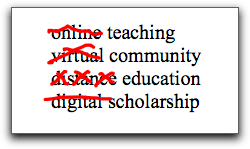
So I’m declaring myself against “digital scholarship”, “online community”, “distance education”, and anything else that applies a special adjective to something wonderful we do as humans but happen to do using a computer.

And no, that doesn’t mean my Facebook “friends” are my “real friends”.

Defaults are bad

I’ve said it before, but the evidence is clearly stacking up.

Take “Hackgate“, where devious journalists apparently hacked people’s cell phones. How did they do it? No complicated geekiness involved, really. Each cellphone provider programs its phones with a default password. Few people change it. So it’s easy to log in as someone and get their info.

According to Tristan Stewart-Robertson , “Most people wouldn’t think to change the standard manufacturer’s code, such as 9999 or 0000, to protect voicemail, and so it’s usually quite easy to access.”

In other words, leaving your cell phone on its default is bad.

Do you like WordPress? I do. When I set up a new blog, it gives me an “admin” username automatically. But since it does that for everyone, it’s easy to hack into.

So you need to make your own account with a password, make that account an Administrator, then delete the default account. Because default is bad.

As online instructors, we do it with Learning Management Systems. Blackboard says this menu button is for syllabus, so we upload our syllabus there. This button is for discussions, so we create them all there. This one is for quizzes. Now they have one called “Content”. Oh my, that’s helpful.

My class is organized like a syllabus. I need a button for Unit 1, a button for Unit 2. Every time we do a workshop where one of our faculty demonstrates how we’ve adjusted an LMS to make it look like a syllabus, we see light bulbs go on all over the room. We have, over the years, called these workshops things like “Making Blackboard Work for You”, “Redesigning Blackboard”, and “The Interactive Syllabus”. Yesterday our presenters Andrea Petri and Laura Paciorek gave a workshop called “A New Wardrobe for Blackboard: Technical Basics of Instructional Design”. Andrea showed us his class, organized into units, with each unit a page full of links, all in one place for that unit.

We’ve got tutorials, like this one on creating an interactive syllabus in Blackboard by Pilar Hernández . We have a handout showing a logical chapter-based LMS menu. Laura Paciorek made a screencast on how to change the Blackboard menu . And still, the first thing most new instructors do is load their .doc syllabus into the Syllabus or Content area. Sigh.

Not changing the defaults is akin to leaving the light flashing 12:00 on the VCR (you remember VCRs, right?). Next semester we’ll offer another, longer workshop. We’re thinking of something like “Creating Learning Units in Blackboard”.

Because defaults, you know, are bad.

From Course Learning to Snapshot Learning

cc shownbyphotos.com

One of my students wrote on her self-assessment today that she was sad our summer course is ending, because she really enjoyed talking to her colleagues using the Messaging feature in Moodle. She wrote “very sad since I greatly enjoyed the lectures in this class and I’ve met new people via messaging them”.

I have noticed this before, that students often use the Messaging system in Moodle (or any LMS) to talk to each other. I’m not aware of it unless they tell me or I have to go into a student’s account for some reason. But it makes sense. It’s less intrusive than trying to be a Facebook friend, and less direct then email. If you use the LMS system, it means, “Hi! I’m in class with you. Wanna talk about class? or something else maybe?” Less risk, and it draws on your immediate and obvious connection.

My student’s sorrow, of course, is based on the fact that this experience is organized as a class that will “close”. No one will come back after this week, and eventually the website will be unavailable as we all move on. It’s like a coffee shop where you meet some people and hang with them all evening, but then the coffee shop closes and really, you’re too shy to ask for anyone’s number.

A lot has been discussed lately about open learning, life-long learning, learning outside the box. We talk about e-portfolios that would span ones whole academic career, and we bemoan courses as isolating events and lack of appreciation for informal learning.

I like to combine things, so let’s try something different, where we still have courses (and grades, and records, and all those socially-sanctioned assessed things everyone needs for credit and advancement regardless of how much you bitch about it). But let’s get rid of the Course in Isolation, and have the Course as Snapshot.

cc Flickr Mykl Roventine

The idea is that everyone would be learning, online and in the open, all the time. I am going to call this Evidential Learning, because you can see that it’s happening. Then an event comes along, which is the Course, and students enroll and work on that course. This happens all the time with MOOCs — one comes along and everyone begins to focus activity they’d already been doing on the schedule, topics, and feedback loops for that MOOC.

So all of their Evidential Learning is considered a flow, but instructors set up courses in their disciplines,and students register as usual, and for that period of time, the student’s energy is directed toward working on that class. This could be in their usual environments, or other online environments added or encouraged by the instructor. Their directed activities during the course are then seen as a “snapshot”, to which is assigned a grade.

Then students will connect to each other in their own way, and the coffee shop need never close.

Glogster & Moodle: good idea, poor execution

For extra credit in my online classes, I usually have students make a slideshow detailing a historical theme they’ve created.

Don’t tell, shhhhh, but: I despise slideshows. They take too long to grade, because they are hard to skim. Worse than audio.

All on one page, that’s my ticket.

So students in my 8-week summer Western Civ class asked for some extra credit, and one mentioned a poster (he also mentioned slideshow, but I’m ignoring that). So I went to Glogster, which I’ve never used for any sort of assignment, and created one as an example.

Then came the embed horror. Since speed is my goal, I want these suckers embedded firmly in a simple forum post, so they’re all one one screen and can be marked easily with a ratings drop-down.

Well, Glogster’s embed code sucks, and Moodle’s forum helpfully strips it to completely useless. And if you used Glogster’s “embed this poster” embed code instead (which is iframes-based), Moodle’s forum strips it all. So I tried to include special instructions as part of the extra credit assignment itself:

Then I looked at my cleverly embeded poster, and it wasn’t there. My own Firefox said I needed a plugin, but my Shockwave Flash is up to date. I looked and Safari sees the embed just fine. Naturally, I was contacted by a student almost instantly saying they couldn’t see the sample poster. I worked on it all morning, and finally had to use this Moodle hack, which creates a database. Took about a dozen tries but now students should be able to do this:

Of course, in WordPress this isn’t an issue.

http://www.glogster.com/flash/flash_loader.swf?ver=1309172180

The joy of revision

Although I haven’t taught summer in two decades, I am doing it now – an 8-week, 3 unit class in Western Civ, online. That’s double-speed, so I’ve gotten rid of the textbook (and instead spent hours writing multiple-choice questions on my lectures to check content retention) and am heavily relying on my two-step discussion forum technique for students to find their own sources and practice historical skills.

During the regular semester, I have at least 200 students (40 for each of 5 class sections) over 16 weeks. That’s too many for me to do as much individual feedback as I would like, so I’ve developed various methods for giving group feedback that’s valuable, and limited individual feedback to essay questions on exams and answers to their questions in the forums.

Here we are compressed, so the content has been combined. But the forum technique is the same. Each week they must post a primary source related to the (now twice as long) historical era by Wednesday. Then I come in on Thursday to guide the discussion, then they create a historical thesis mini-essay by Sunday.

During a regular semester, this wasn’t really an essay – it was just a thesis and brief outline, and it wasn’t graded separately, but as a part of the general Contribution grade. Then they would write a “real” essay in a private quiz, and I would grade it.

In order to reduce workload for summer, I am having them post a full essay each week by Sunday, and am grading it as if it were the quiz essay, right there in the forum. Here have been the considerations.

1. How to grade them

I am using Moodle, and created a scale like this for forum ratings (the “lowest grade” setting is to force Moodle to start the points at 50% instead of 0):

The idea was that on Monday, I’d just go down the essay posts and grade them, but…

2. Public or private?

On the first forum, which didn’t count for points, I graded them openly, so that everyone could see everyone’s ratings (it only shows the qualitative comment, not the number of points). I asked in the Facebook group if they liked this, and several students said they didn’t mind, but there weren’t enough students to tell what they all wanted. So for the next two forums, I’ve kept them closed – students can only see their own ratings.

3. Revision

The first week of grading, I noticed that some mini-essays could have gotten a higher score if they’d had some feedback. When students left feedback, it was often really helpful, but there was not mechanism for revision. During the regular semester, I can’t really do this, come back to an assignment twice to grade and regrade, but why not, with only 40 students?

So that’s what’s happening. They submit their mini-essay, then I ask them to comment on each others’ (which they are supposed to do anyway), and I comment on them too, then they can post again with “REVISED” in the subject line, and I grade that one instead.

I started getting confused – had I graded this one already? So I reset the Forum preference to just show the Maximum rating. That way, if I grade a mini-essay twice by mistake, the student will only get the highest score.

It’s remarkable to me what a difference this is making in their grades and how much work they are putting into the class!

The level of emotional connection in this class is not high (these are mostly university students just trying to get through – they rejected my offer for a synchronous session to talk to me), but the amount of learning is increased anyway.

So two lessons from this:

1. With lower class size, the opportunity for individual feedback, and thus student success, is much higher.

2. An emotional, “friend”, “like” connection between instructor and students, or among students, is not as important in learning a skill as how much work is put into the learning