Flipping research

“Flipping” a class (putting lectures and presentations online, then using class time for collaboration and discussion) is all the rage at the moment.  Everyone’s in on it now, from The Economist to The Daily Riff to Daniel Pink. I don’t see the big deal, since basically using a textbook is the same thing (read at home, then come to class). Maybe in the 16th century people were wowed by this idea. I’m glad it’s come back around – I don’t like using class time for relaying information you could find elsewhere. You want to know when the Battle of Waterloo was? Go look it up. It’s easy now to look it up, so it’s easier to justify not lecturing on the facts unless I’m presenting a different paradigm. I think I started doing that, what, fifteen years ago?

But I want to be more innovative, so I’m doing flipped research.

Here’s the idea. I’m referred to in education research circles as “just a practitioner”. I do stuff. I teach history at community college, and try web technologies to help me do that. I use learning management systems, video, slidecasts, whatever it takes. I’ve done everything from Webboard to WordPress to Google + hangouts.

But I’m not an expert in educational theory, nor in the entire edtech field that I’ve watched emerge (and achieve frightening proportions) over the last decade.

So now I’m doing something really cool: offering an open, online class to prepare faculty to teach online. It’s designed like a MOOC, but it’s not a MOOC because it’s not massive (90 enrolled, 81 blogs aggregated). I’m taking ideas from other people, including Alec Couros’s EC&I831 for the structure and the mentoring, Jim Groom’s ds106 for the aggregated blog and the element of insanity, George Siemens and Stephen Downes’ whatever-MOOC-they’re-doing-today for the large topic and distributed conversation. But I haven’t done much “reasearch”. I do read articles on learning management systems and MOOCs, but basically I’m … just a practitioner.

So now I’m writing a research paper based on what I’m doing, and it all feels like reverse engineering. I’m looking up studies on open classes and professional development for online faculty, and finding a few people doing what I’m doing. Some of the articles show findings that what I’m doing might be good; most end with “further research is required”. I’m doing that research, survey participating faculty, planning to note how approaches change on their blogs.

For a historian, this is so not what you do. You create a provisional thesis based on the reading of primary sources. I guess in this case, according to the educational research folks, the primary sources are the studies. They should have guided what I do, and I should have planned my class based on the findings of others. I should have been consciously aware of what everyone else was studying, not just doing. Instead of pulling cool ideas from Alec, Jim, Stephen and George, I should have read a bunch of studies on the ways of doing this and built my class with a solid theoretical and practical foundation.

But no, I just did it. I created the class based on my experience rather than my research. I’ll probably be kicked out of the historians’ club if they find out. And that’s what makes me…just a practitioner.

Embed, feed and tag: the bare minimum

We’ve been having trouble with the task for this week at Pedagogy First!, the aggregated blog of the POT Certificate Class. I posted a task that asked participants to create a Slidecast (PPT -> Slideshare -> plus audio) or a Jing (usually uploaded to Screencast.com), then embed it into this week’s blog post.

But oh! Trouble ensued because the current free versions of Edublogs and WordPress.com make embedding these items difficult or impossible. While those of us running our own blogs on our own or rented servers can control our WordPress blogs, these vendors have the control. The free Edublog (built on WordPress) won’t actually accept the Jing embed code, and blog posts saying it will lead us astray. It won’t accept the Slideshare embed code either. They tell you that you can embed media in an Edublog, but the fine print says maybe not if it’s a free account. The free WordPress.com blog will accept the Slideshare shortcode, but not the Jing embed code, even when one is very careful. This post says that you can use Vodpod, but one of our participants tried it and it failed. Some participants got around this by downloading the mp4 of their Jing and uploading it to YouTube so they could embed it. I tried downloading the swf version of a Jing to try this tip, but I could only seem to download mp4. So Jing isn’t even trying to help (they want you dependent on Screencast.com, where if your Jings have too many viewers they insist you have a paid account).

We need a new standard for the basic functions of blogs and other social webware. And once I read Martin Weller’s post from 2008, I realized that these are the basics:

1. Embed

A blog or social webware of any kind is useless without embed. . If you cannot share right from your space, if people must click away using a link, the implication is that the media is not yours. It “belongs” to Slideshare or Screencast. YouTube and Vimeo balance this issue, by allowing embed but branding the player. That makes more sense. (BTW, those mysterious embed codes they “give” you are just basic object and embed HTML, which have been around for over a decade — everywhere should accept them.)

2. Feed

Any site that gets updated, but does not have the RSS feed obviously available is similarly useless. Readers need to be able to aggregate all the things they read, create their own newspaper, if you will. Some of the themes in WordPress (including many available through Edublogs and WordPress.com) don’t have an obvious RSS button available, so unless you know how their feed is structured, you can’t put it in an aggregator. And how is it possible that the RSS for Comments is still separate from the Posts? How can there be no progress with this?

3. Tag

We’re still confused by tags, since Twitter needs a hashtag, while blogs use either Tags or Categories, which are difficult to distinguish. Still, most of the save-and-share technologies get the tag idea. Nevertheless, if everyone is using an agreed upon tag on their blogs, there is no way to find these across the entire web. The closest we’ve found is to search for the tag in Google Blog Search, but it’s very delayed and misses many of them, tending to favor those who put the tag in their post title.  For my purposes, if people use our potcert11 tag outside the class, I have trouble aggregating these into a blog or widget, or reading them myself.

It’s incredibly stupid that we can’t do these things for free. They are basic. If you want to pull us in to have us pay for premium features, you need to understand which features are basic rather than optional.

This is serious enough to have me rethinking our recommendations for newbies to use Edublogs or WordPress.com. Posterous and Tumblr are now being seen as being better for this kind of thing. Maybe they are, and we should focus less on full blogging platforms and more on embed, feed and tag.


First POT Cert Class survey results

For Week 3, we surveyed our participants at Pedagogy First!, the aggregated blog for the POT Certificate Class, asking what topics we need to cover more for posts or synchronous sessions. I am also making tutorials as part of my sabbatical, so wanted to know what might be needed. Survey responses are here in summary (n=44 at time of posting).

Issues of course design

Most feedback (10 items)  related to course design: how to use synchronous video, build communities, improve discussion participation, increase instructor presence, development reflective assessments, build a class from scratch. These are all important, and we will be going over all of them in the class. The syllabus lists when the topics will be assigned.

I wondered, though, about questions regarding discussion participation (3 items). It might be best not to separate discussion from overall class design. One of the earliest examples I saw of a great online class had all the content on the “discussion board”. Some classes are all “discussion”, because students blog or post everything and comment/peer evaluate. If we start off by thinking of “discussion” as separate, I fear it will remain separate. This is a great topic for a session!

It’s the same with assessments (3 items). Do assessments have to be separated from class “content”? Can they be built in, as checkpoints or assignments? Can they be formative rather than summative? We should talk about this too!

Issues about the class itself

There were also comments on the Certificate Class itself (6 items). Some were struggling with the distributed nature of the class. Several of us have been discussing this, and we want to make sure that participants understand the distributed nature of online knowledge. This may be more important than having a central location for class discussion. We surveyed independently on that issue, of whether to open a Google Group, encourage people to participate in the Facebook group, or keep conversation on the blogs. Results were mixed, so we’re encouraging people to join the Facebook group, particularly since it was already a POT group and will continue beyond the class dates. We feared that a Google Group would pull conversation from the blog. Blogging and commenting may seem disparate, but Google Reader can help manage the load, and the Facebook group can provide a more central location for certain topics. The web is distributed, and if the web is our classroom, that means the learning may well be distributed too (in fact, we know it is, it’s just that all the learning isn’t necessarily related to our classes!).

Some indicated a desire for “supervised practice” or elements I’d call “technology training”. About half a dozen surveys requested more about Blackboard and Moodle (5 items). We will deal with Learning Management Systems, but have deliberately put that topic later in the class because it is inappropriate to start there. The LMS can limit creativity and constrict pedagogy in nasty ways (I’m actually assigning my own article as reading later in the class — how tacky). Let’s design first, then figure out whether the LMS fits into what we want to do, or how to adapt the LMS to make it do what we want (a specialty of our POT workshops).

That’s not to say people shouldn’t have training in an LMS, just that it’s not central to our class on preparing faculty to teach online, and there are many opportunities for such training elsewhere. Blackboard not only has many tutorials at its website, but if you’re at MiraCosta, Bb training modules at the beginning, intermediate, and advanced levels are available inside Blackboard, and completing them counts for flex credit. Moodle.org offers an introduction to Moodle, plus Jason Cole has a great book. We can do technical training in POT, but we don’t because we believe that the pedagogy must come first, and training can be done with tutorials and with help from technical staff. The pedagogy of online teaching, we feel, is best taught by online faculty.

Similarly, sources abound for information about blogging, WordPress and Edublogs. All products we recommend have some form of support built in – a Help menu or documentation. Which leads us into the topic of specific tools (6 items) and “how to” training. Several people requested we do something with comparing different web tools from our own experience, and indeed, sharing experiences in general — this is a great idea and we’ll do more with that. I can also create some tutorials on the various tools I have experience with. Also check our our Cool Tools list at the POT website.

Other cool questions

Could we have more but shorter synchronous sessions/ sessions at different times?

Yes, and anyone in the class can create a synchronous session, add it to the Distributed Activities pages, and email me with info so I can put it in the weekly email news.

How do I make a Prezi without making the viewer dizzy?

Eschew the paths that turn things around. Here’s an example of a linear presentation I did for class.

Should I have had more blogging experience before starting this class?

No. We are all learning by doing. For some of us, writing does not come naturally, or reflecting (particularly in public), or sharing our work. These are habits that can only be learned by practice.

Is it OK that I’m here with a different goal?

Yes. This is your class, to learn what you need to learn. We have a syllabus with assigned readings, mentors available, and lots of resources, but you are here to fulfill your needs for learning, not ours for teaching. You can come, go, drop out, participate when you want and not get a certificate — it’s all good. Our feelings won’t be hurt. We’re having a blast ourselves learning all this stuff.

Time Management

And last, about time management (a problem for 81% of our participants). Time, as we know, is made, not found. 😉  And learning anything worth learning, we know and we tell our students, takes time. Managing time for doing things on the internet can be especially difficult, because time seems to warp when you’re online — you look up and suddenly realize you spent four hours watching YouTube or making a Prezi. For most people, it’s best to set aside a specific timeframe and a specific task, and stick to it. Easier said than done, I know!


 (Images from hasslefreeclipart.com)

Those crazy comments

The purpose of having multiple blogs in a class is two-fold: have people control their own space by running their own blogs, and have discussion take place in those spaces. We do the discussion part by posting comments on other people’s blogs.

But once we comment, we leave. Then what if the person answers our comment? How do we know? How can conversation happen if we don’t know the other person is talking?

Some blogs have a “subscribe to this post” button or a “Notify me of follow-up comments via email”. That’s handy. But what if that option isn’t available?

This is where a comment tracking service can come in handy. I used to use Cocomment (I even foolishly posted a tutorial on it), but on my Mac OS 10.5, it broke. So I’ve switched to co.comments, which works more easily.

In co.comments, you sign up, go to Tools/Settings, then drag a “bookmarklet” or “menulet” (just a piece of code that says “Track co.mments”) to the bar of your browser (for some reason, the one for Internet Explorer works for Chrome). When you go to someone’s blog to leave a comment, you can click “Track co.mments” and it follows that page from then on, letting you know (if you click Recheck) when there are new comments after yours. And it shows them all right there.

This way I can try to follow all the wonderful conversations!

SMOOC update (or the joys of being a WP admin)

The not-quite-a-MOOC (but rather Small to Medium-Sized Open Online Class) POT Certificate Class is underway at the new Pedagogy First! Blog. What follows are notes about technology realizing my pedagogy for this class.

What I wanted

I wanted something like Jim Groom and Martha Burtis do for DS106, a central WordPress blog that pulled in posts for the separate blogs of people participating in the class.

I wanted to adopt a mentoring system like the one Alec Couros used for EC&I831, where more experienced people could help the newbies.

I wanted it open, as Jim and Martha and Alec did, and as George Siemens and Stephen Downes and Dave Cormier do for their MOOCs (yes, that link is the unfinished Wikipedia entry, but I haven’t had time to work on it).

I wanted participants to be able to add their own blogs to the big blog.

I wanted sticky posts at the top that had the week’s instructions, since we are not using a strictly connectivist pedagogy (if there is such a thing) for the people earning a certificate. Certificate folks have weekly readings and tasks, including a blog post showing what they’ve reflected upon and created on the web.

I wanted each week to have a moderator, who would create some introductory media for that week and then follow the big conversation, just for that one week.

The content was set up as a simple syllabus page. That’s actually been the easiest part of the whole thing. It’s just a syllabus. We all know how to do that!

I wanted it not to be an administrative nightmare. (Well, as they say, ROFLMAO!)

The technology

It’s turned out to be much more difficult than I anticipated. Here are the challenges:

1. Sticky posts (Solved)
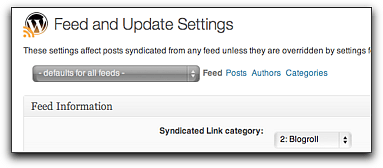
Feedwordpress at first could not do a Sticky Post properly, causing me to try other plugins designed to pull in feeds, none of which were what I wanted. This was resolved with a bug fix in the updated version of Feedwordpress that came out in July. In Atahualpa theme, it was easy to change the background color of these posts, and even add a little POT logo, so they look different.

2. Massive database and CPU usage (Partly made kind of OK)
As I set up the blog and people began adding feeds, even with only a few, the CPU usage at my hosting company (Lunarpages) was climbing. I alerted them before they alerted me, but they don’t support the scripts you use, just yell at you to fix it. I did chat support a lot trying to narrow down the problem with my limited knowledge of databases (i.e. none) and php (almost none). I failed and opened a new account at Bluehost using POT’s Excellence reward money, created the domain pedagogyfirst.org (after checking with Glenda Morgan, who first coined the phrase) and imported the WordPress files and database. Since I’m not a fan of using the phpAdmin to repair and optimize the database (I figured out this was helpful to deal with what they call “slow queries”) I’ve had to use an optimizing plug-in that I manually click on if I want it to clean stuff up more than once a day (and I do).

3. Feedwordpress weirdnesses (OK)

Author names come through as usernames rather than a real name. Since people don’t sign their posts, I’ve changed these so long as I can see that they want their real names used (if they mentioned their real name on their blog).

The first post on WP (“Hello World” with no real content) comes through as the first post in syndication, so if they didn’t change it, it posts the default first post. I am removing these manually.

Jim and Martha had to remind me that when you delete syndications (like with spam), it only makes them inactive. You have to then go to the inactive ones and really delete them. Interestingly, Chrome will immediately not show them even though they’re still there, so you think they’re gone when they’re not. Firefox and Safari will show the undeleted feeds.

Also, if using a Cache (recommended) plug in (I used Quick Cache), be sure to clear it when you make changes. Some browsers will continue to show the old post or page.

And strange things happened, but even with manually refreshing all the feeds, they wouldn’t correct themselves for hours.

4. WordPress things (OK).

When using iframe on a page, you must create a template just for that page. I also used Custom Menu, which meant remembering to add the page to the menu also.

The Atahualpa theme is wonderful, but some of its settings get overridden by Feedwordpress, and it’s hard to tell which ones.

I removed the admin account for security purposes. (I learned this while flailing around trying to decrease CPU usage.)

5. People adding their own blogs (sort of OK)

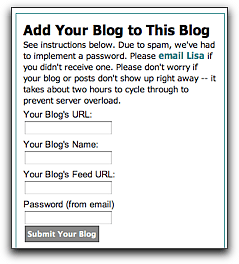
I used the “Add Link” widget plugin, which lets people put their blog onto the Blogroll. Then I set Feedwordpress to syndicate posts from the Blogroll. First, I got some spam blogs, so I had to implement a password. Also, Feedwordpress needs the URL of the blog’s feed, not just the blog’s URL. People put in the wrong feed or a whole other URL. I had to change these manually for each blog. Since most newbies are using Edublogs, the feed URL usually just ends in “feed”.

I also gave instructions for adding only posts that had the class tag (“potcert11”) into the blog URL, but people didn’t always know how to do that. The idea was that if someone already had a blog, instead of adding the feed from the entire thing, they could just add the tag’s feed (for Edublogs or WordPress.com, this is something like http://example.com/?feed=rss2&tag=potcert11. For Blogger, it’s something like http://blogname.blogspot.com/feeds/posts/default/-/potcert11. When folks didn’t understand, I had to try to do this manually to prevent the entire blog filling up with unrelated stuff.

6. The prompts (well, I hope it’s OK now)

The sticky posts, once they were working, appeared to be simple. Just add in the instructions (written by Jim Sullivan, our Blog Meister, who’s wonderfully encouraging). But each post will also have media, and all the  moderators are creating their stuff in different applications — Voicethread, Jing, Camtasia, YouTube. This is what we want, of course! But embed codes didn’t always work. I’d have to add a plug-in, or change the size on a video to prevent it overlapping the sidebars. Lots more work than anticipated.

The Participants

I asked everyone to email me to be “registered”. I kept all their information on a Google Doc spreadsheet. I added their name, where they were from, what they taught or studied, then their blog URL and feed URL, and whether they were interested in Mentoring.

But I also asked them to sign themselves in to a public Doc that appeared on a blog page as an iframe. I used a Google Form for them to enter their info, setting it to show the resulting spreadsheet after they had done so. This way they could know who else was in the class, I could find out how they came to know about the class, etc.

Some people aren’t comfortable being “known” on the internet, so I had a provision for the certificate that they could use a pseudonym. It’s hard to assign a mentor to a pseudonym.

The Moderators and Mentors

Several wonderful people agreed to be moderators and mentors, proof of the old adage that you just have to ask.

Moderators introduce a unit and supervise for a week. I called on POT leaders, certificate holders, and facilitators to take a week and moderate it, making a video tutorial or something to inspire and preview that week (an idea of one of our new people, Eric Robertson). Everyone is doing great work with this, and I look forward to each of them “taking charge” during the week they’ve chosen.

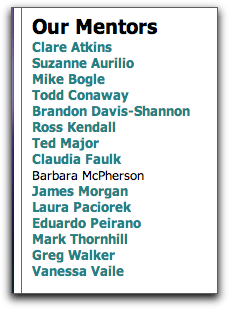
Mentors help individual participants, with a focus on community so no one is sitting there with no comments on the blog. When I saw an obviously accomplished blog post or experienced distance educator add the class, I asked if they’d be a mentor, plus we have people who already earned a certificate last year and are paying it back. As the class registration rose above 50, I decided to follow Alec Couros’ lead and assign mentors to particular participants, so I just added a column to the Doc then gave the mentors edit access to it. Right now each mentor has 4-6 people assigned to him/her.

The Insanity

At one point in my panic, Alec Couros advised me not to abandon my pedagogy. I thank him for that. Others advised me to bail on it and use an LMS (the horror!) or a Google Reader bundle, which is certainly my backup if all this fails and the database crashes or my new host sends me threatening emails. Some people think it’s too open, and they don’t want to blog. Others think this isn’t open enough, and want it to be a connectivist MOOCy thing with internet diffusion and intergalactic social network connections. (If I let this kind of stuff get to me, I’d have given up teaching undergraduates a long time ago!)

It is possible, however, that there is a much easier way to accomplish some of this. I stumbled recently upon a post by Jim Groom, who used WPMU and another plug in to create a Feed to Rule All Feeds by just pulling in any post on the web that had a particular tag. This would be good (no 77 separate feeds, latecomers can play along much more easily) and possibly bad (lots of spam postings, dependence on yet another plug-in to pull them in). I am still trying to decide whether to try it now, but I think it might be better next year. Then we could go even more open and diverse, which would be good.

For now, tracking 77+ people and trying to prevent Pedagogy First! from crashing will be quite enough.

Now what?

The class actually starts tomorrow.

What will we do with those who want to add late? I can allow a few exceptions (I already have, since the registration deadline was August 26). But the way the feeds are done there isn’t much mechanism for just jumping in on the big blog.

People can jump in, though, in a number of places: the POT Facebook group (already very active), a Diigo group, the POT YouTube channel, Twitter (hashtag #potcert11) etc. And we have several mentors already who will be taking the lead in doing synchronous sessions, Google Groups, and goodness knows what other Distributed Activities.

I’m confident that the pedagogical model is sound, and the set-up is sustainable and rich. I mean the people-to-people set-up. We’ll have to see about the technology. 😉

Defaults are bad

I’ve said it before, but the evidence is clearly stacking up.

Take “Hackgate“, where devious journalists apparently hacked people’s cell phones. How did they do it? No complicated geekiness involved, really. Each cellphone provider programs its phones with a default password. Few people change it. So it’s easy to log in as someone and get their info.

According to Tristan Stewart-Robertson , “Most people wouldn’t think to change the standard manufacturer’s code, such as 9999 or 0000, to protect voicemail, and so it’s usually quite easy to access.”

In other words, leaving your cell phone on its default is bad.

Do you like WordPress? I do. When I set up a new blog, it gives me an “admin” username automatically. But since it does that for everyone, it’s easy to hack into.

So you need to make your own account with a password, make that account an Administrator, then delete the default account. Because default is bad.

As online instructors, we do it with Learning Management Systems. Blackboard says this menu button is for syllabus, so we upload our syllabus there. This button is for discussions, so we create them all there. This one is for quizzes. Now they have one called “Content”. Oh my, that’s helpful.

My class is organized like a syllabus. I need a button for Unit 1, a button for Unit 2. Every time we do a workshop where one of our faculty demonstrates how we’ve adjusted an LMS to make it look like a syllabus, we see light bulbs go on all over the room. We have, over the years, called these workshops things like “Making Blackboard Work for You”, “Redesigning Blackboard”, and “The Interactive Syllabus”. Yesterday our presenters Andrea Petri and Laura Paciorek gave a workshop called “A New Wardrobe for Blackboard: Technical Basics of Instructional Design”. Andrea showed us his class, organized into units, with each unit a page full of links, all in one place for that unit.

We’ve got tutorials, like this one on creating an interactive syllabus in Blackboard by Pilar Hernández . We have a handout showing a logical chapter-based LMS menu. Laura Paciorek made a screencast on how to change the Blackboard menu . And still, the first thing most new instructors do is load their .doc syllabus into the Syllabus or Content area. Sigh.

Not changing the defaults is akin to leaving the light flashing 12:00 on the VCR (you remember VCRs, right?). Next semester we’ll offer another, longer workshop. We’re thinking of something like “Creating Learning Units in Blackboard”.

Because defaults, you know, are bad.

POT Certificate Class starts September 1: won’t you join us?

Beginning September 1, our faculty volunteers at the Program for Online Teaching will lead our year-long Certificate Class, which is open to all.

POT resides at MiraCosta College in Oceanside, California. We were founded in 2005 to provide online, on-site and hybrid instructors with professional development opportunities focusing on pedagogy rather than just technology and how to use it. We have since grown to offering over a dozen workshops on campus each year, and many online.

The Certificate Class follows the academic calendar, with 12-week semesters covering different topics. It is absolutely free, and successful participants will receive POT’s Online Teaching Certificate and a logo to display on their class websites (shown at left, available in three color schemes).

Participation in the class will focus on assigned readings and viewings for each week, with attendees blogging consistently and commenting on each other’s blogs to form a community of practice. Each participant will need his/her own blog (or a tag on their regular blog) and our aggregated Pedagogy First! blog will show everyone’s posts and contain all the information for the class. Each week will be spent on both the theory and practice of teaching via the web, with much opportunity for playing with tools and reflecting on our work.

Our class can be considered a MOOC (a Massive Open Online Course) if it gets big enough. Like other MOOCs, participants should feel free to engage in distributed online activity and social networking — the tag is potcert11. But all work for earning a certificate must take place on each participant’s blog and be aggregated into Pedagogy First!, so we need to know who you are. The cohort will consist of certificate earners, but anyone may participate in the conversation and follow whatever readings and conversations interest them.

For more information, see our Certificate FAQ and the Syllabus for 2011-12. To join, just email me with your preferred email address, what subject you teach or area in which you work, and where you’re from. We’ll be contacting all participants in mid-August.

WordPress fail, WordPress success

Boo FeedWordPress

The fail is in the new Pedagogy First! blog, which I am trying to set up for the fall Certificate Class (an open course). Last year, we made all certificate candidates blog as internal authors on our PF blog in Typepad. It was a great blog, but prevented them having the experience of ownership and continuation; we want faculty to keep blogging and reflecting after the class is over. And Typepad only allowed one administrator — we need more.

I was modeling the new blog on ds106, using FeedWordPress to pull in the feeds from all participants’ blogs. Both Martha Burtis and Jim Groom helped me out (Martha fixed some awful problems), but it’s just not working. First it was bringing in duplicate posts by the ton, though Martha fixed that by doing something with toggling authors on and off. I tried different themes and settings. I even tried switching to the wp-o-matic plugin instead, but it required way more administration and it really isn’t supported. (I’m not a coder and I can’t afford too many issues.)

The final fail happened this week. My design calls for sticky posts, to be posted each week by our Blog Meister, Jim Sullivan. But using FeedWordPress, every sticky post I tried got wiped out by the next syndicated post, which then became sticky. Nothing I tried worked. At first I thought the problem was the Atahualpa theme (my favorite), so I followed this advice. But it didn’t matter – it even happened in the Twenty Ten theme, which was what ds106 used.

After weeks of this struggle, I started to get angry, not at things not working but at the complete waste of my time, because I wasn’t learning anything in this whole process. Nothing that I could use later. I don’t mind working, but I hate not learning.

I did hit on a crazy idea. Google Reader can create bundles of feeds – this is what Alec Couros did for his EC&I831 class, created a bundle with all the class participants’ blog feeds, then gave us the bundle. There is a plugin called Postalicious that is supposed to take Google Reader bookmarks and add them as posts – I tried it but it just adds links, not the actual posts. But maybe there’s a plugin that can do this, that can act the same as FeedWordPress without the drama – maybe Feed to Post or something. Worth a try to see whether Google Reader can do the heavy lifting instead of a plugin, I think….otherwise, we’re going to have to just do bundles instead, I guess, and teach everyone how to use Reader.

Hooray organizational plugins

Success is happening in the Program for Online Teaching blog, which is POT’s main website. Over the last several years, it’s become a hodgepodge of resources for faculty. Things are hard to find unless you use the Search box, and even then there’s no way to search for things inside screencasts or videos. Our stuff is also scattered across YouTube, Vimeo, blip.tv, Screencast.com, etc. (as I wrote this, I decided to make playlists, which is a good thing).

I began organizing screencasts as posts, with categories from a drop-down menu item called (duh) “Tutorials”. I used the plugin Simply Exclude to make sure the posts in these categories didn’t show on the front page. Now people will be able to use the Tutorials drop-down menu to find things related to Blackboard, Moodle, rubrics, interaction, etc., and I can put any post into as many categories as are appropriate for easy finding (I know I prefer finding to searching!).

Then I looked at the Handy Guides page, where no one would know to look if they wanted, say, the Resource Guide for Online Instructors or the handouts from our Beginners Workshop. Most of these are PDFs. I discovered the Embed PDF plug in, and it works.

Synchronicity

This is oddly synchronous, since I had just concluded that it would make sense to use Google Reader to help with pseudo-syndicated posts at the Pedagogy First! blog, and Embed PDF solved my problem by using Google Docs as its heavy lifter. It posts the pdf in a frame inside the post, with clicks to zoom in or open it as a Google Doc. This is just what I wanted – now each PDF handout and guide can have its own post, and also be…findable.

Yes, it’s possible I would have thought of this without the frustration of the failed syndication, but I’d like to think differently!

My History MOOC failed. Long live the Online Teaching MOOC.

I thought I was teaching a History MOOC.

But really I am teaching an online teaching MOOC. No one knew about it. Not even me.

When the Program for Online Teaching team set up our Online Certificate Program, we had a major element of community: the Pedagogy First! blog. For the first several iterations, we had faculty attend on-campus workshops, and blogging was just part of reflection. But over the last year or two, the blogging component has been refined until it’s become a full online course of its own.

Beginning this semester, the focus was already there, with assigned readings and reflections. For next year we’ve combined the readings (spaced better), tool exploration, and blogging together into a Certificate Class. We wanted to make sure that faculty were aware of the time commitment involved, and knew what would be covered in advance.

Then it became obvious. The syllabus, when I looked at it a second time, was clearly a MOOC syllabus. All work is done online, with weekly postings on the blog. The article readings and videos are online. The book can be purchased online. Why not invite others to join in? We could have our local MiraCosta folks as authors on the new WordPress blog (we’re moving from Typepad, which only allows one administrator), but have anyone who likes blog for themselves, adding their own blog links to the blog roll.

Our Certificate program has always been open to anyone, though we have limited space. We’re still limited for the number of certificate candidates (we’re a volunteer group), but the class itself is completely open and anyone can join.

We’ve already had interest from six MiraCostans and two people at other schools. Since the focus is online teaching (pedagogy and technology), the Certificate Class is suitable for anyone wanting to learn more about educational technology, online pedagogy and approaches to learning.

The failure of my History MOOC, and my interpretation that the failure was caused primarily by the topic, is what made me realize we already have a MOOC much more appropriate to the audience of educators and technologists who are online a lot already, tend to be self-directed learners, and love playing with ideas and technologies.

We’ve updated the FAQ. We’ll start September 1. Won’t you join us?

Best. Workshop. Ever.

On Thursday, the Program for Online Teaching facilitated a workshop we called, depending on where you looked it up, “Where the Hell Do I Start?”, “Start Here!” or “Beginners Workshop”. A one-day, seven-hour experience, we had a full house of 24 (and more on the wait list), almost all of whom rated the workshop “Extremely Useful”. Here’s our formula:

1. A 1-hour online synchronous planning session with the facilitators to come up with the idea (after a grueling “how do I do this?” session in August where attendees clearly wanted their hand held as they clicked a mouse),
2. A 5-hour planning session with two workshop leaders (fueled by coffee in cups the size of your head),
3. Dedicated, knowledgeable, calm, reliable, flexible, volunteer facilitators in an approximate ratio of 1-to-3 with attendees,
4. A firm commitment to:
* avoid anything that might cause the workshop to be taken over by one instructor’s needs or technical questions
* avoid any technical or educational jargon (I was forbidden from saying “instructivist” and “connectivism”, for example)
* avoid focusing on tools instead of teaching
5. A pattern of activity that uses a classroom for presenting and collaborative work, and a lab for individual playing and help, and going back and forth between them to keep everyone moving,
6. A $20 fee to not only pay for lunch but add value and responsibility to the idea of attendance, and
7. Good facilities and a crucial teaspoon of technical support.

Can’t wait for the description of what we did? No need to wait till the movie comes out — here it is.

[vimeo 19056991 w=400 h=300]

Beginners Workshop from Program for Online Teaching on Vimeo.

The objectives

Goal: Provide novice and beginning online instructors with direction in creating their first online class, and an opportunity to focus on their own needs.

By the end of this workshop, beginning online workshop participants will:
1. be assisted in determining their own online pedagogy for one class
2. set up and storyboard an online class
3. set up Blackboard to match their own pedagogy as expressed on their storyboard
4. determine which course design elements to add
5. review a road map of resources to learn how to add these elements

The set-up

Got approval through professional development
Workshop announced two months in advance by newsletter, email, and on the POT website
Each participant signed up through professional development’s website
Each participant paid $20 to Academic Senate for lunch and materials
Participation limited to 24 attendees (the max in the computer lab)
One facilitator bought pastries and one two dispensers of Starbuck’s coffee
Another facilitator brought drinks for lunch
Lunch of sandwiches, salad, breadsticks and cookies ordered from Pat and Oscars with delivery
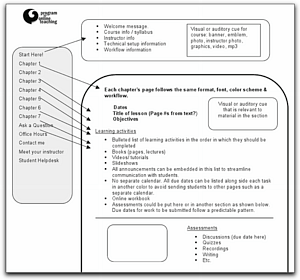
Porfolios created by one leader with POT stickers (not the Chinese kind, made at Office Depot), and the following pages:

What we did

Coffee and pastries in the courtyard 8:45
Nametags for all.

9:00-9:30 Classroom: Show and Tell
We passed out the packets.
Pilar welcomed attendees and introduced the Show and Tell videos:
Jill’s screencast
Lisa’s screencast
John Turbeville’s screencast
Janeen’s screencast
Pilar’s screencast
Lisa worked the technology (played the videos).

9:30-11:00 — Classroom: Understanding the Guiding Force of your pedagogy
-Pilar briefly described to attendees what would happen throughout the day.
-Lisa led them through the Questionnaire so they could start to understand their teaching style and goals. Talked about how each score might lead toward focusiing more on either presentation or interactivity.
-Pilar asked them to get with the person next to them to discuss what their Guiding Force is when they think about their class. Facilitators circulated amongst the groups to help them figure that out– what guides your class? (Your syllabus, Textbook, Course pre-made software, SLOs,…)
– Pilar shared examples of 2 course designs and how they are organized (based on guiding force), allowing questions but limiting them to course design
– Participants created their own draft of a course map from a blank storyboard, separately or in pairs as they preferred – presenters walked them through essential components (which were listed on worksheet for guidance), for about 20 minutes

11:00 Computer Lab: Using Blackboard to set up a course your way
– Pilar demonstrated how to set up Blackboard to match their pedagogy by first erasing all menu items and anything forcing Bb’s innate pedagogy
– Everyone assisted, and Karen Korstad from Academic Info Services set up blank Bb classes to play with

12:20 lunch on the patio 4800 building, dealt with the fact that Pat and Oscars didn’t bring forks (a good lesson in the need for appropriate technologies)

1:00 Classroom: Determining what you need to learn to create what you want
– Jim and Jill focused on “what do you need to know now?” — determining knowledge needs so they could list what kind of tools they might want to use to fulfill their goals (synchronous meeting, short video, audio recording, etc.).
– The rest of us were on hand to help with questions, discussion.
[The goal: Determine which elements you need to add to your online class based on your pedagogy for your class, and produce a comprehensive needs list — what categories of tools?]

2:00 Computer Lab: Accessing Resources, tools and help
Lisa + Karen presented Resources and Help, Jill demonstrated how to set up voice communication inside Bb since there was much interest in that; we got out the headsets for people to play with Wimba, Audacity or Eyejot, but couldn’t do Jing because the lab didn’t have it installed

3:00 Classroom: How do we prepare students?
We all returned to the classroom to discuss: based on what each instructor plans to create, what will students need in order to understand how their class works and be prepared (including technologically) to participate fully? Lisa led discussion of what individual faculty need their students to know how to do, and wrote a list on the whiteboard. Then we listed ways to make sure that happens, through syllabus quizzes, low-stakes usage and tutorials. We sent everyone back to the lab on their way out to do the survey.

Feedback

We got immediate feedback via SurveyMonkey, which all but one attendee filled out.

Of attendees, 56% were associate faculty, 44% were full-timers.

Experience: 74% had never taught an online class.

Goals: 87% took the workshop to enhance their teaching skills.

Satisfaction: 87% said the workshop was “Extremely useful” in fulfilling their goals.

Among the things participants found most useful was access to expert teachers, help setting up their course, a thorough introduction to key components of getting started, seeing what others were doing, being introduced to various tools, and “Understanding that these online instructors do not let the technology drive the course”.

Among the things participants wanted was more attention to their individual questions, the avoidance of too much computer detail, and 2 or 3-day workshops.

Of the activities they might consider participating in now that they’d taken the workshop, 83% wanted more workshops, 78% intended to explore online tools independently, 78% were interested in POT’s Online Teaching Certificate, 65% planned to participate in the new automated online Blackboard training, 57% would participate in Bb workshops, 39% intended to discuss online teaching issues in their department, and 9% intended to start their own blog.

Lessons learned

We consider that we have both inspired and educated 23 people to become independent, pedagogically-driven online instructors, and couldn’t be happier. Suggestions for ourselves:

  • Make sure the computer folks don’t reimage computers on the day before or day of the conference.
  • Get Starbucks to put the milk in containers that actually pour.
  • Get Pat and Oscars to bring forks to prevent raiding of people’s offices at the last minute.
  • More cookies.
  • Make an open board for participants to post questions that can be addressed throughout the day.

A re-visioned professional development model for online instructors

Working with my colleague Pilar Hernández and our other POT leaders, I have begun revising the Program for Online Teaching certificate to put pedagogy first and provide better pedagogical preparation for online instructors, followed by tool exploration (see previous post).

The creation of new tasks has given me the opportunity to share, in a more formal way, the articles and videos that have influenced my own practice. You can see some of them listed in the draft page for the cohort of instructors starting to work on the certificate next Fall. The same readings will be used for the cohort finishing by blogging this spring, starting February 1, so I need them ready very soon!

Instead of having workshop attendance be a separate requirement, I’ve encouraged taking workshops (especially for novices) but put recordings of some of our previous workshops right into the weekly assignments as appropriate. This will have the added benefit of making the certificate obtainable in only one year, and (we’ve had lots of requests for this) fully online.

We’ll use Ko and Rossen’s Teaching Online: A Practical Guide (3rd ed) because it has the clear pedagogically-based focus we need, and the latest edition is updated with web 2.0 tools integrated into the chapters.

Pilar also had the idea that instead of the POT leadership feeling responsible for the ongoing monitoring of the multi-author Pedagogy First! blog, we should ask a larger number of folks (including those earning certificates previously) to act as mentors by signing up to host one of the weeks.

Considering that this is a volunteer program (none of us are paid for any of this), we wanted something that was open to all and self-directed, but with specific guidance that didn’t have to be continually moderated by any one person. This has led automatically to an open website and an open blog — anyone can comment and participate, and anyone from anywhere can read along and join us.

This summer, I’ll move the blog to WordPress, so that faculty can use their own blogs (aggregated to the Pedagogy First! site) and allow non-certificate folks to participate on their own blogs but be part of our community.

I’d love feedback!

Reorganizing professional development to emphasize pedagogy

Our Program for Online Teaching says we emphasize pedagogy, that we want faculty to think first about what they want to achieve in class, then look at the tools.

That’s important to us, because a primary emphasis on the technology leads to bad things among novices. I’ve written about this before, so I won’t go into it here, but starting with Blackboard training is the road to canned courses and standardized pedagogies based on using the system defaults. It also leads to the IT tail wagging the teaching dog.

Anyway, we all know there are many wonderful tools out there that can be used instead of, or combined with, a CMS. Most POT leaders, including myself, are easily enchanted with these tools, and faculty who attend our workshops want to know how to use them. They want step-by-step guidance through the tools they’ve seen or are interested in. That’s fine, but it’s training, not pedagogical preparation for teaching online.

Tackling the POT website is the first step. Our website has a page of cool tools, organized by type. Our Pedagogy First! blog, the basis for our certificate program, explores different tools each week for its first of two semesters. Both of these are backward. We should be starting with the pedagogy. But how?

First, I want to take a tip from a great list of resources, the DiRT Digital Resources list, which is organized as “I want to…” items (mine data, network with other researchers, make a screencast). The tools themselves should be accessible through this somehow.

Second, there are organizational problems. I’m thinking that the category pages (Cool Tools, Guides and Handouts, Outside Resources) are very difficult to update and won’t help faculty find what they’re looking for. On the front page right now (the real “blog posts”) is what’s new in terms of workshops and activities. As the site has expanded with more information, I’ve found it increasingly difficult to keep it organized and useful.

So somehow I want to redesign to display our own pedagogical priority: starting with what faculty want to achieve. I have added a How Do I Start? map for faculty, and updated the look of the site, but more is needed.

Third, I want to flip the certificate program. Right now we have the first semester exploring tools, and the second semester applying them, and we plan to add prompts for the second semester (like we have for the first). The first semester should be pedagogical preparation, with articles and maybe even this book to read and explore together. Our faculty deserve more than just guided tool exploration and a place to post their accomplishments, and we’re not utilizing all the pedagogical resources we’ve been collecting.

That means a better place to post as well. Pedagogy First!, where faculty post who are working on the certificate, is a multiuser TypePad blog, administered by the excellent Jim Sullivan, one of our volunteer faculty. It’s a bit cumbersome, and the faculty might not have a chance for ownership of their work, though the blog has certainly helped build community. It might be better to shamelessly copy Jim Groom’s idea of WordPress with FeedPress, so that faculty who are formally enrolled in the certificate program could have their own blogs, and their posts would automatically appear. Then we could add, as I have to my on-site 104 class, a signup for anyone who likes to join us and have their blog linked from the “outside”. A MOOC for professional development!

Time for some meetings and discussion among the POT leadership, I’m thinking…

Simul-learn and set-up instructions

Having not figured out a good name for our two-site workshops, where one group is in a lab on campus and other in Elluminate, I’m going with simul-learn for now. It doesn’t work any better than the others we tried (polycast? simulcast? doesn’t sugggest interactivity….) but it’ll do till we think of something better.

Ben Daley at High Tech High contacted me last week because he’s doing the same thing: offering a presenter (last week his speaker was online in Elluminate) to a class on campus (two cameras) and students also attending via Elluminate. All is being done, as we do it, not through complex teleconferencing setups (soooo 20th century) but via computer webcams/videocams and Elluminate. He was under the impression not many people are doing this.

The setup isn’t that easy, though. We had our third experience Friday: the Elluminate recording is here. Previous experiences are related in a previous post.

We had a few difficulties, and they were entirely different from last time (<- lesson here!). AIS had helpfully brought a wireless microphone so our presenter wasn’t tethered, and we tested it in advance. But in the actual session, the presenter’s voice was muffled because the Elluminate session needed to be set at USB mic input and no one knew that. Our intrepid Laura Paciorek figured it out after about 5 minutes, but at first our presenter was trapped at the computer because the sound was so bad the people in Elluminate could not hear him clearly.

We also had a peek-a-boo problem. In Elluminate, it is possible to send “private” chat messages to certain people. The moderators (me and Pilar Hernández online, Laura alone because our other in-lab helper was out with an emergency) talked to each other about the setup and sound throughout the workshop. Unfortunately, because the presentation computer was logged in as our presenter, with moderator privileges, all private exchanges could be seen on the big screen in the lab (luckily, they did not appear on the recording). That won’t do, and means two computers, which we had going anyway for two webcams. The presentation computer can be logged in as moderator, but needs to have the chat set to show only public chat.

Afterward, Laura and I stayed in Elluminate to debrief. She took some shots of the setup with the webcam, and we worked on the whiteboard to create this image of the setup, instructions in case someone else needs to do this (click on the image for larger version):

The Insanity of the Two Location Workshop

Yes, we did it back on May 7, and perhaps it was beginner’s luck, but all went well.

We had me in Elluminate with the online participants, and Elluminate showing on the screen in the lab on campus, where Jim Sullivan was presenting. We had a video camera there plugged in as a webcam, and a microphone on a long cord. Online, we could see and hear Jim, and also talk ourselves in the chat. On campus, they could see me (if I had my webcam on), hear me, and read our chat.

We had one volunteer, our wonderful Laura Paciorek. She sat at the computer in the lab, got things hooked up, and communicated with me for set-up and throughout the session using the chat. We had one helper from Media Services, our fantastic cameraman Alan McCarron. The only thing that didn’t work was the room speakers in the campus lab — but the desktop speakers on the presentation computer worked fine so they could hear online participants. The subject was using online resources for professional development.

It went so smoothly that this semester, the Program for Online Teaching will be offering simultaneous on-campus/online workshops on the First Friday of the month at 2:30 pm PT. We’re calling them simulcasts, but since the participants on both sides can actually participate, they really aren’t “casts”. I don’t know what to call what we’re doing.

Our first of the year was last week, on September 3.

We tried for the same setup we had on May 7, but this time I had more support from Media Services, so it got increasingly more complex as more technicians got involved. At least five people from Academic Information Services, in various capacities, responded individually to try to help get this going, even meeting separately for a trial run. Ultimately I think it was made clear that all we needed was a person manning a video camera that can plug into the USB port and act as a webcam, plus a pair of computer speakers in case the room system doesn’t work.

There was some confusion about the camera, because Alan had used a regular video camera (the Sanyo Xacti HD) as a webcam, and it had worked great. When that set-up was tried this time, it didn’t work and the feed was switched to a regular webcam (which had given us a poor image on May 7 so we hadn’t thought of using it).

We had also purchased a USB omnidirectional microphone over the summer, with the idea that it could just be placed in the middle of the campus lab so we could hear the presenter and all participants. This didn’t work, and the presenter ended up carrying the microphone around to be heard properly.

Last, we were told the room speakers were now functional. They weren’t, but we still had the desktop speakers standing by and those did.

As it turned out, we didn’t even need a cameraman, because our newest faculty volunteer, Lyle Blackmon, did a great job managing the camera.

So for next time, we need to:
– use the webcam in the lab
– use the microphone with the long cord in the lab
– keep using the little speakers since the room speakers still don’t work

Our feedback from doing this has been very positive. The late afternoon time on Friday works for both associates and full-timers tied up in meetings till 1:00. Those who really need a f2f experience prefer being in the lab with the facilitator, and those who cannot come to campus appreciate participating online.

The only thing that went really wrong is that I failed to press the Record button in Elluminate before we started! The microphone issue became apparent immediately, and I focused on solving it instead of recording. Ah well, the price of experience. Enjoy what I did record using this link.

Back away from the ledge, please

I was working on the POT website. One of our wonderful facilitators, Laura Paciorek, had sent me some sample self-assessments she uses with her students. She had mentioned them at her Elluminate session “Connections in Online Classes” last Friday (the recording is here) and had been asked to share. So I went to the website to post them on the Handouts page.

It’s really a WordPress blog, so I went to upload the two pdf’s. It was very easy. Then I thought — wait a minute, this isn’t how I do things!

I put everything in a folder on the college’s server, a folder for all our Program for Online Teaching stuff. The website used to be a plain website. Then it was in Moodle. Everything was linked to the files in the web folder.

I tell everyone new to online teaching: don’t enter anything into the LMS you don’t have to! Keep it all in your own files, in your own folder, and link. Every button in Blackboard can be changed to show one of your pages. All you have to enter into an LMS are your quiz questions and discussion prompts, and even these should originate as plain text files you keep on your hard drive.

Why? because who knows whether that system, that package, will be available five years from now? or next year? What if you teach at two colleges mandating two different systems, and no one lets you export? what if you change your mind? what if your pedagogy takes a different turn? what if someone gives you freedom you didn’t have before? what if everyone went to the same restaurant on the same day and ordered blintzes? (They don’t, but I worry about these things…)

So what the heck was I doing uploading pdf files into WordPress? I must have been mad. I put them in the web folder, uploaded, and linked.

Whew, that was close…

Meanwhile, at POT

My thanks to Glenda Morgan for allowing the Program for Online Teaching to use “Pedagogy First!” (a phrase she coined) as the title for the POT community blog, now required for those earning our certificate.

I blogged there myself for the first time today.

We also have our new website, and I’m uploading our MiniConference workshop videos to our Vimeo channel as quickly as 500 MB a week will allow.

What I find interesting is how quickly the community formed at the blog after my delightful colleague Jim Sullivan set it up and faculty became more aware of our existence, presumably because of our presentation at MiraCosta’s convocation to-do at the start of the semester. While this was a “command performance”, it seems to have made an impression.

We had half a dozen certificate candidates before, but each had their own blog, and they rarely associated. Now with everyone on one blog, the more experienced folks have joined in. I confess I was skeptical, because we hadn’t created real community among our online instructors in an online environment over the last five years. Faculty would gladly show up for in-person workshops, but only those needing help with Moodle participated online. But Jim has done it. It’s really like working together now!

I’m reminded of Rick Schweir’s work “Pursuing the Elusive Metaphor of Community in eLearning Environments” (here are his slides). In some ways we might have created a formal learning environment, since we now require blogging on certain topics. If Rick’s work is right, our community will experience outstanding engagement and then die a sudden death when the semester is over. The difference, though, is that unlike a closed CMS or system, the blog will be there for everyone to reference and participate as they wish.

Clearly we are growing, and that’s such a good thing.

Blackboard as Kleenex

In recent conversations with Mike Bogle, I’ve stumbled on the idea that a lot of students, and online teaching novices, are using the word “Blackboard” when what they mean is “web learning stuff”.

It’s become like Kleenex, at one time the top brand of facial tissue in the U.S. People say “hand me a Kleenex” instead of “hand me a tissue”. The brand has become synonymous with the generic item.

My evidence is that students often say things like “I posted in the Blackboard”, when my class is actually located in Ning or Moodle. I find it interesting that they know what “posted” means, but not where they’ve posted. It’s all just the web, a Narnia that exists somewhere behind their computer screen. If their other teachers have referred to their course being in Blackboard, that must be where the online courses live, back there behind the fur coats amd the ads for enhancing male potency.

I’m sure this would thrill Blackboard, though it annoys the hell out of me, and folks like Mike, a leader in applying technology to the problems of pedagogy, who’s being called “the Blackboard guy”. I frequently have novice faculty approach me and tell me they’re getting into online teaching, so they’re going to take a Blackboard workshop, and where do they sign up for one?

I am always shocked no matter how often this occurs. I never know where to start. Do I first mention that they need to decide what they want to accomplish, then look at technology? point out there are many other systems (and non-systems) they can use? point out that POT doesn’t do “training” but we are delighted to help with their pedagogical needs?

Instead, I think I should try to figure out what they mean by “Blackboard”. Then I’ll probably need a Kleenex.

“Training” faculty to teach online

At a professional development meeting last year, I found myself objecting to the word “training” to describe what the Program for Online Teaching offers to our instructors.

dog jumping through hoop
Image from SkycaptainTwo at Flickr

I was recently made aware that we may need to justify our “training” of online faculty for accreditation reports. Occasionally, I hear that we should have a program for “training faculty to teach online”. Everyone who teaches online, goes the argument, should be required to complete such a program. Other colleges offer training, at least through @ONE group, or have required workshops. Do we?

Note first that we have no “training” for on-site faculty, those who work in the classroom, with or without supplemental electronic technology. Something is perceived to be very different with teaching online, despite the fact that the course description, transfer requirements, materials, standards, student learning outcomes and everything else are identical regardless of “delivery format”.

And we need to define the word “training”, since two areas are often combined which shouldn’t be.

Technical training means teaching the use of the technology. Unfortunately, doing so is often used as a substitute for the development of an instructor’s online pedagogy, which should come first. Many other programs drill the technology and have faculty fit their pedagogy to it, as opposed to the other way around. The result is cookie-cutter courses and little innovation, plus an unhealthy reliance on expensive, enterprise-based CMSs like Blackboard.

Such training may not even be needed if the instructor knows the web, and those who do spend much time online tend to find training “requirements” intolerable (I know I do). Such training is commonly requested by faculty themselves on a “just in time”, need-to-know basis, from technical staff. It should never, ever be required. In the case of POT, we supplement the college’s technical training with faculty-led workshops on new technologies we know work for teaching, but which wouldn’t be on anyone’s “training” radar because they are not commercial systems. It would be bizarre to require it.

The other area I’ll call “training in teaching online“. Some colleges have a workshop or two in this, often called “Introduction to Online Teaching”, usually as a single offering among multiple workshops on how to use Blackboard. Sometimes such intro workshops are taught by faculty, but usually by those who are not experts in online pedagogy (or those who say they are experts but only teach about teaching, having PhDs in Education). POT, instead, uses experts in pedagogy (active professors in the disciplines) to teach about online pedagogy.

I don’t like to call this “training” — though some do. What is it? Teaching? Collaborating? Learning? Let’s try “preparation” or, I know, even better: “professional development”.

Such professional development for effective online teaching should be faculty-led. Technical training in commercial systems should be provided by technicians as needed. Online teaching standards, curriculum, etc. should be determined by departments and Senate, the same as they are for on-site classes — they are, after all, the same courses.

teacher-point-color
Clip art licensed from the Clip Art
Gallery on DiscoverySchool.com

So how do we know that our online teachers are doing a good job? How do we know if they need “training”? The same way we know this about our classroom teachers, of course.  At our college, the hiring committee, then the Tenure Review Committee, determines the need for any additional professional development or skills acquisition as part of the evaluation process. Departments set standards for the teaching of the discipline, and department chairs and administrators evaluate faculty work.

Unfortunately, these colleagues and administrators, those doing the evaluating, are often uncomfortable with online teaching. I know any number of them, people I respect, who really don’t think teaching a class online is “real”, that it involves real learning or real teaching. Perhaps they are the ones who need to be “trained” in online pedagogies, since they are having trouble determing standards for online. In almost all cases, basic pedagogy (such as Chickering and Ehrman’s seven priniciples for good practice in undergrad ed from 1987) apply the same to online as on-site classes [see the TLT interpretation (1996) and this fabulous white paper from Virginia Commonwealth University (2009) about which I’ll write more anon]. The weakness is one of understanding on the part of colleagues and administrators, and, in some cases, lack of meta-cognitive pedagogy (whether online or on-site) among faculty.

The misconceptions about the validity of online teaching are only encouraged by using the word “training”. It implies a false proposition: that instructors need to learn the tools first, and that once they have done so they will develop good online classes. Neither of these is true. Instead, instructors should be encouraged to examine their pedagogy as they begin to teach online, and be provided with extensive technical support as they develop courses based on their chosen pedagogy. And powers-that-be (accrediting agencies, Chancellor’s Offices, and our own colleagues) should be aware that the need is for creating a good environment for encouraging such practices, instead of certifying “training in teaching online”.

ED-MEDIA 2009

Last week I attended the ED-MEDIA conference in Honolulu, the highly productive conference sponsored by the Association for the Advancement of Computing in Education (AACE). I had attended in 2007 in Vancouver and knew it would be great. I took notes on all the sessions and the many things I’ve learned, so much that it would make this post WAY too long! So you can read my full report if you wish — I will be later developing some of the ideas into individual posts.

It was most exciting to meet some of the people I only know from online, including George Siemens, Stephen Downes, Kristina Hoeppner, and Alan Levine. Plus I gained great respect for the work and delightful conversation of Nancy White and Tony Hirst. The beautiful setting was an enhancement rather than a distraction, and our mile-plus walk to dinner one night while talking teaching, technology, and more was a highlight of my time there.

pictochatMy first technology-related experience, however, was on the plane getting here from San Diego. The flight was 5 1/2 hours, and during that time total strangers sat next to each other without ever introducing themselves, sharing adjacent space. Gradually I noticed some children giggling nearby. I looked over and they were, I thought, playing Nintendo. But when I peeked, I saw that they were writing on the screen, and I soon realized that many children on the plane had Nintendos and were using its wi-fi pictochat feature to write to each other. After an hour or so, children were exchanging information about their seat locations, and were getting up and saying hi. At one point there were kids standing in the aisle and the flight attendant had to ask them to sit down so she could serve food. By the time they had to shut off their devices for landing, they knew where everyone was staying in Hawaii and had arranged playdates if their hotels were near each other, forcing the parents to actually meet each other. The kids used technology to create society on the plane, where adults only endured the enforced company of others.

Flickr photos: a few of mine (most not by me) are tagged as “edmedia”. See also Twitter stream with #edmedia hashtag.

Upgrading Discussion

Last year, for my onsite class, I used Moodle’s glossary function to have students create an annotated art collection. Although I used it occasionally in lecture, the outcomes for its use were not very clear — we were mostly just experimenting with the technology. I liked what students found to post, though, and what they said about their items.

For some time in my Moodle discussion forums, I’ve been using a two-step system. Each week has its own forum in the simple format. I post a visual or video prompt, asking a very open question such as “how does this connect to our reading this week?” They are required to make their first post by Wednesday midnight. I come in on Thursday, summarize the discussion, and take it to the next level through quoting them and asking questions designed to deepen the discussion. They have till Sunday night to respond.

A couple of weeks ago, I explained what I do in an Elluminate session for our Program for Online Teaching. The visuals aren’t the point here, but an excerpt from the session should provide an idea of what I’m doing:

http://lisahistory.net/media/discussionelluminate5.mov

As I mention, students are assessed on their discussion performance twice during the semester, at the half-way point and at the end, each for 10% of the grade. They do a self-assessment based on the rubric (for example), and I assign points to that. This semester, on both the self-assessments and the end-of-semester class evaluation, a few students were saying what’s become a typical discussion complaint. They felt that the students who got there before them had already “said everything” so they didn’t have much to say.

Now remember, I’ve designed the prompts to be so open that having someone else say what you were going to say shouldn’t even be possible. And, of course, a number of students didn’t return each week for the analytical part of the discussion. And yet, they felt this way.

My own dissatisfaction with discussion has been different; it isn’t about management or what they’ve said. I not only enjoyed their posts, but my bi-weekly summarizing and guidance system was highly efficient. Their self-assessments were usually dead-on, and they appreciated the opportunity to do them.

Photo credit: exzombie at Flickr

My problem was that discussion seemed text-heavy and overly directed. We call it discussion, but of course everyone is typing. A number of students were writing when writing didn’t seem to be their thing. Some students did post images, which I encouraged, and some linked to other kinds of resources. Sometimes discussions got very lively, with (civil) disagreements and connections to modern events. But these things seemed to happen by chance rather than as part of my instructional design. Discussion just wasn’t broad enough, visual enough, connective enough, exciting enough, for me. There wasn’t enough sense of students discovering things on their own, constructing something. I wanted something constructivist, like my art gallery glossary had been, but directed in a way that enabled me to guide effectively in alignment with the course goals.

Plus, I’ve been sensitive for awhile that, although my assignments are very open and let students work on things in different ways, I do not have alternatives built in. In other words, you can’t either take the quiz or do a project. I have felt unable to individualize assignments and grading this way because I have so many students.

Today a possible redesign occurred to me. I’d keep all my prompts (I do like them, after all), but the assignment would be different. Instead of commenting textually, students will have options. They can post an image, audio or video clip, and just briefly explain how it’s connected to the original prompt, or add their own connection to someone else’s item. In other words, we’d be collecting evidence related to that week’s topic (this is possible because my online West and US classes focus on the modern era, so there’s lots of stuff available). Students who like text could post excerpts from historical documents instead of something aural or visual.

Then, for the second part of the week, they’d need to select several of the pieces of evidence that have been posted, and construct some kind of theme or thesis tying them together, in their own way, to say something about the era. This is the historical skill I spend all semester cultivating anyway, gradually getting them to construct and prove historical theses, in a way that allows for lots of mistakes and re-doing. And as I’m doing now, I can guide more specifically early on in the class, and more loosely later on.

This new design would create several benefits:

  • More work for them, less for me — this is one of my mantras, because their learning should result from their own practice of skills and reflection on material (as Stephen Downes has noted, that’s their job).
  • Themes would be introduced earlier — the gradual approach I’ve been using of starting with facts, then moving slowly into interpretation and themes, did not allow enough thesis practice — this will.
  • Options and choices — students who are visual can post images and videos, aural folks can post audio files, text learners can post text, so more learning styles are reached and a wider variety of evidence is collected.
  • Tech-savviness would be encouraged — students often either have very few web skills or don’t use them much for learning, so this might help them practice.

So that leaves me a few things to do:

  • Change the instructions for each forum.
  • Create tutorials on how to add images, audio and video to the forums.
  • Update the FAQ to point to these tutorials.

Overall, this should be a good change. I want to focus more anyway on designing for openness inside a Course Management System, and I think this will be a good start. The wonderful resources on the web can be searched, posted and repurposed, even though the class is offered in a CMS. And that’s worth doing for all sorts of reasons….

The Unbearable Absence of Tags

Moodle, alas, doesn’t get tagging. And it hurts that much more because I myself am only beginning to understand its power, and I like my course management system to be, well, a little ahead of me.

You can tag Moodle forum posts and search for the tags in forums, which is great, but you can’t tag resources. And the Program for Online Teaching site has lots of resources, with more being added every month. These resources are for online teachers, and include audio podcasts, videos of our workshops, links, advice, papers, forums.

As the main page of the site, divided into helpful areas like “Moodle House”, “Workshops” and “Archives”, has become more and more full, the system has become more confusing and useless. Want to get to that Elluminate recording where Robert Kelley shows cool things with pdf files? Is that an Archive or a Workshop or a Podcast? What about that Brainstorming workshop – was it recorded on video? And I keep hearing about this online teaching checklist – where can I get one?

Tags, obviously, are the answer here. Every resource should be tagged so it’s searchable. No can do, says Moodle. Oh, except in the Glossary. The Glossary has keywords, and categories.

I’ve used the Glossary before with students. I had them create an art gallery for my Western Civ online. It was pretty cool, although some students put in huge images that threatened to crash everything, and no one seemed to reference it on tests. So today I began adding to a Glossary all the resources scattered throughout the site, using keywords and searching. I showed it tonight on our Third Thursday Elluminate session.

My only misgiving is that this is still closed, inside a CMS. My glossary will never export in any meaningful way. And feature-wise, it’s pretty weak. I wanted to post a Zoho Show, and a Zoho Notebook, that went with a workshop. But Zoho’s iframe code wouldn’t work in the Glossary (I understand it should, but apparently Moodle 1.9 has some iframe issues in labels, and I’d say here too). But I got the audio and video in, and the index will be searchable. The main page will go from a mess to something meaningful, where faculty can access information. And that, I think, will be worth it.

Debriefing: POT Mini-Conference

Monday we had our first mini-conference, a collection of on-campus workshops designed to overlap and give people more options for learning online pedagogy and techniques. Previously we have spread our workshops out over flex week and not had overlaps, so this was an experiment.

What Worked

  • The one-day format: despite the fact that the mini-conference took place on the Monday of spring flex (one of the least-attended days), the parking lots filled and we had many participants. People need to get used to the freedom to move from one workshop to another, but I think that will come with time. They still have that built-in habit that keeps them stuck in a room even if nothing is useful.
  • The signage: I put the same grid of all the workshops on each door, right under the door number, but with that room’s offerings highlighted. I saw a lot of people refer to those. In addition, our wonderful secretary Dana Ledet got out the markers and made signs that stuck in the grass to help direct people to the computer labs, which are hidden behind a recessed door. As far as I know, no one got lost.
  • The food: both breakfast and lunch, provided by the Professional Development Program for 40 people, vanished so quickly that many (including myself) didn’t get any.
  • The presenters and facilitators: they were brilliant as always! The evaluations are outstanding. People want more.
  • The selection of workshops.

    What to Change

  • Room distance: the presentation room (a Technology-Enhanced Classroom) was too far away from the labs, making it difficult to manage. I plan to move that to T-413, a building on the opposite site of the courtyard that fronts the computer labs. That would make the courtyard the hub for the mini-conference, which with its benches would allow for more cross-fertilization among attendees.
  • Assistants: normally I ensure that presenters have at least one assistant, either from POT or of their own choosing, in the lab with them. This time I neglected that, and at least one presenter was exhausted because she needed an assistant. One never knows the level of experience attendees will have. There are always novices who’ll need extra help. We’ll fix this.
  • Photographs: I didn’t take a single picture. Aaarrgghh.
  • Workshop lengths and passing time: Mine (Serious Play) was too long. Instructional Design Using Flash was too short. The ten-minute passing time between workshops in the presentation room was much too short. Presenters need time to get into the room and set up, check their tech. Perhaps 30 minutes would be better. It would also be good to have someone assigned to the presentation classroom to assist the presenters.
  • Water: like regular conferences, I’d like pitchers and glasses of water for presenters, at least in the presentation classroom if not in the labs.
  • Greater media/facilities support: Work orders were put in to have classroom doors and cabinets unlocked early and kept unlocked. This occurred, but not early, and the presentation classroom door got locked too early when I needed to get in to get rosters. I ordered Media Services too late and too unofficially, and as a result we did not have the kind of support needed for recording the presentations. What was confirmed was late for the first session. I will request earlier and more specifically from Media Services, and set a time that includes at least 15 minutes set-up, instead of providing the start time of the presentation.
  • The Showcase: although a good idea and heavily attended in the first of its two hours, setting this up was very difficult, particularly with so many faculty and trying to get confirmation on a weekend. Some didn’t show up. The open format took awhile for people to get, but for some it turned into one-on-one tutoring instead of a showcase. For next time, each faculty member will have 10 minutes to show one thing from their class as a presentation. Then they can open their classes and show them to individuals. I think this will set a better tone and organization, while still preserving the idea: seeing what others are doing.

Abandoning the Idea of Distance Ed

I arrive back at my blog after a stint as a student in the Connectivism and Connective Knowledge class. I created a separate blog, and found myself in an environment led by marvelous techno-utopians who believed that learning would be vastly improved if teachers got the hell out of the way and let learners find their own way among the sea of information and perspectives available via “today’s technology”, by which they meant the internet. In such an environment, I became (uncomfortably, to be sure) a traditionalist, pointing out the value of historical perspectives, 17th and 18th century learning theories, and previous media revolutions. I also became very critical of the current net hype.

The abilities of individuals to engage in this “connective” activity was assumed, rather than discussed. Even before the class I was aware that there was a perception that the “Net Generation” is different, that those born after, say, 1990 think and behave differently, that their brains are wired for speed, multitasking, simultaneous multiple inputs. I have even taught other faculty, in workshops on individual learning styles, that those who are younger (or, I was quick to add, sophisticated in their use of technology regardless of generation) didn’t see technology the same way as the other people. The net gen’ers, of whatever age, don’t see the technology itself, and only care about what it does.

While taking the class, I read Mark Bauerlein’s The Dumbest Generation (2008), with its extensive research demonstrating that the younger crowd is self-centered (or friend-centered) and permanently adolescent, thanks in part to their overuse of the internet for social networking. I can easily see his research in my own students, many of which are entitled, dependent, and print illiterate. [Only just now, while writing this post, I had a student frantically contacting me because she did not submit an assignment when it was due, by 5 pm. I closed the assignment at 6 pm (an hour’s grace, I thought), so it afterward required a password. In the last few hours she has emailed me 5 times, asking why I’m not immediately answering her message to give her the password. This pecular combination of entitlement, dependency and lack of personal responsibility is endemic — this is an “A” student I’m talking about.]

Now I am reading Don Tapscott’s Grown up Digital: How the Net Generation is Changing Your World (2008), which shows research the opposite of Bauerlein’s and promises a better world led by this generation. And it was here I finally understood the word “transparency”, the idea that a technology with which one grows up is transparent: you don’t see it. Most people of my generation still see the technology, talk about “using the computer” to do something. To Net Gen’ers, that would be like “using the television” instead of “watching Dancing with the Stars”, or “using the refrigerator” instead of “getting something to eat”.

This view connected immediately into my (recently evolving) position on the role of online education. In the Program for Online Teaching, we have begun seeing the same faces at the workshops, and they aren’t the faces on our technology decision-making bodies. When I invite other faculty to a workshop, many tell me they’re not interested in teaching online, so they don’t go. A couple of months ago I began sending out the POT newsletter to all faculty instead of those on the interest list, but there was no increase in participation. Then just in the last few weeks, we’ve had people who are new to campus searching around for some online teacher “training”, as if the Program for Online Teaching, with its extensive pedagogy-based workshops, didn’t exist.

I have begun to realize that the problem is separating online from teaching. Online teaching is, in all substantial ways, the same as any other teaching. When we say it’s different, we are seeing the technology — it isn’t transparent. And the result is that we focus on the technology, the course management systems and who runs them, and how to do this thing in Blackboard, and how to “train” college instructors. We create separate Distance Education departments, with separate deans, and talk about our “Distance Education program” because we see it as separate from our other education program. And I’m starting to think that such a perspective might be hopelessly old-fashioned and backward-looking, like asking how we can improve the reception with the rabbit ears instead of wondering if there’s something better to watch on the television.

I think it’s time for some good old-fashioned desegregation. Good teaching is good teaching, regardless of venue/mode. Not every lecturer can do well with small group work, not every constructivist can give a great lecture, not every in-class teacher can teach well online. No big surprise there. The technology itself has advanced enough that we can afford for it to be as transparent as the chalkboard, the overhead, the VCR. (Did anyone ever offer training on how to effectively use a video in class?) Perhaps we can stop separating our “distance”, “classroom”, and “hybrid” thinking, and instead work on teaching and learning.

Third Thursday wrap-up: Bb groups, Flickr, wikis

Our November Third Thursday Meetup (recorded) in Elluminate last night had great ideas, and it occurred to me I should be blogging these!

1. Signups in Blackboard

Pilar Hernandez showed us how to use a feature in Blackboard that allows students to sign up for groups. In her class, many students are local, and would like to meet in person to practice their Spanish. But they were unwilling to set up those meetings themselves, being shy about contacting each other. So Pilar set up half a dozen meeting times and places, using the

To do this, use the option under course content’s “select” drop-down:

Students can see how many are coming, and add or remove their names.

2. Annotate images in Flickr

I demonstrated how to annotate an image in Flickr. I uploaded a copy of the painting Masaccio’s Trinity, then used the “add note” button to put annotations anywhere I wanted in the picture.

You save each one. Then when a student mouses over the picture in Flickr (you need to link them to the main picture page) they can see your annotations.

3. Wikis for classes

Donna Marques took us into the wonderful world of wikis, where her students create and practice Spanish. To start, she showed us Common Craft’s video explaining how wikis work:

[youtube=http://www.youtube.com/watch?v=cKSxJFKoDb4&w=425&h=350]

Her preferred platform is PB Wiki, which uses Google Gadgets. Students can practice writing, make to -do lists, see a countdown to presentation day, and work collaboratively in groups. Donna will be expanding this topic in her “Wiki Wonders” workshop on January 12 during MiraCosta’s flex week.

All Third Thursday meetups are recorded and posted at the Program for Online Teaching site. Join us there on December 18.

Connecting Connectivism

Like 1,200 other people, I’m planning to take George Siemen‘s and Stephen Downes‘ Connectivism class through the University of Manitoba in September.

I listened to the planners’ podcast at EdTech Talk this morning, and it sounds like they’re expecting only about 30 people to take the class for credit (I will be doing so, and think it will be many more than 30). There is already a mail list, a blog, a Google group, a wiki, a tag (CCK08) and numerous groups forming by language and location. The instructors are organizing for what is already a welcome experiment in open education, a class which is a model of its own learning theory. I am spending the morning organizing feeds in preparation.

One of the intriguing elements of this class is that its organization seems to be paralleling what we’re doing with the new Program for Online Teaching Online Teaching Certificate. In terms of assessment (of interest to every student, even me) the Connectivism instructors sound like they’re developing versions of self-assessment through blogging as a primary tool. This is also what we’ve created for the Program. As instructors accumulate workshops and outside information while learning how to teach online, they are required to share by using a blog, wiki, or web page.

The intention is both documentation and building of community among our online instructors, which has been sorely lacking. People show up for workshops, we get rave reviews, but then I tend to hear from participants individually, rather in a group setting (such as the forums on the POT Moodle site). At the same time as I encourage more discussion online, I hope that the certification plan will lead to more sharing of technology methods and pedagogy.

I originally thought that the Connectivism class would be of most help with my teaching history, and I’m sure it will. But the overlaps are making me think that it might be even more helpful for POT.