AI in assignments

While all professors and teachers must deal with Artificial Intelligence, I have never thought it a good idea to forbid students from using it. I also don’t think it’s a good idea to ignore it.

Whenever a new technological challenge to traditional teaching has arisen, the initial response (usually either enthusiasm or despair) has eventually quieted down to a norm. The question is how to accomplish this with AI.

AI illustration
Photo by Steve Johnson on Unsplash

First, we must be clear what AI actually is. It’s been in use for years, but I’ll just give one example: spell checking. At first, some were aghast at spell checking. How would students ever learn how to spell? A decade later, profs were insisting that all papers be spell-checked before being submitted. Grammar checkers weren’t far behind. Professors were tired of reading/correcting/mourning spelling problems, since their job was to focus on content.

Now the content itself is being created by computers — it’s generative AI. But instead of producing better content, it’s sometimes worse. Human error, as with all errors, are magnified. (Remember the old meme “to err is human — to really mess things up requires a computer”?) And it’s impossible to tell what a student is learning about the subject when they didn’t write the paper, so how do we grade work?

Why do we use AI?

At the most basic level, student use of AI for written assignments is plagiarism, with all the problems that entails. It is harder to tell whether a student has used AI, since unlike the old practice of lifting passages that were better written than a student could manage, the content comes out with errors and problems. We just don’t know who made them.

Students use AI for the same reasons they plagiarize generally: laziness, perceived lack of time, lack of confidence in their own understanding, lack of English skills. All of these are affective disorders, and all of them have causes often related to previous academic experience.

Of course, professors also plagiarize, or at the very least may rely on test banks, textbooks, and other resources not created by them. They do this for similar reasons: laziness, perceived lack of time, lack of confidence in their own understanding, and lack of English skills.

Changing the focus from product (the paper, assignment, or post) to process might help.

Maps
Photo by Andrew Neel on Unsplash

An example

I give an assignment asking students to use primary sources to construct their own historical argument in a short paper. I am aware that they may work with friends, buy a paper online, or use AI. The latter has become most common so the question is how to work with that process rather than against it.

(You’ll notice the assignment is designed to make students choose their topic. I don’t ask a question that can be typed into Google. And they have to use sources from the class, not just anything they find online. I don’t use “prompts”, but we practice the thesis/evidence thing a lot in class, and I model it.)

After crafting the assignment to minimize boilerplate responses, one could assume students will use AI. Instead of punishment, and spending hours trying to use AI to figure out whether the student has used AI, one could require documentation.

Instructions could go like this:

Write a three-page paper on what three of the assigned historical documents have in common, creating a historical thesis that’s proven with those documents. You are welcome to use AI at any stage, documenting your work by creating footnotes. These footnotes must contain which AI generator was used and list all search term/phrase/question efforts in order.

For example:

President Abraham Lincoln developed the Emancipation Proclamation in an effort to cause slave rebellion in the Confederacy.3

3. ChatGPT: Emancipation Proclamation, Emancipation Proclamation and slavery, Why did Lincoln write the Emancipation Proclamation?, Was Lincoln trying to cause slave rebellion with the Emancipation Proclamation?, Lincoln and Emancipation Proclamation, Emancipation Proclamation goals.

Skill sets

Those of us who mourn the loss of the card catalog and shelf browsing are aware that one cannot really browse anymore. Search is the new browse. Search terms are crucial; knowing which ones to use is an important skill for finding information. You can’t find the answers without asking the generative AI program the right questions.

Documenting process is meta. The student becomes more aware of how they’re searching. If we agree in class that AI is sometimes wrong, those who care may even fact check what AI tells them. Since what’s important to me is the skill in developing a thesis/evidence argument, I can then grade the product as I did before, on accuracy and writing and fulfilling the assignment (or whatever is on my rubric).

Is AI a horrible thing?

Sure it is. The magnification and popularization of inaccuracies, the pressure to work “smarter” and more superficially, the lack of deep thought and analysis — all of these are horrible.  When society values these things, a teacher can focus on ways of training the mind to counter them, rather than opposing them directly.

That’s natural intelligence in action.


After 33 years

I just finished grading the last batch of Final Essays for the last class I will be teaching as a full-time tenured history instructor at a community college.

There are so many reasons I’m leaving early, but one is that it had become untenable (and untenure-able) to continue as an academic who believes in civil discourse and rational analysis as more important than group identity and ease of academic achievement.

But I do love my students, and this last group turned in a batch of essays about how horrible American history has been to certain groups of people. Within these essays, I can see neither myself nor the history of my family, who love this country but have always striven to make it better.

So in my last teaching to this group, Modern American history, in an Announcement likely many will not read, I wrote:

I will say this is one of the most depressing batches of Final Essays I’ve ever read. Many were proven well, written well, with a good thesis, and got high marks, but I can sense some despair. So just a few points after going through the ups and downs of history myself, both academically and personally:

First, people can make change, even when there are deeply embedded inequities. Most progress in history is achieved by people doing exactly that. One way to do it is to live what you believe.

Second, celebrating the achievements of the past is not an exercise in futility. If we do not recognize and celebrate the steps forward, the people who did make good change, then they are forgotten. It’s not all about being angry and forceful; some of the most interesting change has been through the use of satire and comedy, and emphasizing our common humanity.

Last, we need nuance. Categorizing events as good or bad, people as whites or minorities, politics as left or right, causes more trouble than just divisiveness. It makes true understanding impossible, demonizing those who want to engage in rational thought and civil conversation. If you wrote an essay like that, try taking out the nouns that pigeon-hole Americans and qualify them by talking about what groups of people stand for, what’s important to them, rather than just their race, class, age, etc. It’s a good exercise.

It will make no difference, but after 33 of teaching the basic principles of historical research, rational analysis, and emphasis on the commonalities of humankind, I just wanted to say something.

Quick messaging with students in Canvas

It’s been awhile since I’ve posted so I remember something, but a faculty member asked how I did this:

It looks like it’s just a link in the menu that says “* Message Lisa”, but it’s so much more. You’ll notice to the left, in the system-wide blue menu, is the Inbox. This is what students are told to use to message their instructor. But when you go there, you have to search for the instructor, by course and by name, before you get a window where you can type your message. That’s stupid. It should be easy to contact your instructor.

But my “* Message Lisa” link doesn’t just go to the Inbox. It opens a window immediately where they can type their message, with all the fields (their course, their name) filled in already. No searching required.

For that link, it’s tricky. Each course in Canvas has its own link to the instructor’s inbox. The format is this:

https://YOURCANVASINSTALLATION.com/conversations?context_id=course_COURSEID&user_id=USERID&user_name=CANVASNAME

So for me in course #29474 that’s:

https://miracosta.instructure.com/conversations?context_id=course_29474&user_id=83&user_name=Lisa%20M%20Lane

To find the course number, you can go to any assignment inside your class and look at the URL, or you can mouse over the class tile in the Dashboard. To find your user number, mouse over anywhere your name is linked in the class (like at the top of an Announcement). To find your user name, see your Profile.

Then I use the Redirect App in the Settings – Apps, and create it as a link, just changing the course number for each course. It rolls over each term, so I just have to change the course number each time.

Considering World History

Is it more important for students to know the facts and themes of the world’s separate national histories, or to learn the more global commonalities among peoples?

Image by Oberholster Venita from Pixabay

When I was hired at the college over thirty years ago, the problem was simple: world history wasn’t about the world. It was designed as a “West and the Rest” course, and it was my job to teach it. Even though my training was in European and American history, I knew this was wrong. So I got heavy into curriculum development, established the North County Global History Project, and brought together as many practitioners of world history as I could to learn how to globalize the course.

We did well, although there were few textbooks to support the approach, because we happened to be at the epicenter of global history. The leaders were scholars like L. S. Stavrianos at UC San Diego and Ross Dunn of San Diego State University (who spoke at one of our conferences).

The central difficulty is that it is impossible to “cover” the history of whole world in one year (to 1500 in the first semester, then 1500-present). It’s too big. So historians, scholars, and teachers developed different frameworks to teach it. Most tried to retain some sort of chronological structure, although a few were thematic. Ross Dunn’s World History for Us All project remains a great example of how to expand eras of time so they become more thematic.

But by then it didn’t matter much to me, because I had hired world historians (good ones, who understood global history) to teach the course, and I went back to doing European and American history, including History of England and History of Technology. My efforts turned toward online teaching instead over the last two decades. But now, with enrollment declining, History of England and History of Technology no longer draw enough students. So I’m designing courses in World History.

I wish I could say redesigning, but the way I was teaching it before isn’t how I want to teach it now.

I wanted the setup to be similar to my other online classes, which all have readings, a discussion of primary documents using social annotation, lecture notes or quizzes to check comprehension, student collection of primary sources, and writing assignments based on those sources. But it became clear early on that this wasn’t a good idea.

Photo by Clay Banks on Unsplash

This is because the textbooks (both traditional and open) still try to hang onto regional and national narratives, meaning you get a “touch down” version of history, where you first touch down in Europe, then China, then India, etc. The book may be really good at making connections among societies, but the fact is that if this week your chapter is on India, and next week on China, you’re not going to get those connections.

So I designed a Discussion Board to bring together larger themes. It takes a bit for students to get used to it, since I’ve asked them to consider events and people from the textbooks as examples of certain thematic dichotomies, or concept sets, that I’ve created. Their job is to choose one side and present an example, then present a counter-example for something a colleague posts. The concept sets are:

  • individual achievement / community values
  • environmental degradation / respecting the environment
  • justifications for war / actions toward peace
  • expansion of trade / emphasis on local needs
  • racial distinctions / promotion of diversity
  • technological change / traditional technologies
  • political power / political opposition
  • short-term goals / thinking of the future
  • secularism / spirituality
  • search for knowledge / acceptance of limited understanding
  • creativity / suppression of creativity
  • outsider being accepted / insider being rejected

I am doing this instead of what I usually do: provide primary source documents for each chapter and have students comment on them in Perusall. I intended to do that at first, setting up documents, this one from Meiji Japan, this one from the English Civil War, this one from Qing China. But then I realized that undermines what I find important about teaching world history.

Providing such sources encourages a focus on detail in an individual country or culture, but does nothing to emphasize the commonalities among all humans. Our view of the world needs to get bigger, not smaller, and the less time students spend on their schoolwork the more we have to be efficient about our goals. In a time of increasing divisiveness, emphasizing our common humanity is more important. And since I believe taht global understanding is furthered by working on what we have in common rather than trying to accept our differences, my pedagogy should reflect that.


The centrality of the textbook

It is an axiom frequently ignored that any technology has to have a reason to exist in a class. The textbook is a technology. If one were to actually read it, that would be a huge investment of time in an era where attention is continually diverted. A chosen technology is either central to learning or it shouldn’t be there at all.

Students, understandably, won’t read the textbook without stakes (a quiz, a paper). Increasingly, many students cannot sustain the attention and access the vocabulary skills required to read one.

As a result, publishers and professors have developed ways to force students to read the textbook. Publisher’s courses read the book aloud to the student, provide embedded quizzes and pop-up vocabulary as they go, and assess performance before pushing the grades into the Learning Management System. Annotation systems like Perusall make it possible for students to annotate a textbook together. These approaches are far too much if we only want the textbook as background.

I confess that I’ve edited several textbooks of my own that I use in my classes. These are classes where I have substantial lecture material, so the book is context. For the first two years of the pandemic, I made reading them optional and eliminated book quizzes, but now that students are more accustomed to online learning, I’m bringing them back, with some regret.

             my new OER textbook

This regret is coloring my view as I design two “new” World History classes (I’ve only taught them in the classroom and that was many years ago). For the first, I’ve spend the last several months with the Cengage textbook I’ve chosen, and made it central to the short recorded lectures. In these lectures I explain the chapter, note its strengths and weaknesses, clarify points. The lecture itself is quizzed internally, using the quiz function in Canvas Studio. Class starts in a little over a week. I hope it works, but either way I’ve made the book central to the class.

Now I think about the other half of the course. For this one, world history to 1500, I have found an Open Educational Resource, a free textbook. Of course, it’s only free in its electronic form. So I’m thinking how to use it, since it must be central. I have no lectures prepared for the class, and am not sure I want them.

So, a new idea. Since it’s free and electronic, I could put it inside Perusall, the social annotation program. But instead of expecting students to annotate, or requiring that they do it (as I do with primary sources), perhaps I’ll put in the annotations little videos of me, glossing the text myself that way. Perhaps I’ll ask questions, invite participation, and grade it in Perusall.

In the old days we turned up our noses at “teaching from the textbook”, ridiculing those who tied their lectures to it. Perhaps we felt that we could leave students alone with the textbook, and they’d read and understand it. I doubt this was ever true, but in a world where we can chose to eschew the textbook entirely, create ungrading schemes, and have at our fingertips more resources to share than ever before, we should consider the textbook differently.

Building a better syllabus in Canvas

While I haven’t written a post on Canvas in awhile, I’ve been invited to co-host a workshop on creating an equity-based syllabus that can be accessed from outside the learning management system. Doing this makes sense for all sorts of reasons:

  • Students who are curious but not yet enrolled can see what the class entails
  • If there’s a lag time between enrollment and being able to log in to the LMS (at our college it can be overnight), there’s something to point new students to
  • The syllabus can be shared with colleagues
  • The syllabus can be livened up and used for other purposes: introduction, sending a friendly greeting, etc.

The original idea for the workshop was to use Google Sites to create the external syllabus. It’s easy to use and lets you embed video, plus it creates a phone-friendly page. But I’ve been creating my syllabuses (yes, it’s Greek, not Latin) for years in Google Docs, which I can then embed on the Syllabus page in Canvas. That way, whenever I make a change on the Google Doc, it shows also in Canvas.

Unfortunately, Google doesn’t make doing these things easy. Google Sites cannot be embedded in Canvas. And Google Docs doesn’t let you embed video.

But the Syllabus page in Canvas itself is just a web page, and there is a way to make it visible without logging in to Canvas. It allows video to be recorded right on the toolbar, text to be formatted, links to be added, etc.

But the trick is in Canvas settings:

If you set the visibility to Course (or Institution), you can still use Customize to make the Syllabus page public. Then if you give students the Syllabus page URL, they can see the page even if they’re not logged in to Canvas.

The only caveat is that the class must be Published. But even if you set the class so that students can’t see the rest of the pages before the start date, this works: the Syllabus page is visible from outside.

A couple of hints:

  • On the Canvas Syllabus page, uncheck the “Show Course Summary” box. The course summary adds a huge list of every assignment in your class, when they already have that in the To Do list, and makes your syllabus huge, so get rid of it.
  • Use a shortening service, like tinyurl.com, to make your syllabus link smaller. Instead of https://miracosta.instructure.com/courses/28100/assignments/syllabus, you could share the link https://tinyurl.com/history100.

Copying and pasting syllabus text (don’t make it too long — no one will read it, and you can have a separate Information page or a FAQ instead inside the class), then adding a recorded friendly greeting, takes very little time. Making things better doesn’t have to be hard.

Why your LMS sucks

During the pandemic year many faculty have been forced to create fully online classes in a Learning Management System, such as Canvas or Blackboard. It has been surprisingly difficult. Even those fluent in technologies like email and social media have been flummoxed by the difficulties of using the LMS as an online classroom. There are three main reasons why.

Got folders?

Learning Management Systems appear to be innocent shells into which teachers load “content”, but in reality they each have their own built-in pedagogy. This pedagogy is often archaic and is based on outdated norms of information organization. In the 1990s, LMSs imitated the folder-style structure of Mac and PC (Windows) operating systems. They were really just places to upload content items (usually Word files) and perhaps run a single discussion board (by 2005 or so).

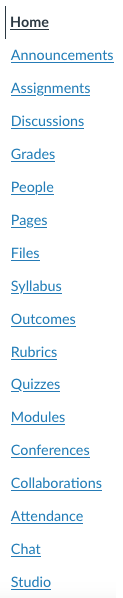
Surprisingly, even when LMSs added more and more features to enable greater interaction and activity, they retained the old structure. It is designed to present material by type: Pages, Lectures, Discussion, Grades, etc. You can see this in the way the menu is constructed.

Presentation by type undermines the organizational integrity of the course. Most scholars think in terms of their field, and how best to present its habits of mind. As teachers, we think next in terms of wrapping elements together to encourage understanding. We do not think in terms of all the articles, all the lectures, all the exams, all the discussions.

Instead, we think in terms of weeks, or units, or modules. We section the learning, combining various elements to cover a particular subject. Separating those resources by type makes no sense when one is creating a pattern of learning.

One solution is to break this framework. If the LMS allows us to add, delete, or hide menu items,we can make new pages which link to the whole pattern of information. It may be possible, for example, to have the menu say Module 1, Module 2, etc., instead of Announcements, Syllabus, Pages, Discussion, Quizzes.

Even so, the system may force its own design. We may have a Module 1 page with all the links to activities, but when the student clicks on that activities, the breadcrumbs may show the folder name (“Quizzes”). Students can get lost following these.

Student-led what?

None of the major LMSs make it easy to implement constructivist or connectivist learning theory. Unlike twenty years ago, instructors may have studied and be trained in active learning teachniques, and have been using them in the classroom. When faced with the LMS, they find themselves stymied.

Created student-led or student-designed work is difficult. LMSs require teacher permissions to set up an assignment, quiz, content area, or discussion. Although some discussion forums allow students to begin topics, this feature must also be set by the instructor.

Some systems seems to be more adaptable, or at least expandable. In LMSs like Canvas, LTI’s (tools using the Learning Tools Interoperability standard) can be added to the system with varying levels of success. An example might be an improved discussion board, or Google Docs, or a group annotation app. Some integrate fairly well into the LMS, making them easy to access from inside the shell and pushing grades back into the system. But all require a bit of technical expertise to set up, and the integration is rarely seamless. Some, like Google Docs, may require students to have a separate Google account, while others need their own structural folder inside the LMS for all activity related to that app. This is particularly true of textbook publishers’ material, which often tries to integrate the publisher’s own textbook site with the LMS.

The solutions here take one of three directions: the internal approach, the LTI approach, or the textbook publisher approach.

Since students can be given control of discussion boards, the internal approach would include using them for different kinds of activity other than discussion: posting lists of websites, sharing resources, posting quotations from reading. The other folder areas (quizzes, pages, etc) can simply not be used.

The LTI approach would involve using more collaborative tools, like Google Docs or group annotation apps or pinboards as the main outside tool, with the instructor learning it well and monitoring it thoroughly.

The textbook publisher approach would be to ignore or hide everything possible in the LMS navigation and use the publisher’s folder as the main work area.

Fifteen papers due today!

Gone are the days when your class was the only online class students were taking. They are now enrolled in many classes within the same LMS at the same institution. In an effort to help them remember the deadlines for everything, the LMS aggregates all the information from all the courses into task lists, using a Calendar or To Do feature.

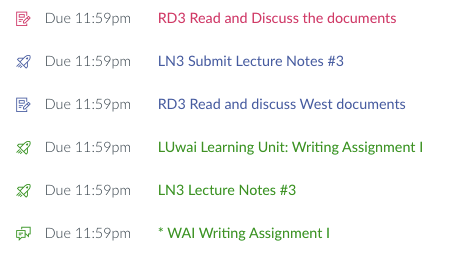
For example, a conditional release feature makes it possible to prevent a student performing Task B (a test) before they have done Task A (an assignment). Task A is designed to prepare the student for Task B, and ideally would be done within a short period of concentration. But on the student’s Calendar they see Task A, then Task 1 from another class, then Task iii from yet another class, before Task B. By the time they get to Task B, they have no idea what was learned in Task A. An example from three of may classes, running at the same time:

Same day, three different classes

Perhaps you have designed a module to lead students through an introduction, then a short lecture, then a video, then a discussion, then a test. All of these will be disaggregated by due date and will appear in a jumble on the students’ Calendar. Wrapping elements for your class together to encourage deeper understanding becomes impossible.

In addition, by listing all the tasks from all the classes together, the Calendar or List “flattens” all the assignments. It becomes impossible to tell which tasks are more or less important to the student, to learning, or to the grade. They all look equivalent in the same font and size, even if one is a two-minute video and the other is a paper that would take several days.

Unfortunately, this problem may not be solvable. Few LMSs allow control over whether or not to show calendars and lists to students. Because permissions for such features run above the individual course level, instructors usually have no access to any methods that would change the LMS behavior.

The bottom line

Creative pedagogy can work within the limitations of the LMS, but it is not easy to implement. Systems are designed to systematize, and the LMS is designed to create cookie-cutter classes based on outmoded structures rather than to promote innovative approaches. Thus for many of us, understanding its design is essential to adapting, subverting, or acquiescing to its suckiness.


Also published on Medium

Making online teaching less painful

So many people have been thrown into online teaching and learning, and the most conscientious professors want to do a good job. And yet, as the holidays approach, many are weary of the online grind, and looking to make some changes for next time.

Image for post
Photo by engin akyurt on Unsplash

Care for students, and professors, is different in a pandemic. Changes to online teaching methods can reflect that. This fall, teachers reported spending quite a bit of time soothing fears, making exceptions, and being kind. Many found that sticking to the syllabus and insisting on strict deadlines became too hard on them and on their students. So how can we build in the kindness that makes things less painful while still encouraging learning?

Keep the deadlines but remove the penalties

Deadlines have a number of purposes. They organize workflow to make it more reasonable and logical, set a pattern of expectations, and project an aura of professionalism. One would not expect a doctor or lawyer to wait for us because their time is valuable, and teaching professionals should not be kept waiting either.

Getting rid of all deadlines would cause chaos. Work couldn’t be assessed in a timely manner, sequential learning would be delayed, and teacher burnout would result from the crush at the end of the term. Besides, most students want deadlines to keep themselves on track.

The penalties for late work, however, serve a different purpose. They punish the student for wasting our time and making us wait, for delaying the steps in the learning pathway we laid out for them. But delay does not change the path, only the timing. In emergency circumstances, eliminating penalties does no harm: students who would ordinarily do good work will simply do it later, while those who do poor work will have a chance to do better.

Consider eliminating timed assignments

Assignments have a time limit for a number of reasons. We may want students to remember something instead of looking it up, or prove they can do a task at a particular speed, or not overthink their writing.

Image for post

If we want students to remember something in a short period of time, a pandemic is not a good time to do this. Mental capacity is reduced and tempers are frayed. If we’re concerned about them looking up the answer, it might be a good idea to consider whether there’s an alternative that would allow them to do so. Can an essay prompt be adapted so it is more individualized as a response, and thus unlikely to be mindlessly copied from somewhere? Can their process be graded instead of their product?

In general, timed assignments can seem punitive, especially for students who do not have set times and places where they can be alone or concentrate. This has always been true, but is a particular problem during a pandemic. Setting the timer may just add to unreasonable levels of stress, preventing learning and leading to more pleas for exceptions, which take up teacher time.

Treat cheating differently

Academic integrity is a serious thing, and no one wants to enable student cheating. There are many ways, however, to make academic honesty more likely and dishonesty less painful.

Consider the structure of the assignment. If there is concern that students will work together and cheat, can the assignment be rewritten so that such collaborations are assumed or acceptable? Can a self-assessment or review be added, so that the student is responsible for explaining the process they engaged?

In written assignments, phrases can be spot-checked for plagiarism using quotation marks in Google. If students are not supposed to lift phrases from the internet, or are supposed to cite them and don’t, it is a teaching opportunity. An instructor can prepare a short video talking about what plagiarism is, and give the student an opportunity to view and discuss the implications before giving a grade, then give an opportunity to do that assignment again or do another.

And for the humanities and social sciences, can the written assignment be revised so that the response is individualized and thus difficult to find elsewhere?

Convert some assignments to automatic points

Assignments that students turn in may include a review or recitation of facts. These can be graded immediately and automatically in a quiz or by assigning a set number of points to an assignment or forum post. An immediate grade lets the student know the task is complete and they can move forward.

Similarly, homework, journaling, and other work that calls for reflection can be automatically scored.

Automatic scoring does not mean permanent scoring. Giving points upon submission makes it possible for the professor to go back through the work after the student has received the grade, and request any changes necessary, such as expanding an entry to cover a particular topic. The pressure is off, and students who have the time will often be happy to make the changes. Up-front grading also gives the professor more time to go through everyone’s work, or to decide to accept the work as is.

Be available but ease off the synchronous stuff

If there was ever a time to be at the computer continually, or get a second cell phone or a Google Voice phone number, it is now. Student questions may be urgent or not, but they will feel urgent. The deadline is still there, and a student may need to ask for an exception to it (the answer is always yes unless it’s the end of the term).

If there is an open forum for the class, or students message the instructor, an encouraging response is crucial. All questions should be received in an appreciative tone (“I’m glad you wrote!”) and answered as kindly as possible. We have students who are ill, who are caring for others, who are overloaded, who are in unsafe situations. Simply writing in an announcement “office hours MW 11–12” or even “contact me any time” is not enough.

For students who are in unsafe living situations or who have job requirements they did not have when they enrolled, synchronous sessions are an added stressor. Likewise with students who have social anxiety, are unaccustomed to online interaction, or are experiencing Zoom fatigue. Lectures, required discussions, or calling out students to participate may not be necessary or desirable. Instead, synchronous sessions can be used to work on homework in each other’s presence, with cameras on or off, to provide support to each other, to discuss the social changes happening around us all, to exchange ideas. The sessions may be required by faculty contracts, but student attendance may be optional or made up in an easier way.

Tame the Learning Management System

Many Learning Management Systems are overly complicated. Most, for example, have too many default items in the menu (Canvas has 18). Any that aren’t being used (that can be most of them) should be made invisible to students.

Clear navigation is more important than ever before. Whether the system uses modules or pages or assignment numbers, the sequence of tasks should be obvious. It is important to keep in mind that in many learning management systems, the student calendar or to-do list mixes together all their tasks from all their classes. Naming assignments clearly (“HUM101 Quiz 1”) can make things easier for everyone.

More often than we think, missed assignments are the result of students not seeing them or knowing they are there. Continual reminders will be of little use when all classes are sending them, not only because they go into Spam folders and students rarely use email but because the mind cannot process all of that and organize it, especially in a crisis.

And, as the saying goes, if you have to write lengthy instructions, the task is not clear enough. When the mind is overloaded, excessive direction cannot be taken in. It’s better to have a brief description of the task, and more lenience with the result.

Don’t expect close reading

This one is tough. Professionals expect their every word to be understood, and their every instruction to be retained. “Read the syllabus” is all too often the response to student questions that are, clearly, answered in the syllabus. That response, however, is unkind when the questioner is frazzled. Simply quoting the pertinent passage from the syllabus takes little time and answers the question.

Image for post

When people are struggling to make ends meet, take care of people who are ill, work double shifts at work, it is important to ask whether the workload is reasonable enough that it is possible to learn what is being taught. This is particularly true of readings, which take time and concentration as well as literacy skills. Can less reading be assigned, but more importance put on that which remains? That would create less breadth but more depth, which could reinforce concepts rather than continually introducing new ones.

Is everything we’re assigning truly necessary to learning the skills and content when students are unable to absorb as much as they usually do? If not, it’s time for some pruning.

Caring more may mean doing less

All of these recommendations involve, to a certain extent, doing less, except helping students individually. While it may feel like professors are doing more counseling than teaching, that just could be the appropriate response during these difficult times, and may teach lessons beyond the academic subjects.

It is natural in a crisis to streamline ones workload, to focus only on that which is important. Students and professors alike are trying to reduce the load to make things less painful. To the extent that professors can help students stay organized but build in flexibility, the stress can be eased and learning can happen more readily.

Also published on Medium

Canvas is not your friend

Instructure’s Canvas continues to gain market share as the Learning Management System in colleges and universities, despite limitations which have become more apparent as more faculty teach online. Want to assign extra credit? That’s really hard. Want students to maintain individual graded journals? Super difficult. Want to use the shell to create student-led learning? Forget about it.

And yet schools have been overjoyed to adopt Canvas as the new friend who will help with everything while not having too many needs. It’s so easy to use, everyone says. It looks so simple and clean and Google-y. Students like how all their classes look the same, reducing their cognitive load.

But for the more creative teacher or professor, those interacting with it intensely rather than casually, associating with Canvas exposes its shortcomings and begins to cause frustration. Faculty who have had more useful relationships with other systems know exactly what’s missing, but even those new to the playground are stymied when trying to get a simple friendly response.

The fact is, Canvas is not our friend. That’s because its design forces us to engage with its emotional problems.

Navigating like it’s 2005

Canvas is stuck in old patterns of thinking, even when those patterns cause problems again and again.

Learning Management Systems appear to be innocent shells into which teachers load “content”, but in reality they each have their own built-in pedagogy. Canvas’s pedagogy (like its other market leader, Blackboard) is based on outdated norms of information organization. In the 1990s, LMSs imitated the folder-style structure of Mac and PC (Windows) operating systems. They were really just places to upload content items (usually Word files) and perhaps run a single discussion board (by 2005 or so).

Surprisingly, even when LMSs added more and more features to enable greater interaction and activity, they retained the old structure. It is designed to present material by type: Pages, Lectures, Discussion, Grades, etc. You can see this in the way the Canvas menu is constructed.

Menu on left, and text saying “friends don’t let friends have eighteen menu items”

Most teachers do not think in terms of “type”. We think in terms of weeks, or units, or modules. We section the learning, combining various elements to cover a particular subject, assigning a reading, practice test, discussion, and exam all on the same topic. Separating those resources by type makes no sense when one is creating a learning pathway for students to follow, and can undermine the organizational integrity of the course.

Trying to help

But Canvas promises an alternative navigation for the students: Modules. You can put all your tasks in the correct order under headings. The “Back” and “Next” buttons, which automatically follow your sequence, will ensure that students stay within their lane.

                                    Exciting Modules page for Chapter 4

Unfortunately, this doesn’t solve the problem. Canvas’s Modules page is a list of links, with every item listed in the same size and color. But the menu items, ever visible even on the Modules page, will still say Pages, Assignments, Discussion, etc.

One can try to break this framework. Since we can add, delete, or hide menu items, it is possible to make new pages which link to the whole pattern of information. It may be possible, for example, to have the menu say Module 1, Module 2, etc., instead of Announcements, Syllabus, Pages, Discussion, Quizzes.

You could use the Modules pages as a home page, even though it’s ugly. Or you could make all the menu items for types invisible, and build a Home page with a schedule or grid, and each unit could be a list of links. Students can then see how everything fits together for that week.

But no…

Both solutions will be undermined by Canvas’s internal navigation. Even if you set up Page-based or Modules navigation, the “breadcrumbs” will show everything by type anyway. Any student going from your Week 2 page of links to Quiz 2 will see a breadcrumb in the upper left saying “Quizzes”. It they click it, the full list of all the quizzes in the class appear. Ditto with Discussion 2 — the full list of discussions will be there, and students will start jumping around and get lost.

Canvas provides the way to make things right, then undermines its own good intentions.

Working in five classes at once

Canvas wants everything combined for convenience, ignoring all your plans.

Let’s say you create a learning pathway through the content, considering the holistic nature of your course, using Modules or Pages. The Calendar and the To Do list will immediately come along and destroy your careful course structure, by disaggregating all the tasks in all your students’ various classes and lumping them together into a giant list.

For students, as a convenience, the Calendar lists everything from all their classes in order of due date. When they look at the month’s or week’s tasks, everything from all their classes is listed, making it difficult to see the order of anything for one particular class. Your “Discussion 2” which you carefully designed to follow Reading 2 has another class’s “Discussion 4″ in between.

The To Do list does the same thing in an even simpler list that appears on the Dashboard and every course home page.

In addition, both the Calendar and the To Do list don’t include anything that isn’t graded. That might include the week’s main page, the discussion students are supposed to return to on two different dates, or a required reading. Students will miss ungraded assignments entirely as they innocently follow these helpful lists.

What to do?

Because the Calendar and To Do features are controlled above the course level, there is no way to make them invisible or change them, except by adding more items from your class. There is limited space in the title, especially when the Calendar or To-Do List is seen on a phone, so we cannot put “Eng101” as the first word to help. But we can add additional Calendar items for things that aren’t connected to a graded item: “Week 2 starts today”, or “Return to discussion”, or “essay corrections due”. When we make an ungraded assignments, we can check the “Add to To Do list” box. Adding more things to do may be, strangely, the best way to help students.

Relying on others for basic functions

Canvas has no inner reserves of strength, and relies on outsiders.

It is a truth generally acknowledged that Canvas’s discussion boards are the most troublesome element of the LMS. Conversation is not its strong suit. Canvas requires an administrative setting to do things like make the barely nested posts obvious in a threaded discussion. There is so much white space that one scrolls until one forgets the topic — it isn’t practical to engage in extended, much less semester-long, discussions. There is no distinction between instructor posts and student posts. The toolbar cannot be customized, so it has become bloated and even more difficult to use than when it had fewer features. There is no @ feature or notification sent to students to let them know someone has responded to their post, unless they subscribe to all posts on all boards in the class.

Canvas is very instructor-focused, making student-led learning difficult to design. There are no collaborative or whiteboard spaces built in. Extending Canvas means using LTI (Learning Tools Interoperability) apps, or what used to be called “plug-ins”. These are made by external providers, and vary widely in cost and ease of use. Some integrate better than others, passing grades back into the Canvas Gradebook with ease. Others force students to create external accounts.

Given these difficulties, it is often easiest for faculty to succumb to the temptation of using a big stick: the textbook publisher package. The big companies offer full packages that can plug in to a Canvas course, essentially connecting their own learning management system to Canvas. This adds another layer and another (sometimes more than one) menu item as a “type”. Then it becomes necessary to spend much time learning the publisher’s complicated system as well as Canvas.

Less may be more

The only solution here is to limit oneself to one LTI. If it’s the publisher package, all the time will be spent learning and dealing with that. If it’s Google Docs, that will have a learning curve too, and possibly external accounts. If group annotation is desired, that can be the only extension.

Being honest with each other

These three big flaws don’t even include the many inconsistencies and gaps that Canvas has had since the beginning. There is no way to change things in bulk, like assignment due dates or quiz instructions. There is no pop-up to alert students that a message awaits from their teacher. There is no font customization on the Modules page, which flattens everything and makes it look like a two-minute video is equivalent to a twenty-page chapter. The drag-and-drop Calendar won’t let you drag-and-drop items from one month to another.*

One should not expect a friend, especially a troublesome friend, to change. Until 2015 there was a chance the relationship would improve. Indeed, things had been improving with help from the Canvas Community, a rich resource of teachers and expert users. But once Instructure went public, they became answerable to shareholders, just like Blackboard. Their “open source” street cred died, as did their need to respond to users.

It may be be best to consider Canvas as a flawed, if necessary, companion. It has its own desires and needs, which will often be counter to yours. But its unreliability means it’s best not to get too dependent.


*Update: Kona Jones has pointed out to me a couple of revisions. One can drag-and-drop to a different month if you start with an undated item from the list, and a recent update now means that Canvas includes bulk editing of Assignment dates only.

The increasingly possible: online labs

Ever since I discovered the back pages in H. G. Wells’s Text-book of Biology, (1893),  I’ve known a bit about scientific work being done at home. Doing “practical work” at home was important for correspondence education at the end of the 19th century, so that students could study for examinations even if they didn’t have access to a laboratory.

When online teaching started at our college, back in 1998, and began to grow, a number of science instructors were concerned. You could do a lecture online, fine, but you couldn’t do a lab. Simulations weren’t enough, they said. You need real materials. Wells’s students, of course, had real materials. They ordered them by mail or, in the case of frogs, went and caught them.

So here we are in 2020, with online labs foisted onto unsuspecting faculty, and they’ve done brilliantly. I attended this session, where four professors, from auto shop to biotechnology, showed how they do labs online. For inspiration alone it’s worth the 50+ minutes.

MiraCosta College: Hands-On Labs in an Online World on Vimeo.

It’s an odd feeling for me, a promoter and practitioner of online education since the 1990s, to see that the materials (lab kits, go-pro cameras, etc) have come so far. But it’s even more thrilling to see the new attitudes, confidence, and willingness to serve students this way. It feels (finally!) like the new world we were hoping for.

As I watched, I thought like a student. In-person education isn’t always the best way to learn. When I was 19, if I’d had a way to learn about cars without having  to show my ignorance to the guys in auto shop, I might know how to fix my car today. I was shy, and had already been subject to sexism in art class — I certainly wouldn’t walk into a guy-dominated shop. I was also clumsy, but if I’d been able to make mistakes with those test tubes at home, I might have given it a try in high school or college. (I actually had a chemistry set as a child, and created something so horrid the chemistry prof at the local university had to be called so we knew how to dispose of it.)

At any rate, I think H. G. Wells would be proud. I’m delighted.

Do I have to grade everything?

Why a bit of auto-grading is helpful rather than harmful

Certainly it was overwhelming to bring home an intimidating stack of exam books or papers. But it isn’t any better online. In fact, a notification that there are 173 things to grade can make you want to close your laptop and walk away.

Learning Management Systems offer to grade things for us. Set up a quiz and students can get instant results. Count participation in a forum for three points automatically. Create one rubric for all the papers.

Image for post

As professors we hesitate. This seems like cheating. And it’s letting a machine do our job, the job of assessing student work. No computer, we know, can grade an essay or walk through a science or math problem. It requires expert knowledge. Our expert knowledge.

Those lucky enough to have Teaching Assistants can, with only a few pangs of conscience, leave the grading to them. But the rest of us, at community colleges and small universities, can’t dump the responsibility on someone else. And if we’re new to the online environment, between setting up classes online and answering endless queries, our grading can get sloppy. Or it gets done very late. Or both.

Automatic grading, we know, is antithetical to good teaching. Every student’s work deserves our time and attention. Studies show that individual feedback provides instructor presence and encourages a direct relationship with the student. They will care, we are told, if they know you care. And you care because you read each and every word.

At the same time, we strive for interesting and media-rich lectures, free or low-cost reading materials, meaningful online discussions, and speedy, friendly answers to student questions. It is simply not possible to do it all.

We’ve heard about ungrading, of course. Don’t grade anything; give feedback instead. Have them set up blogs and just do work. Or, if that’s too scary, implement contract grading. Here’s what the student has to do to get this grade. They agree to do it, and you agree to give the grade. This makes it possible to focus on the feedback and the relationship.

And that’s the point. For those of us who believe that grading is necessary at some level, that we must rank work in order for education to be meaningful, we need the time for the feedback and the relationship. Grading robs us of this focus, especially online. We grade all the time, and when we finish we’re too exhausted to do anything else.

The instructor’s pedagogy should determine where individual feedback is most useful to the student. If they are engaged in factual retention, grading can be automatic — the answer is right or wrong. They memorized it, or looked it up, or they didn’t. If most of the focus is on constructivism, creating and sharing, we can give set points for doing it, without the need to assess at a granular level. If the students are writing extensively or solving complex multi-step problems or creating legal briefs, individual feedback is needed and we want to have time for that, with or without a set grade.

So no, we don’t have to grade everything ourselves. Taking advantage of the Learning Management System’s ability to give points automatically does not mean we are shirking. Rather it means that we are willing to have the machine do that which is best done by machine, leaving time for us to engage the teaching aspect of our job.

Also posted in Medium

Lecture: recorded, zoomed, or what?

The word “lecture” conjures an idealized image of students listening attentively as a professor relays knowledge. Almost all of the lectures I enjoyed at university were in this format, and when I began teaching I lectured this way too.

With this year’s quick and unexpected transition to online teaching, many professors assumed that online lecture meant reproducing what they do in class. Zoom.com was grateful for this assumption, even as they struggled to accommodate the massive numbers holding live lectures. Almost immediately, however, there were complaints and problems.

Professors whined that students weren’t paying attention, or didn’t want to turn on their cameras. They couldn’t see the facial expressions and body language indicating comprehension (or lack thereof). Students complained about boring, wandering lectures, and they felt exposed. You can’t sit at the back in an online classroom, and they didn’t want thirty strangers to see the trailer they lived in. Many decided they would watch the recording instead.

The problem? Zoom provided the platform, but the pedagogy was still based in the classroom. This worked better for some professors than others. At our college, they let us choose before this fall whether we wanted our classes scheduled and in Zoom, or “online only” (meaning asynchronous, with no live meetings), or a mix. Many professors regretted their choice.  Those in Zoom wished they hadn’t, and those who chose asynchronous were sorry they’d done that.

For two decades, I’ve been pushing the idea that the technology should follow the pedagogy. Your preferred teaching method should dominate. In the rush, there had been no connection between a professor’s pedagogy and their choice of format.

So, assuming you lecture, what kind of lecturer are you?

Interactive lecturers count on student participation. They ask questions during lecture, or survey the mood, or set tasks for students during the lecture.

Interactive lecturers should consider live (synchronous) lecturing in Zoom or another webconferencing program. The live approach online, however, works best for the simple lecture, on one topic. Shortening lecture time by about 2/3 is also a good idea for live session lectures, but they can be immediately followed by breakout room activity.

Traditional lecturers are those who lecture to an audience, and don’t expect, need, or want the lecture to be interactive. They relay a lot of information, framed by their own interpretation from their professional experience.

Traditional lecturers should record these lectures, and students can view them in an asynchronous way. Students particularly appreciate recorded lectures when the topic is complex, so they can go back and review without being on the spot.

Online lecturers, long ago, were all using dial-up modems and there wasn’t much bandwidth. A lecture quickly became a typed out version of ones lecture notes. As bandwidth expanded, these written lectures could be enhanced with images, then audio, then video. Written lectures can be more like reading, or they can be multi-media experiences, but they’re based on the web page or blog. They may include recorded mini-lectures. Like traditional lectures, they tend to be asynchronous.

So, planning to offer a 90-minute lecture on the historiography of the fall of ancient Rome? Go ahead, but considering recording it with images or video clips rather than doing it live. Want to lecture on solving a quadratic equation, using a whiteboard and asking students to help as you go? Consider a live lecture. Already wrote a great article that covers everything that would be in this week’s lecture? Record your voice reading it, and add some pictures or video clips.

But we don’t all have a choice. Have you been told you have to fill 75 minutes of scheduled class time? Consider creating interactive lectures and activities that require working together. Or have students view a recorded lecture, then come to the synchronous class to work out problems or just do their homework together. I would consider this a flipped online classroom, a model that understands that absorbing information may be best done on ones own but applying it should be done together.

So as we approach spring, let’s consider.

Why discussion sucks (and what to do about it)

Students at colleges around the country are told to participate, but why?

Since the dawn of online classes, the goal of college professors has been to somehow duplicate the excitement of classroom discussion. With the advent of the Read-Write Web (Web 2.0) fifteen years ago, the threaded discussion forum became popular, and immediately the pattern was set.

We do what we’ve been told to do: create a great prompt, not a yes-no question or something too shallow. We want everyone to respond to it, reinforcing readings or other learning in the class. Then, because we want student-student interaction, each student is required to reply to at least two of their colleagues. The prompt-post-reply model has held.

Never mind that this is not the way discussion happens in a classroom. There may be a prompt thrown out by the professor, but only a few students answer, and only if their answers can be different. We might set up small groups to get students to talk, but if we’re experienced we know better than to just say “discuss”. And we usually intervene to advance the discussion or take it in another direction.

Never mind that we haven’t bothered to ask why we’re doing online discussion at all. It’s discussion. You’re supposed to do it. Or you have to do something. Many colleges require “student to student interaction” for all online classes. But no one explains why. It’s just assumed to be a Good Thing.

And yet the result is often appalling.

The problem

Most online discussions are absolutely worthless to read (from an instructor perspective) and worthless to do (from a student perspective). The eager students answer the questions first and fully. The others trail along just to finish and get the points. Every student knows the drill: post once, reply twice. Then leave as quickly as you can and do not return.

If the prompt is a question, however intricate, or a specific task (“post your thesis”), then once their first post is done, the student’s task has been completed. The only reason to reply to anyone else’s post is because the prof told you to. That’s not interaction. It’s mandatory politeness, like saying “how are you?” when you don’t really care.

“I agree, James,” they write, “I also think that slavery was bad.” Nothing really happening there mentally, I don’t think. And James likely won’t return to see the reply anyway. Why should he?

A twist on traditional discussion

I went as far as I could with the method, in an effort to increase participation. I achieved discussion somewhat successfully with my two-step approach. This involved starting with a prompt that did not require previous knowledge, and set up some kind of moral judgement to get people engaged. Questions like “was it right to drop the bomb on Hiroshima?” or “did the Confederacy have a point about states rights?” or “was slavery essential to the growth of the United States?” got students started.

After they had all emoted about the topic for the first half of the week, I posted “Take discussion from here”. I used big font and a color for my post, and it summarized what they’d said so far, naming names of students who had made good points. Then I asked different questions that seemed to follow from what they’d said, questions that relied on their reading and used reason (rather than emotion) to deal with the main issues. Their second post was a reply to mine and/or to each other, to conclude that week.

It worked, in a way. But many students, having given ill-informed opinions to start, didn’t bother to return for the real work in the second half.

Designing for necessity

Sometimes, there’s simply no need for conversation. You read (or look, or listen), you do the work, and you’re done. Discussion should only take place when it is necessary, whether in the classroom or online. There are two things that can make discussion necessary:

  1. If talking together is essential to work something out or to complete a task.
  2. If the product of the conversation is going to be used, applied, or figured out.

So we could design for necessity. Let’s say I’m teaching design, and I demand on the discussion board that each student design and post a different carnival ride. Once they have posted, they seem to have finished the task. There could be no reason to ask them to comment on two other students’ designs. But if the next task is to write a short paper contrasting three designs (yours and those of two other students), then the comments become preparatory for creating something.

Or we could do role play. The class is to be considered a committee-as-a-whole for determining which route across campus would be best for the architects to create as a footpath. What information should be gathered, and how? Once results have come in, how will the data inform the decision? The deadline is Thursday, because the architects need to break ground.

Or let’s take my two-step discussion technique, where I start with something ill-informed and emotional, and then we get informed in the second step. I could have made it better by making sure that the discussion was used somehow, through a formal assignment such as a paper or quiz. The conclusions we developed could have been summarized and used to inform individual work.

The rules

So my new rules for discussion would be:

  1. ensure that conversation is inherently necessary to the task or subject
  2. design so that each student would naturally post something different
  3. create something that applies or uses the results of the discussion

Otherwise, I’d say there’s no point.

Discuss.

Practical and equity-minded class changes

As I finish preparing my classes for Fall in a time of plague and social distress, I’m making several changes with contemporary practical/pedagogical issues and equity issues in mind.

Make textbook reading optional

My textbooks were already free and included as part of the class, and were well-balanced in terms of coverage of events and social groups. Most I edited myself, and they took a lot of time and thought.

Practical/pedagogical: They don’t have time to read everything, and reading blocks of text on a phone is wearying. This stuff simply won’t be remembered. I want to focus on process and skills instead, doing things rather than reading. I made textbook reading optional during the summer, and had several students contact me about items in the textbook anyway.

Equity-minded: Even the textbooks I edited myself are still “traditional”, focusing on facts and tending to ignore the thinking shaped by the last ten years of scholarship, particularly on race and gender issues. Textbooks themselves are increasingly seen as tools of the elite, creating a narrative that keeps social hierarchies intact. The diverse voices of the past are more significant than the interpretation of those voices in a secondary text, particularly since my lectures already contain a secondary synthesis.

Eliminate content quizzes

I have set up the quizzes to be as fair as possible, with no time limit. All are open textbook (see above) and have been rigorously tested by students in other classes. They are multiple-choice and score immediately, providing instant feedback. They took much time to create.

Practical/pedagogical: Since the first part of each week already features lecture, and the whole week may be needed for annotating primary documents, the quiz is shoved to the end of the week. That’s too much to do in a time of plague, and it divides the mental tasks too much. If the textbook is optional, such quizzes are unnecessary.

Equity-minded: Quizzes are intimidating, and present themselves as being objective when they really aren’t. Such assessment tools have built-in barriers. These are technological (it’s not easy to take a Canvas quiz on your phone), emotional (quizzes cause stress even when you have multiple tries), and cultural (they privilege those individuals trained to answer factual questions quickly and confidently). Like textbooks, “objective” tests in general are viewed as enforcing social hierarchies. Instead, I have students turning in lecture notes, annotating primary sources, and writing on their own subjects, all of which can be informed by what they bring to the class from their own experience.

Beef up Learning Units

There are five Learning Units: two about primary sources, and one each for the three Writing Assignments. They are designed to teach students the skills before they engage the practice. Each features a written and illustrated lesson, followed by a quiz that has drop-down and matching choices.

Practical/pedagogical: I had a comment on a summer evaluation that Learning Units should be longer and more detailed. Students realize these are helpful to doing well on assignments, but need more.

Equity-minded: Not everyone comes to college prepared to do college-level work, and preparatory low-stakes exercises help such students gain confidence as they earn points for learning the ropes. But more hands-on help may be needed. Even though my classes are asynchronous, I am considering Zoom sessions that would take students not only through the unit but through the quiz together.

Emphasize annotating primary sources

My primary sources are carefully selected — I once had a student call them an “activist workbook”. They are a mix of political documents, cultural expressions, and on-the-spot journalism. We annotate using Perusall.

Practical/pedagogical: Reading things written long ago takes more time and energy, as does interacting with ones colleagues. Annotating primary documents combines social interaction and helping each other with deep reading of the sources. In a time of plague, I want students to focus their attention on fewer items, and those items must be significant.

Equity-minded: The primary documents I have students annotate are the voices of the actual people who experienced their time, and their voices are diverse. If we want students to “see themselves” in their work, they need to hear from history’s people.

Remind about individualization

In all my classes, students find and post visual primary sources for the era being studied. Then all writing assignments are based on the collections of sources all students have created. I tell them they can follow their own interests, posting sources that fit their topic and writing all three assignments, each building on the last, about their topic. They don’t have to do this if they wish to just put together papers using available sources, but they can.

Practical/pedagogical: I want to continue to offer a choice, but some students simply do not believe that they can follow their own interests, and assume I secretly want papers on “The Impact of Andrew Jackson on the Cherokee” or “Should We Have Dropped the Bomb”. I don’t. I want original theses the students create themselves. It makes plagiarism a non-issue and creates papers that are so much more interesting to read. Since some students don’t figure out that they can do this until the last assignment, I want to remind, remind, remind. With examples.

Equity-minded: Some of the very best papers I have read resulted from a student following her own complaint or perspective about society’s ills. Supporting ones own view, informed by ones own circumstances, with historical evidence makes for much stronger arguments against racism, oppression, classicism, sexism, etc. Intellectually and methodologically solid argumentation is a major tool in the fight for social change.

There are other issues to address, of course, that may not be seen as either pedagogical or related to equity in the current sense. Most of those will be in the practice of teaching: kindness as a default, for example. And I went at this backwards. I’ve attended numerous workshops and read many blog posts and articles on equity-minded practice, but it seemed like I was already doing everything I could while being true to my own belief in equality of opportunity. I change some of what I do every semester. But it only occurred to me as I was making these changes I innately felt were necessary why I was making them. Perhaps others will go about this in a more forthright way, but I think the result will be helpful to students on a number of levels.

Just Be Kind

I’ve been attending the Humanizing Challenge offered by Michelle Pacansky-Brock at @ONE here in California. For years, Michelle has been encouraging faculty to put themselves into their courses, continuing a tradition begun by Pat James.

The tone has shifted to humanizing online instruction through equity and empathy. Unlike many programs using the word “equity”, here it is in its fullest sense of caring for everyone and treating differences with understanding. During the pandemic, I have tried hard to push back against approaches that simply ignore the situation. It is deeply unfair and inhumane to continue as if nothing is happening.

The response of some professors, unfortunately, has been to double-down on enforcing their own rules and regulations. Psychologically, this provides a feeling of control. New instructors do this a lot. I recall when I was a new professor being very concerned that I have authority in the classroom. I was 25 and anxious that students wouldn’t respect me or do what I needed them to do. When they didn’t come on time, I locked the door.

Over the first year or two I relaxed, established the minimal authority necessary for classroom functioning in my tone and personality. I changed, students changed. I put more responsibility for learning on them, and removed elements that caused me the stress of adjudication and enforcement.

The many profs new to teaching online are reacting like I did when I was 25. They have been thrown into an environment they cannot control, and they are as frightened as I was. Training has not been helpful, emphasizing regulations and technology: FERPA, how to upload things into the LMS, how to use Zoom. “We are here 24/7 to help you” does nothing when you don’t know what to ask. It’s as useless as “Hope you are doing well in this challenging time.”

The approach of the Humanizing Challenge reverses this to acknowledge the affective domain of teaching online, to put kindness toward ourselves and our students at the top of the agenda, not an afterthought at the bottom. Because basically it all comes down to Just Be Kind.

We should always have been kind. Students have always faced challenges, not just of the financial kind. They have always had a husband dying of leukemia in the next room, a severely autistic child, an environment too dangerous to learn in. They have had these individually, and we should never have responded with “it’s due Sunday or else”.

Yes, there will be a conflict between academic standards and kindness. The Humanizing Challenge has focused on empathy and teaching from a place of love, and asks faculty to reveal their vulnerability. I have seen this go too far (I know a faculty member who teaches drunk, and one who overshares about her life, burdening the students). While I do not agree with the current article in the Chronicle of Higher Education (they say a Zoom background is necessary to be professional), we do need to be models of how to handle adversity while learning.

I recall 1991, when I was teaching during the Kuwait war. My classroom filled with military wives who desperately needed to be somewhere at a particular time. I was teaching US History, but the subject didn’t matter. They told me they needed the class time to focus on something else, to not think about their husbands deployed overseas. When I missed a day, they were distressed because that day they had nowhere to be. It is our job to provide stability in a crisis, a chance to focus on something else.

But while being professional, there are so many ways to be kind. Deadlines are the perfect example. Why are your deadlines important? Mind are important for establishing rhythm. I have lots of small-stakes assignments. A student who misses a deadline knows they’re off the rhythm. If I individually say it’s ok, let’s try to get this in a few days late, no penalty, it’s just basic kindness. It doesn’t mess up my life to the extent it’s worth harming theirs. For first responders, students working in health care or working extra shifts, deadlines are removed as soon as they contact me.  The only real deadline is the end of the class. Will they get as good an education doing things late? My answer used to be equivocal. Now its “We’re in a plague, people!”

It’s taken a pandemic for more people to realize the extent of human suffering. You don’t lock the door — you open it wider. It’s a shame that it takes a program like the Humanizing Challenge to give such a basic message: Just Be Kind. But with hundreds of faculty attending the sessions, I’m very glad it’s there.

Behind the scenes?

We’re nearing the end of summer term, so I get two different kinds of emails: one asking for an extension on the final essay, and the other thanking me for the class.

I’m happy to deal with both (yes, you may have an extension — we’re in a plague, dammit). But the emails thanking me are so nice. One of my top students wrote me that even though they unfortunately could not see or meet me, she always knew I was behind the scenes, helping them through it.

Gratifying, certainly. I love that they know I’m there for them. On my student survey, I have a question on the Lickert scale: “I felt that Lisa was really present and visible during this class.” I get extremely high marks on this, which makes me proud. But last spring, they were a little lower. And now, a student feels I was “behind the scenes”.

                                  CC Flickr Osman Kalkavan

I used to work in theatre. A lot. I was a lighting designer, sound board operator, props person, stage manager, and I even directed once. I know “behind the scenes”.

But my online class? I have all of these roles, plus I am the actor on the stage. My lectures are written out, and they are original. They can click a button and hear me reading them. I have video recordings of me talking to them for each unit. The whole production is mine. I’ve even put together the textbook. I am the show. I’m not just behind the scenes.

So why do they think so? Because I’m not doing synchronous. I’m not using Zoom.

Thank you, pandemic, for making people think that the only way to teach, the only way to get to know your professor, is live on camera. It isn’t. Asynchronous education is brilliant. It allows people to learn when they can, from anywhere. For the past 20 years of asynchronous teaching, I’ve developed solid relationships and firm friendships, students who write from wherever they are to keep in touch years later. None of them have ever said it was unfortunate we never “met”, because we meet all the time.

But within the span of a few short months, even students who don’t want to be on camera think that’s how it’s supposed to be. Administrators have cleverly figured out that this is the way to make sure faculty are doing the work. They have always suspected that, even though studies show that teaching online takes more hours than classroom teaching, we’re all here shirking in our summer shorts. Now they can track camera time.

As videoconferencing company shares go through the roof, I’m here to tell you: it’s only one method. It can be used effectively, for getting a group or class together to do something meaningful that requires being together. It can be used badly, for watching students take an exam or for enforcing attendance.

And you’d think the plague would have demonstrated the limitations of synchronous learning. I don’t just mean the frozen frames students have on Zoom so they can do something else. I mean the students who are first responders, whose parents are dying in hospitals while they sit and cry in their car in the parking lot, the ones doing double shifts at the food bank. They want to go to school, and they can’t be online every Tuesday and Thursday from 10-11:50 am. That was the whole idea of online education in the first place: to accommodate those who couldn’t do the butts-in-seats thing.

So I’m thrilled the student knew I was there. I really am. I have spent many hours this summer conversing with individual students through messages and emails, often responding minutes after they write me. It’s real. It is the scene, not just behind the scenes.


Modified Ungrading

I have written a lot on this blog about grading, about my longing for “ungrading”, my qualms about heading that direction, and the things I’ve decided to do instead. This is a more specific post about the latter, and my gradual shift in emphasis I’m calling “Modified Ungrading”.

We know the arguments against A-F grades. They encourage a focus on marks rather than learning, and they can be discouraging. We know there are also arguments in favor. They rank performance against a standard, they inform the student of their level of success, and they mark improvement. (Many years ago I heard a speaker say he did not want to drive across a bridge built by someone who got a C in engineering, or be operating on by someone who got Cs in medical school. I get that.)

This is an area where faculty workload and student desires can profitably intersect. Most of us teach large groups of students, and at community college we do it without teaching assistants. The big argument in favor of ungrading is that students benefit more from individualized feedback than from grades. But in this environment, tutorial-style feedback and individualized learning isn’t possible. Auto-grading, with current technology, is possible, and helps fill the gap between grading and ungrading.

In most learning management systems, when a student submits something, a certain number of points can be automatically assigned. The arguments for and against doing this are the same as those for grading in general. But in addition, auto-grading provides immediate marking and a sense of completion, two factors which are often ignored in discussions of grades vs feedback.

So far, I’ve implemented auto-grading for two types of assignments, both of which are submitted only to me: lecture notes, and document paragraphs. What this enables me to do is have 2 points automatically assigned, then go back and look at the work itself. Sure, I could assign the points when I look, but auto-grading instead changes things, for me and for the students.

For the students, they get their two points immediately, so it’s confirming they did it. For me, I then have ample time to go back and peruse their work. And with the points already given, I can pay more attention to my Assignment Comments (feedback). The tendency is to talk to them first, then think about the grade, instead of the reverse.

I’ve had to change the grade sometimes, but I’ve had the chance to explain individually before doing that, and to give an opportunity for corrections.

This shift to Modified Ungrading may seem ridiculously subtle, but it’s quite real. Mentally I can shift from “processing” the work of 40 students per section, to responding to it personally.

In fall, I intend to apply this to discussion forums, which we use for posting primary sources. Ultimately, I would like everything auto-scored except writing assignments, on which I can spend more individual time.

This way, I can focus my work more on communication than grading. And when students see their points immediately, and rarely changed, I’m hoping they will do the same.

Working against Canvas: three tips

So many instructors, some of whom have used Canvas as their LMS for their on-site classes, are now encountering the system’s complexities and limitations. Teaching fully online is different from posting ones class resources online, or at least it should be.

My advice has changed from three years ago, because Canvas itself has changed.  My reasoning, however, has not changed from eleven years ago. My article on Insidious Pedagogy: How course management systems affect teaching (2009) explained how the designs of learning management system tend to control pedagogy, especially among novice users. We need to spend some time working against the system.

So I’ve reduced my top ten tips to three. And they may well be suitable for LMSs and VLEs other than Canvas.

1) Create full navigation using Pages

As with LMSs of old, Canvas continues to default to grouping content and assignments by type. This is a holdover from Blackboard, which relied on the early computer analogies of “files and folders” to imitate paper filing systems. So “Lectures” can be a folder, “Discussions”, “Quizzes”, etc.

But for most of us, learning is time-oriented, or theme-oriented, not type-oriented. We tend to have units with multiple types of content and activities. Many of these are organized by unit or week. There is no way to express this to students without making a page of links.

Canvas, of course, has a Modules page with a list of links. On the Modules page, you can load in everything, and have students do things in sequence, or with prerequisites, or both. The Modules page is, and has always been, ugly. The most you can do is add emojis to the headings, if you know how. And every item listed on the Modules page is the same size and color, creating the impression that everything listed has the same worth. All you can do is indent, or use caps.

The best Canvas classes I’ve seen have a schedule or grid on the main page:

Each of the links goes to a Canvas page, which has links of the activities and content:

One can of course put all these in the Modules page also, which will enable the “Back” and “Next” buttons for those into sequences and control. Then it’s up to you whether to show that Modules page, because you also ought to. . .

2) Hide menu items

This has not changed from earlier advice: features we are not using, or that we don’t want students accessing from the menu, should not appear on the menu.

For Canvas, this involves going to Settings – Navigation and dragging the items you don’t want visible down to the inactive area. It used to be that when you did this and saved, neither you nor the students saw these items on the menu, and the look was clean. Recently, Canvas changed this so that the instructor sees them all, but with the hidden items indicated by a crossed-out eye.

Well, at least students don’t see them.

3) Do low-stakes stuff anyway

Here working against Canvas means working with it. Students need reasons to work on your class, and to get immediate feedback. This is difficult in Canvas. Doing extra credit, creating short quizzes, using test question banks, all are ridiculously complicated. And there is still no easy way to just copy a quiz.

Canvas will also passively prevent what you want to do. Want to create a discussion forum where everyone who posts twice gets 3 points? Can’t do it. Want to have 20 questions on a 10-point quiz, so each question is worth half a point? No can do. Want to rename an assignment and have all the internal links still work? Good luck. Want to change all 28 due dates to a week later? It’s a one-at-a-time job. (At least there’s a hack for this one.)

It pays to spend some time seeing what can be done with zero-point assignments, and complete/incomplete grades, and the default grade feature in the Gradebook. Students learn from short, formative assessments.

Working against the LMS has always been required for us to teach the way we want to. More and more, I see LMS trainings covering these problems, and teaching the workarounds, which is great. Particularly when your LMS is owned by an equity firm, after going public and answering to shareholders, we can be sure that improvement is unlikely (most Canvas problems have been around since its inception). We must be willing to work against the system.


Simplifying a class

I think now is a good time to simplify our online classes. So while everyone is giving advice on how to add things, I figured I’d do the opposite.

Students are overwhelmed, by everything. So are we.

Faculty who have had only a half-semester teaching online are trying to prepare their classes for fall. Some of these classes will be simple, and effective. Others will be cluttered with features, or try to do too much, or not follow basic principles for student ease of use.

I’ve been doing this for awhile, and I already responded this summer by reducing the workload in my classes. But for fall I had considered keeping things the same as before, the same pattern of activities and readings.

Instead I am considering some ways to simplify.

I’m stuck using Canvas so these ideas relate to that LMS, but apply to others as well:

1. Remove “Until” dates

I have always had assignments close a week after the due date, and have told students that between the due date and “until” date they’ll get half points. I’ve never enforced the point reduction — it was just to help keep students on track. It was always inconvenient for me to re-open assignments for individual students anyway, so I’m going to remove all the “Until” dates (a batching process only possible with James Jones’ brilliant hack) on everything except the one assignment I really need to close on time. It’s been pretty clear that students appreciate the extended time.

2. Convert self-assessments to automatic points

For my primary sources, I have students post in a discussion board, then take a one-question checklist quiz to check their work. They often don’t check anything but the boxes! And this summer, I’ve had a student not submit anything, but do the checklist anyway just to get the points. The exercise isn’t working. It would be better to just give them the points when they post, then spot-check myself if certain work needs improvement, and request such improvement with no point reduction.

3. Be more available for immediate response and encourage communication

I have always been good about responding to students when they message me, but over the summer I’ve gotten even better, checking my messages continually. Students have said they really appreciate a quick response, especially since the class is only six weeks long. I intend to keep this up for fall. In addition, I have adopted some new habits designed to encourage students to contact me individually, including inviting them to “keep those questions coming!” when they contact me with a question, however simple it is.

4. Remove unnecessary assignments from the system

This is a Canvas thing. When I change what I’m doing, and no longer use an assignment, I used to just “unpublish” it. But if you do that, and it has a due date or until date attached to it, it still shows to students in various places unless you chase it down and undo that. It’s too automatic. So now I will delete them, confident that if I need them back I can import them from a previous course iteration (I already download classes when they’re finished, just in case).

I’m sure there will be more, but it’s a start.


No more online teaching conferences for me

I believe in keeping up in my area of expertise, or at least one of them: online teaching. Having just attended a conference on online teaching, my first in many years, I have one take-way:

The issues are exactly the same as they were twenty years ago.

The main affordance of online learning is anytime/anywhere education, as it has always been. Distance education allows people who could not come to campus to learn with formal guidance. This is the exact same benefit as correspondence courses of a century ago.

The challenges of online learning are the same also. Recent large surveys of instructors and students show that the weaknesses of students are self-discipline and time management. For instructors, it’s creating courses that are hard to navigate, and not responding in a quick and friendly manner to students.

Navigating these same issues are newly minted PhDs in instructional design, distance education, and various academic subjects. To them, it seems, all this is new. The recommendations, however, are the same: we need to help motivate students and hold their hand, get training so we create navigable courses, and answer student requests promptly.

The problems with these recommendations are also the same. Hand-holding and continual reminders undermine a student’s ability to develop their own resources of self-discipline and organization. Cookie-cutter courses undermine the creativity and academic freedom of instructors. And answering student requests promptly is mere politeness, and should not require rules other than those of basic human consideration.


In fact, the only change I saw is in the heavy-handed focus on policies, learning management systems, requirements, and training. For me, these should always take a back seat to pedagogy. And yet, there was little about pedagogy at the conference. My notes amount to half a page of large printing.

Perhaps the merging I had always hoped for is happening. Perhaps one could attend teaching conferences, and it wouldn’t matter whether that teaching took place in a classroom or online. I think I’ll give that a try.

“Online teaching isn’t working”

Looks like we have a problem with conclusion validity.

The papers are full of how students are getting behind because they can’t go to school during the pandemic.

But the conclusion for many of the articles is the same: online teaching isn’t working.

Hold your horses, boys!

Let’s review what’s happened. Most schools turned to distance education with teachers who were mostly inexperienced teaching online, and many had never had an interest in doing so. And it happened because of a pandemic that has turned the world upside down and caused untold damage to people’s lives.

That is not a controlled study of the effectiveness of online teaching.

Online teaching has been working just fine, thank you, before this March. Here’s a recent review of the literature on efficacy. Distance education didn’t just emerge like a new high tech product to clean your floor. It’s an entire discipline of study and practice. Its affordances and inadequacies have been studied for decades (or over a century if you include correspondence courses).

Concluding that online teaching isn’t working because a bunch of people have been thrown into it, unwilling and unprepared during a global pandemic, is akin to a non-pilot saying that airplanes can’t fly because he’s sitting in an airplane that has three gallons in the tank, pushing levers but just getting strange noises.

Which makes me wonder in whose interest it is to give online teaching in general a bad rap. Is it just the folks who don’t believe in the science of pandemics? The media outlets catering to worn-out parents who want their kids out from underfoot? The makers of chalk and lunchboxes?

It certainly isn’t those of us who’ve been doing it, and studying it, all this time.


Thoughts on art and windows

Some of the best things happening at the moment are related to art.

Not being an Instagram aficionado, I read in 1843 magazine that Instagram is the place for art and artists. So I signed on and followed my favorite museums: The Metropolitan Museum of Art in New York, the Uffizi, the Getty, the Ashmolean, the Fitzwilliam, the Victoria and Albert, the National Gallery in London, the National Portrait Gallery, and the Bodleian Library (yes, I know it’s not an art museum).

Each are posting an artwork a day, and most are responding to questions. It’s a delight.

Most of these works, like most of my recent blog posts, are not directly about the current situation. And yet they touch upon the values, knowledge, and sympathies that inform our response to it. So for example, Antonella da Massina’s “St Jerome in His Study” (c. 1474-75), from the National Gallery:


This has been one of my favorite works since I first saw it. I can see myself there at the desk, reading and writing. (This is despite the fact that Jerome would not have liked me at all, and that if you look at it realistically the place would be awfully drafty.)

On Instagram, people replied to this post asking about the birds in front and the lion in the back hall, and National Gallery staff explained about peacocks and wisdom and the story of Jerome and the lion’s thorn. It had over 23,000 views in 13 hours. It’s learning, without a class, but with guidance and expertise, in an interactive environment, with object-based instruction and student-based inquiry. A perfect lesson.

When I first saw the work of Vanessa Bell, it was in an exhibit where the curator, Laura Smith, pointed out how views out of windows relate to women’s experiences. An example is “Interior with a Table” (1921 © Tate):

Some would say that women’s domestic lives are often more isolated than men’s, that over time many have seen the world from behind a window. Given a choice, I often prefer life through a window, but that’s because nature and I have an enigmatic relationship. I want her protected, unpolluted by my footprints. I prefer the idea of wilderness to the idea of conserving nature for human use. But I’ve also been teased, having been camping only twice and told that my idea of “roughing it” is a hotel without room service. Looking out a window, one has the illusion that one is in control of what is behind it. The wildness and beauty of nature is beyond, seen through glass. It can do its own thing, while inside I do mine. A Room of Ones Own must be a Room with a View.

Nowadays many people are supposed to be inside for awhile. There have even been art jokes about this self-isolating, and the tongue-in-cheek adapting of artworks. A copywriter named Peter Breuer in Germany posted this in Twitter:

Art can show, articulate, or contrast reality. A person can be put inside, or the outside can be swept of people. The work of Jose Manuel Ballester, which removes the people from art masterpieces, has a new resonance these days. For example, the Hieronymus Bosch’s “Garden of Earthly Delights” becomes “El jardín deshabitado” (2007).

I do miss the guy with the flowers.

Art appreciation can also be personal and timely — the Getty has people recreating art masterpieces all over the world. The idea of people using things they already have, to recreate great works, and create new things, shows the best of humanity. And yes, some people are working extra hours in dangerous conditions, while others are unemployed and too worried to create, but it is often at the busiest and worst times that art provides some comfort.

One of my Honors students just finished her final paper for this term. At the beginning, in January, she wanted to write about the history of social media. I assigned her Tom Standage’s Writing on the Wall. As the term progressed, her topic gradually changed. Her paper is titled “Art and Technology as a Mechanism for the Reduction of Isolation”. And it’s quite wonderful.

It is said that the pandemic has proven the necessity of the arts and humanities. It’s true, and not just for the comfort they provide, but for the reminders. How to take the familiar and make it intriguing. How to hold an object in your hand so people see it and ask questions. How to change your perspective by changing your window. How to teach by showing instead of telling.

With the arts and humanities, we are part of a larger experience. We can be inside looking out, instead of outside looking in.

A Bit of Pedagogy: between remote emergency learning and online teaching

Quite a few colleges are putting their classes for summer, and many for fall, online. So many faculty who had never taught in the online environment before this term will be doing it again.

What might they do differently?

The hope of many admins and techno-utopians is that the newbies will have time now to take online pedagogy seriously, perhaps learn how to use the LMS more effectively, or read up on online pedagogy. But the hope of many newbies is that they can just do what they did again, while reducing their cognitive load.

There is a middle ground.

Emergency remote instruction

What just happened did not, in most cases, cause newbie online faculty to create a pedagogical plan based on their own teaching. There wasn’t time. So it wasn’t normal “online instruction”. It’s been emergency remote instruction, often instituted in the middle of the class. See, for example:

Of course, what one does in an emergency couldn’t be the same as what one would normally do.

Pressure from above

Distance learning is different. It’s an entire field of knowledge. They give PhDs in this stuff. So now there may be a demand (mostly from those PhDs) that all faculty must up their game. Now. In the middle of the pandemic (yup, sorry, I think we’re still in the middle for summer and fall, but that’s only because I know about 1918-19).

And commercial pressure? I’m sure you’ve seen it all ready. Faculty mailboxes have been jammed with “we’re here for you” emails from every conceivable online learning product, textbook, and service. All free! Well, for now, anyway. They advertise like old 50s commercials. Got a problem? We understand! Our product will solve it for you! Try now with no obligation to buy!

We don’t want to do this

Increasing instructor dependence on the LMS, adding various products and materials from publishers, will not turn newbies into online instructors. It’s better to face the fact that those who were not teaching online before the pandemic were resisting because they didn’t want to do it. It wasn’t their thing. They didn’t care for the online environment. They were forced into this, and are still being forced. Maybe now they can use their LMS better. But they’re not happy.

Yes, there’s plenty of training out there, but they don’t want to be doing any of this. I don’t blame them.

A Bit of Pedagogy

What’s the middle ground? A Bit of Pedagogy. Bring ourselves back into our teaching, even though we must do it online. Change things? Sure. Not everything went well this time around. Good faculty will want to make changes. What they won’t want to do is become online teachers. And that’s ok.

A bit of pedagogy would consist of doing some thinking, on ones own or with others, about how we can adapt to work with our strengths. If I fell in love with Zoom, and it was effective for my students, I should use it again. If I wasn’t, I should look at different ways to do things.

Some ideas for the in between, the middle ground, a bit of pedagogy:

1. Work to your strengths.
What did you do this term online that you liked, or seemed to work for both you and your students? That should be the central guiding idea for summer or fall.

2. Decrease areas of weakness.
What didn’t work? Can you get rid of it? For some, synchronous (Zoom) meetings were horrible. Students wouldn’t show their face (why should they?) and you didn’t want to show yours. Are you required to do synchronous sessions? Then think of ways around the worst parts of it. For example, show slides, narrate, and record the session. Require students to view if they don’t attend, and submit questions to a discussion board. During the session, have a student monitor the chat for questions. Make it “present and chat”, not the Brady Bunch. Don’t expect enthusiastic participation if Zoom isn’t your strength. And if you aren’t required to have synchronous sessions, consider how to teach without it.

3. Pull in your pedagogy.
What do you like best about your pedagogy in the classroom? If  you are a lecturer, get better at online lecture. If you like discussion, work more with the discussion board, and do some database searches for how to create good online discussions. If you like student-led inquiry, think about how to do that online. A set of collaborative documents, maybe. If you like creating an environment with rich resources, then leaving students to it, do that.

4. Be kind.
It’s tempting to think that this time around, students will know what they’re getting into. They may, but that doesn’t mean they like it any better than you do. In fact, those students who were hoping to celebrate a big life change (entering or transferring to university) may well be angry about this. So the same advice is as true now as it was for emergency instruction. Don’t expect too much. Lower the bar a little, but keep the challenge. The good students want to do well. Some will depend on your class to be a distraction from the real world. Some will need to feel they can reach out to you, and get that deadline extended. Do it for them. Consider how you’ll answer the question, “how did you help students get through the plague year?”

For more than bits

For those who want to get group-y about this and work together, or follow a more structured path, you’re welcome to use or steal my open access Canvas course in Practical Online Pedagogy. It’s more than a Bit of Pedagogy, but it’s not a full course, nor is it LMS training. Rather it’s an expansion of the first three points above, and has some useful handouts, worksheets and reflection exercises. It’s available to all (the download link is on the main page) for free use only — no one may be charged for using it, no matter who’s leading the group.


Perusing pictures

I almost forgot, in all the madness, that I am trying an experiment in my History of Technology class. I detailed the idea in my post from July. But I hadn’t implemented it till this semester.

First a review: in every class I teach online, instead of a traditional discussion board, I assign a set of primary source documents. I put these in Perusall (using the LTI in Canvas), uploaded as a pdf. Students then can select parts of the text, and annotate it. They can respond to each others annotations, and add images or video to help each other read the material.

This semester I’ve tried it with images. I put together two sets of images in Microsoft Word, one for images from the Book of Hours of the Duc de Berry (for the Middle Ages), and one for a collection of postcards from the early 20th century imagining the world in 2000 (for the turn of the 20th century). I then saved each collection as a pdf, and uploading them into Perusall.

I’ve just been reviewing the latter. The History of Technology class is always difficult to get talking. The class attracts a wonderful assortment of students, particularly those in computer science or who already work in information technology. They don’t tend to be much for chit-chat, and some of the written articles on technological history don’t interest them. The pictures, however, have created much more participation.

You can see here that not only did they comment on the images, but that they also replied a lot to each other (the bubble with the number is replies to the comment showing).

So I’m calling this one a success, and plan to do more!

Steampunk pedagogy

I’m watching rather horrified as faculty try desperately to replicate their classroom experience online, and plan to require students to do things they might not be able to manage, even while keeping grading structures in place.

Steampunk is an art form, one that takes the technologies of the Victorian era and combines them with a contemporary sensibility.

I am sending out the following to my students tomorrow (all students, including those who’ve already completed the first half of their fully online class):

This week we restart in earnest. If you have internet and can access everything in Canvas, just follow the instructions and deadlines and let me know using the Canvas “Message Lisa” or Inbox if you have any questions (and it’s ok to have lots of questions!).

If you got this email but cannot do the work because you lack internet access or a device that can do Canvas, please email me at llane@miracosta.edu and we’ll figure out something together. No need to drop the class if you don’t want to.

The thing is, just because a student had good computer access before, it doesn’t mean they do now. Some never did. I had students who were already sleeping in their cars and using their phone to do the class. Some of them are now called in for extended shift duty in hospitals and as first responders.

In addition to extending deadlines, eliminating timed tests, and easing grading practices, I am willing to go backward in time. The first correspondence courses were papers and assignments mailed back and forth. The first online classes were the same, but with email. We can copy web page text (well, any text) into an email. We can accept emailed work, emailed photos of handwritten work. Even those of us who have hundreds of students can handle this for the few who need it.

I realize I will lose the students who don’t want to do this, or try but can’t manage. I don’t want to lose those who want to continue, but don’t have all the 21st century tools. While I don’t see a need to go back to mailing things with so many people owning a cell phone, steampunk pedagogy should be our fallback.


Crash Course in moving a class online

The recommendations I’m seeing for faculty are overly complex. So here’s some completely unofficial advice for faculty as we all scramble to move on-site class sections into the Canvas online environment.

What to do first

Send a Canvas announcement out from inside the class letting students know this is where the class will be and that you are creating all the resources they will need there. Assure them you are on the job and in control!

Three things to know about going completely online:

1) The process by which you inform students is diluted in the online environment. Thus reminders and deadlines should appear in multiple places.

2) Students will access the class in different ways. Some will struggle to access a computer. Others will attempt to use their phone and the Canvas app. Simplicity of tasks helps everyone.

3) Students who choose on-site classes sometimes do so because they cannot stay motivated on their own or need personal help. Individual contact with these students may be important.

Here are some basic steps for moving your classes:

Determine priorities
Set up the Canvas shell
Set up Readings
Lectures
Create Discussion
Adapt Assessment
Be kind

Determine priorities

1) Students

Keeping in touch with students might seem to be a first priority, but colleges are already sending out many emails, and many students don’t use email. Use the Announcements and the Inbox in Canvas to contact students, but keep in mind:

Announcements by default go to student email, so they could miss them. You might recommend that students go into their Profile and change their Notifications if they want to receive class communications another way (such as by text).

The Inbox is tricky to use. You might consider sharing your email directly with students in several places on the site.

For students who do check email, they read the subject line, not the email. So be sure your Announcements have a subject line that contains the main point (for example, “mid-term due Sunday!”).

2) Technology

Many of us know that each class has a Canvas shell already. Perhaps we’re using it for the gradebook or to post readings. In this case, students are accustomed to going there, which helps.

The key with an emergency situation is to keep things as simple as possible. Since each class has a Canvas shell, use the Announcements feature to tell students this is where the class will be. That way, the link is included already in the email.

3) Pedagogy

There are basically three aspects to what we do (yes, I think in threes!): Presentation through readings and/or lectures, discussion, and assessment.

In Canvas, presentation elements can go on Pages. The syllabus can go in Syllabus. Discussion is in Discussions boards. Assessment is in Quizzes.

What to work on first:
If you have a big test coming up at the start of the transition, work on Quizzes first. If you have readings they must do, work on getting them uploaded using Pages and Files. If the whole format of the class is having to change (new deadlines, etc), do the Syllabus first. If you promised a discussion right away, set up a Discussion forum first.

Setting up Canvas

We refer to each instance of Canvas for an individual course as a “shell”. Shells all contain the things in the menu items. Here’s the order I recommend for set-up (adapt as needed!):

Syllabus

Unless you are in a hurry to start a discussion or get readings uploaded, I recommend starting with your syllabus. You have two options:

1) Upload. If you already have it in a .doc, keep in mind that not all students have Microsoft Word. You might want to save it as a pdf first. To upload, go to Files, +Upload a new file, select it on your computer, and upload. It will then appear in the Files list for you to link.

2) Create it on the Syllabus page. You can copy all the text from your word file, then click Edit on the syllabus page, and paste.

Assignments

The Assignments page is what determines how much each of your syllabus items counts for a grade. Quizzes are also assignments. Anything that gets graded is an assignment.

If you have standard percentages:
First we need to set up assignment categories, called “groups”. So let’s say you have a standard 10% for each of 5 quizzes, 20% for the midterm, 20% for the final, 10% for participation.

Using the plus sign, create an assignment group for each of these, indicating the percentage. You can come back later and put in the actual assignments.

Doing this does two things: makes a category in the gradebook, and makes a list for students on the Syllabus page.

If you do cumulative grading, ungrading, points based grading:
Do not set up Assignment Groups. If you have a highly complex grading system, or one which adds points as you go, you don’t want to use the categories. You’ll want to spend more time directly with the Gradebook. But consider using the simplest system you can.

Course settings

Go to Settings at the bottom of the near left menu. It will open in the Course Details tab. We’re only going to change the important stuff.

Make sure the dates match your course dates, and that all the availability boxes are unchecked so your class is fully open.
If you are using standard grading (A, B, C, D, F) be sure to check the Grading Scheme box.

Click More Options at the bottom. This is the important list. I recommend showing the Announcements at the top of the Home page. Choose how many Announcements you want showing all the time (I prefer one!). Decide what permissions to give students, for uploading files, starting discussions, etc. Decide whether you want them to see the total of their grade all the time (I do and check), and whether you want them to know the grade distribution of the class (I uncheck).

Menu Items

Each Canvas class has two menus. The blue on on the far left is the Canvas menu, and you can’t change it. The one with a white background, on the near left, is your class menu.

There are too many menu items. Do you want students directly looking at your list of Files, or do you prefer they only access them from the pages you create? Do you want them jumping around the Quizzes in any old order? Are you even using Conferences, UDOIT, Outcomes? Let’s simplify the menu.

Go to Settings at the bottom of that menu. Click on the Navigation “tab” at the top. Drag and drop anything off the menu you don’t want to be seen by students. Then click Save below.

Students can still get to all these places. For example, if they take a Quiz, they will still see the Quizzes link (a breadcrumb) at the top, and can go to a list of all the quizzes. But removing Quizzes makes it invisible on the main menu, where they don’t need it and can get confused.

Readings

Textbook
If you have a textbook, or are using a course cartridge or system, you may already be set up.

Posted readings

If you have already posted readings in Canvas, it may just be a matter of linking them to a Page with assignments.

Uploading readings

If you have readings you want to upload, go to Files, +Upload a new file, select it on your computer, and upload. It will then appear in the Files list for you to link from Pages or the Syllabus.

Lectures

Lectures online may be written out (in which case they are like Readings), delivered in real time, or recorded.

Real Time (synchronous) Lectures

If your college requires real time lectures to comply with student contact hours requirements, the tool to use is Zoom. Zoom is a videoconferencing program. It downloads a version to your computer, and when you enter a Zoom meeting it loads that program. Participants can communicate through video, audio, and text chat.

A lecture can be just you talking on video, or you can use the screen sharing function to show slides while you talk.

If you lecture to slides in the classroom, this may be the best option. [Since you are sharing your screen, be sure nothing is showing on your screen that you wouldn’t want students to see. Some faculty use a separate browser for this purpose, so their bookmark bar doesn’t show.]

Students may be shy about using video or audio, so many faculty allow the chat to be an option for participating. It’s very hard to watch the chat window while you are lecturing. Be sure to pause every so often to read the chat. Narrate what you’re doing (“now I’m going over to read the chat…”).

Zoom lecture meetings can be recorded for later viewing by students.

Naturally, learning to use Zoom may require more time than anything else you need to do! That’s why colleges are offering workshops.

Asynchronous Lectures

Lectures that are recorded or written or can be accessed any time are called “asynchronous”.

Recording lectures can be very time consuming, as can writing them out if you haven’t already. But basically, there are a few ways to do it:

1) Audio record (podcast) yourself talking the lecture, then post the recording.
2) Video record yourself talking, create a screencast using your slides, or do both together.
3) Write out the lecture like a book chapter.

There are many complex ways to do these, too many to go over for an emergency situation. But Canvas Studio (inside Canvas) can be used to record audio and video the quick way. I’d advise keeping individual recordings short (15-20 minutes or so).

Discussion

There are two kinds of discussion: synchronous (real time) and asynchronous (anytime).

Synchronous discussion: real time

This can be achieved during real time lecture (see above), or as a separate meeting. As always, if assigning any real-time activity outside of class, we need to be sensitive to student schedules. For this reason, I recommend against synchronous activity outside of regular class time when doing an emergency shift.

Asynchronous discussion: forums

Canvas discussion forums are simple, and resemble Facebook forums. Students will likely be accustomed to using them from other classes.

The most important thing to determine is how many Discussions you need. Each one needs to be fairly focused, particularly if you have a large class. Canvas’s design means that individuals posts take up a lot of space, so much scrolling is involved. It is difficult to follow a highly complex conversation.

A weekly discussion forum is traditional. You can set dates for participation when you add a new Discussion.

The simplest form of online discussion just asks a question or set of questions in the initial prompt, then asks students to reply a certain number of times.

There is a lot of literature on how to set up effective online discussions, but here are just a few tips:

1) Ask open questions
If the first one or two students answers the question(s), what’s the point for the other students? Open-ended questions, ones that require exploration but don’t necessarily have a certain answer, can be more useful.

2) Make expectations clear
If you want a particular word count, or a number of replies to other students, or a new term introduced in each post, or a picture posted, say so in the instructions.

3) Choose your own participation level
You may choose to stay out of discussion, but if you’re accustomed to guiding in-class discussion, you likely won’t. Participating occasionally can be better to encourage conversation among the students, while participating frequently can guide the discussion more directly.

4) Consider projects
Discussion forums are the only place in Canvas where students can see each others work. You can even set up forums for groups of students. Canvas also allows implementation of Google Docs for this, if you’re comfortable learning about that. But for quick group work or projects, forums may be used.

5) Consider using the discussion forum as an assignment board
Discussion forums can be set so that students cannot see what is on the forum until they post. Keep in mind, of course, that students may work together on forums. Even so, this may be a good way to turn in assignments where you want students to see what each other has done, or you want to use the initial post as a jumping off point.

Assessment

We all have our own ways of doing assessment. Quizzes/tests and Zoom lectures will be the biggest technical challenges for moving a class online.

Assignments

Assignments can be submitted online, uploaded, even automatically graded. Setting this up requires spending some time in the Assignments category.

Multiple-choice questions

If you do Windows, the program Respondus can help create your quizzes into a format that Canvas can use and adapt. See your campus resources.

Essays

Essays can be Assignments turned in just to you, or they can be questions on a regular Quiz. They can even be items posted in a forum. In all cases, essay questions may need to be copied and pasted into the system.

Be kind

An emergency is not the time to worry about strict deadlines, gate-keeping, or “no exceptions” policies. It is an exceptional time. Students are not just sitting at home, eager to participate. Some have jobs that are now demanding overtime, family members to care for, and concerns about feeding their families when people have been thrown out of their jobs. Do not demand doctor’s notes or “proof” of inability to finish work. The least we can do in a time like this is trust our students and help each other. We should be providing the opportunity to go to class, not increasing the stress.

Consider some symbols of online class kindness: deadlines without late penalties, retakes on exams, quizzes graded by the system, and more.

Checklist for moving a class online

____ Send a reassuring Announcement from inside Canvas to all students
____ Determine priorities: syllabus, readings, assignments/quizzes, discussion
____ Post or create the Syllabus
____ Set up Assignment Groups if using standard percentage grading
____ Select Course Settings
____ Remove unused menu items
____ Decide about lecture / learn Zoom if doing real time
____ Set up Discussion as appropriate
____ Create assessments
____ Be kind