The not-quite-a-MOOC (but rather Small to Medium-Sized Open Online Class) POT Certificate Class is underway at the new Pedagogy First! Blog. What follows are notes about technology realizing my pedagogy for this class.
What I wanted
I wanted something like Jim Groom and Martha Burtis do for DS106, a central WordPress blog that pulled in posts for the separate blogs of people participating in the class.
I wanted to adopt a mentoring system like the one Alec Couros used for EC&I831, where more experienced people could help the newbies.
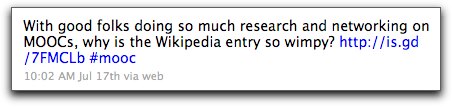
I wanted it open, as Jim and Martha and Alec did, and as George Siemens and Stephen Downes and Dave Cormier do for their MOOCs (yes, that link is the unfinished Wikipedia entry, but I haven’t had time to work on it).
I wanted participants to be able to add their own blogs to the big blog.
I wanted sticky posts at the top that had the week’s instructions, since we are not using a strictly connectivist pedagogy (if there is such a thing) for the people earning a certificate. Certificate folks have weekly readings and tasks, including a blog post showing what they’ve reflected upon and created on the web.
I wanted each week to have a moderator, who would create some introductory media for that week and then follow the big conversation, just for that one week.
The content was set up as a simple syllabus page. That’s actually been the easiest part of the whole thing. It’s just a syllabus. We all know how to do that!
I wanted it not to be an administrative nightmare. (Well, as they say, ROFLMAO!)
The technology
It’s turned out to be much more difficult than I anticipated. Here are the challenges:
1. Sticky posts (Solved)
Feedwordpress at first could not do a Sticky Post properly, causing me to try other plugins designed to pull in feeds, none of which were what I wanted. This was resolved with a bug fix in the updated version of Feedwordpress that came out in July. In Atahualpa theme, it was easy to change the background color of these posts, and even add a little POT logo, so they look different.
 2. Massive database and CPU usage (Partly made kind of OK)
As I set up the blog and people began adding feeds, even with only a few, the CPU usage at my hosting company (Lunarpages) was climbing. I alerted them before they alerted me, but they don’t support the scripts you use, just yell at you to fix it. I did chat support a lot trying to narrow down the problem with my limited knowledge of databases (i.e. none) and php (almost none). I failed and opened a new account at Bluehost using POT’s Excellence reward money, created the domain pedagogyfirst.org (after checking with Glenda Morgan, who first coined the phrase) and imported the WordPress files and database. Since I’m not a fan of using the phpAdmin to repair and optimize the database (I figured out this was helpful to deal with what they call “slow queries”) I’ve had to use an optimizing plug-in that I manually click on if I want it to clean stuff up more than once a day (and I do).
3. Feedwordpress weirdnesses (OK)
Author names come through as usernames rather than a real name. Since people don’t sign their posts, I’ve changed these so long as I can see that they want their real names used (if they mentioned their real name on their blog).
The first post on WP (“Hello World” with no real content) comes through as the first post in syndication, so if they didn’t change it, it posts the default first post. I am removing these manually.
Jim and Martha had to remind me that when you delete syndications (like with spam), it only makes them inactive. You have to then go to the inactive ones and really delete them. Interestingly, Chrome will immediately not show them even though they’re still there, so you think they’re gone when they’re not. Firefox and Safari will show the undeleted feeds.
Also, if using a Cache (recommended) plug in (I used Quick Cache), be sure to clear it when you make changes. Some browsers will continue to show the old post or page.
And strange things happened, but even with manually refreshing all the feeds, they wouldn’t correct themselves for hours.
4. WordPress things (OK).
When using iframe on a page, you must create a template just for that page. I also used Custom Menu, which meant remembering to add the page to the menu also.
The Atahualpa theme is wonderful, but some of its settings get overridden by Feedwordpress, and it’s hard to tell which ones.
I removed the admin account for security purposes. (I learned this while flailing around trying to decrease CPU usage.)
5. People adding their own blogs (sort of OK)
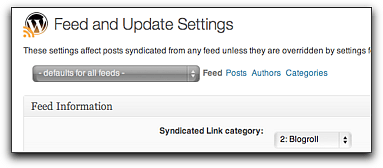
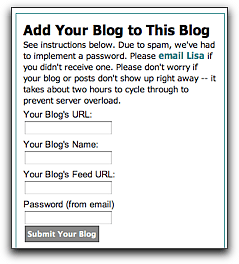
 I used the “Add Link” widget plugin, which lets people put their blog onto the Blogroll. Then I set Feedwordpress to syndicate posts from the Blogroll. First, I got some spam blogs, so I had to implement a password. Also, Feedwordpress needs the URL of the blog’s feed, not just the blog’s URL. People put in the wrong feed or a whole other URL. I had to change these manually for each blog. Since most newbies are using Edublogs, the feed URL usually just ends in “feed”.
I also gave instructions for adding only posts that had the class tag (“potcert11”) into the blog URL, but people didn’t always know how to do that.  The idea was that if someone already had a blog, instead of adding the feed from the entire thing, they could just add the tag’s feed (for Edublogs or WordPress.com, this is something like http://example.com/?feed=rss2&tag=potcert11. For Blogger, it’s something like http://blogname.blogspot.com/feeds/posts/default/-/potcert11. When folks didn’t understand, I had to try to do this manually to prevent the entire blog filling up with unrelated stuff.
6. The prompts (well, I hope it’s OK now)
The sticky posts, once they were working, appeared to be simple. Just add in the instructions (written by Jim Sullivan, our Blog Meister, who’s wonderfully encouraging). But each post will also have media, and all the moderators are creating their stuff in different applications — Voicethread, Jing, Camtasia, YouTube. This is what we want, of course! But embed codes didn’t always work. I’d have to add a plug-in, or change the size on a video to prevent it overlapping the sidebars. Lots more work than anticipated.
The Participants
I asked everyone to email me to be “registered”. I kept all their information on a Google Doc spreadsheet. I added their name, where they were from, what they taught or studied, then their blog URL and feed URL, and whether they were interested in Mentoring.
But I also asked them to sign themselves in to a public Doc that appeared on a blog page as an iframe. I used a Google Form for them to enter their info, setting it to show the resulting spreadsheet after they had done so. This way they could know who else was in the class, I could find out how they came to know about the class, etc.
Some people aren’t comfortable being “known” on the internet, so I had a provision for the certificate that they could use a pseudonym. It’s hard to assign a mentor to a pseudonym.
The Moderators and Mentors
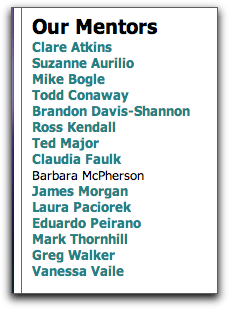
Several wonderful people agreed to be moderators and mentors, proof of the old adage that you just have to ask .
.
Moderators introduce a unit and supervise for a week. I called on POT leaders, certificate holders, and facilitators to take a week and moderate it, making a video tutorial or something to inspire and preview that week (an idea of one of our new people, Eric Robertson). Everyone is doing great work with this, and I look forward to each of them “taking charge” during the week they’ve chosen.
Mentors help individual participants, with a focus on community so no one is sitting there with no comments on the blog. When I saw an obviously accomplished blog post or experienced distance educator add the class, I asked if they’d be a mentor, plus we have people who already earned a certificate last year and are paying it back. As the class registration rose above 50, I decided to follow Alec Couros’ lead and assign mentors to particular participants, so I just added a column to the Doc then gave the mentors edit access to it. Right now each mentor has 4-6 people assigned to him/her.
The Insanity
At one point in my panic, Alec Couros advised me not to abandon my pedagogy. I thank him for that. Others advised me to bail on it and use an LMS (the horror!) or a Google Reader bundle, which is certainly my backup if all this fails and the database crashes or my new host sends me threatening emails. Some people think it’s too open, and they don’t want to blog. Others think this isn’t open enough, and want it to be a connectivist MOOCy thing with internet diffusion and intergalactic social network connections. (If I let this kind of stuff get to me, I’d have given up teaching undergraduates a long time ago!)
It is possible, however, that there is a much easier way to accomplish some of this. I stumbled recently upon a post by Jim Groom, who used WPMU and another plug in to create a Feed to Rule All Feeds by just pulling in any post on the web that had a particular tag. This would be good (no 77 separate feeds, latecomers can play along much more easily) and possibly bad (lots of spam postings, dependence on yet another plug-in to pull them in). I am still trying to decide whether to try it now, but I think it might be better next year. Then we could go even more open and diverse, which would be good.
For now, tracking 77+ people and trying to prevent Pedagogy First! from crashing will be quite enough.
Now what?
The class actually starts tomorrow.
What will we do with those who want to add late? I can allow a few exceptions (I already have, since the registration deadline was August 26). But the way the feeds are done there isn’t much mechanism for just jumping in on the big blog.
People can jump in, though, in a number of places: the POT Facebook group (already very active), a Diigo group, the POT YouTube channel, Twitter (hashtag #potcert11) etc. And we have several mentors already who will be taking the lead in doing synchronous sessions, Google Groups, and goodness knows what other Distributed Activities.
I’m confident that the pedagogical model is sound, and the set-up is sustainable and rich. I mean the people-to-people set-up. We’ll have to see about the technology. 😉