The ever-wonderful Jim Groom (you’ll notice I’ve linked to his blog) and the folks at Reclaim Hosting are engaged in a series of deep-diving video conversations about writing and blogging called “On Writing”. You can view the sessions on YouTube. The Reclaim crew has talked with Kate Bowles, Alan Levine, Martin Weller, Bonnie Stewart, and many more people I’ve worked with either directly or tangentially over the years.
It’s all about writing and blogging. I do both, so folks may well wonder: what is my story with blogging?
The Beginning
I began by blogging about history (because I’m a historian), but I couldn’t say exactly when (because I’m not a very good historian when it comes to my own life). The first post I have a record of was dated 2006, even though I’d been teaching online and a citizen of the internet since 1998. That first blog was hosted in a Lunarpages account, using a program (they weren’t called apps then) called Nucleus.
When I got deeply involved in educational technology and educational philosophy (c. 2008), I created a new blog in WordPress instead of just posting on my Nucleus blog. That seemed like a huge decision, and in retrospect it was. It meant bifurcating my online identity into “historian” and “educator”. Two identities, two blogs.
Blogs, blogs, and more blogs
Over time, I began to focus more and more on college teaching and ed tech, so my WordPress blog got far more attention than my history blog. And other blogs were set up. Some were for courses in which I participated, like CCK08, EC&I in 2010, and DS106 in 2011. Some were for me to use with my students as I fought the Learning Management Systems trying to control my pedagogy. I created a Tumblr and joined Twitter and became part of the online community of educators. I blogged with students and helped them set up their own blogs. I ran entire classes via blogging. But I posted in my own space throughout, and finally pulled my Nucleus posts into my WordPress blog.
In 2012 I participated in the wave of Massive Open Online Classes, and created them for the Program for Online Teaching. That project, with volunteer faculty teaching other faculty how to teach online, had been active since 2005 and would be around till 2017. I blogged about the MOOCs, POT, online pedagogy, etc. The posts are still there.
Since 2017, I have gone back and forth separating and combining blogs, importing and exporting posts as I saw fit. Then when I retired from teaching a couple of years ago, I started a separate author blog as I became a fiction writer, since why would anyone who knew me as an author care about online teaching or educational technology?
As Alan Levine mentioned in his conversation with Maren Deepwell, blogging can seem old-fashioned. With Facebook and Threads and Instagram (oh, wait, that’s all the same thing) and Bluesky and Mastadon, what is the point of writing on a blog? Well, unless you choose to monetize your writing via Substack or Medium (tried that), your blog is the place for long-form thinking in public. It can be, as I’ve rebranded it here, your “webhome”.
Outside of blogging (and inside it’s too dark to see), I struggled with social media as a fiction author. Following all the usual advice, I spent 2023 and 2024 posting continually in FB, Instagram, TikTok, GoodReads. I did Canva placards and videos on YouTube. I put energy into an author newsletter rather than my blog. (Of course, I posted copies of my newsletter on my blog.) I even paid for ads on Facebook and Amazon. I had a few hundred followers as an author, and a few hundred newsletter subscribers.
But nothing I did in these spaces sold any books. That became my new metric for determining how I spend my time doing things I don’t find fun or interesting.
One Blog Alone
So this year I went back to my Lisahistory blog, the one that originally combined ed tech with history. I’ve cut down on social media. I’ve added an author page with its own URL (lisamlane.com) to my one blog, and closed out the separate author blog. I’m working on linking everything to my one blog, slimming down the categories, maybe writing my newsletters here, posting whenever.
Reunited and it feels so good. Blogging is fun and interesting, especially when I remember that I can post about anything I wish. No more “is this an author post? would readers be interested?” or “oh, that’s edtech–where do I put that again?”.
There has been a price: the followers I had elsewhere have been lost. But if they want to, they can find me here, in my webhome, turning on the porch light, letting Jetpack accept subscribers, chatting history and edtech and being a writer, and making a pot of tea for whoever comes by.
Generative AI isn’t new to me, but I don’t like that everything we put into ChatGTP (or any other online AI platform) will be used to train it for private corporations, who then profit from my work. So I’ve avoided it, particularly doing things like putting a whole novel in to have it write a blurb.
Now I’ve discovered a more private route, where I can use AI without the internet on my home computer (a MacBook Pro with an M2 chip).
Here’s what I did. I downloaded GPT4All, and installed it. Then I had it fetch me a couple of Large Language Models. I wanted to try the ones not associated with Meta, then I realized that DeepSeek is connected to China. So I’m trying Llama (3 8B Instruct) and Mistral (Instruct). I put the .docx versions of my Victorian mysteries, plus the “bible” I use to keep track of them, in a folder on my Mac desktop, and made those the Local Docs for it to access. Then I turned off access to the internet.
Attempt #1: a fact
Then I asked it questions, beginning with something factual: the age of my character Tommy Jones. I asked it for each book, but it couldn’t tell me. So I asked it for all books, and it couldn’t do it.
How old is Tommy Jones in these books?
Tommy Jones’ age is not explicitly stated across all contexts provided. However, based on the excerpts: 1 In “Murder on the Pneumatic Railways,” he mentions working as a bricklayer and refers to himself as possibly 25 but looking older, suggesting an age in his mid-20s or beyond. 2 He is described alongside Susie, who is seventeen at some point mentioned (though context suggests she might be younger), indicating Tommy could be either slightly older than her or of a similar age depending on the narrative progression. Considering their background from derelict houses after their parents’ deaths in the war and their friendship with Samson, it’s likely that Tommy ranges between being a teenager to someone around his mid-20s. His exact age may vary within these bounds across different parts of the story.
Susie is a character so minor I’d forgotten about her, and Tommy’s age is explicitly stated and referenced not only in each book, but detailed in the “bible” to keep track. He was never a bricklayer, and never refers to himself as 25. Not an auspicious beginning.
Attempt #2: a blurb
Then I asked it to write a blurb for my current work in progress, Murder at the Gasworks.
“Murder at the Gasworks” is a gripping mystery novel by Lisa M. Lane that follows Detective Sergeant Cuthbert Slaughter and Inspector Samuel Revel as they investigate the murder of a stoker at the City Gasworks in London. As they delve deeper into the case, they uncover a web of corruption, illegal activities, and threats from trade unions that may be connected to the murder. With the help of their colleagues and members of the community, they must race against time to solve the double set of murders that have perplexed them for months before the killer strikes again. Will they be able to bring justice to the victims and put an end to the dangerous game being played at the City Gasworks?
OK, well, that’s wrong. Inspector Revel is off the case for most of the book. Slaughter works with Inspector Martin, his mentor. There are absolutely no threats of any kind from trade unions — two of my characters just happen to belong to them, and one is an organizer. The race against time is pretty mild, and it’s only been about a month. The City Gasworks is only one of the two gasworks involved. When I tried again in the other LLM it used the same wording: gripping, web of corruption, race against time.
Attempt #3: reading group questions
Fine. Since I will be writing Reading Group questions for Murder at Old St. Thomas’s, I asked it to do that.
Write ten reading group questions for Murder at Old St. Thomas’s 1 What is the setting of Murder at Old St. Thomas’s and how does it contribute to the atmosphere and mood of the novel? 2 Who are some of the main characters in the novel and what motivations do they have? 3 How does the author use historical details about the hospital and its era to add depth and authenticity to the story? 4 What themes are explored in the novel, such as loyalty, betrayal, and medical experimentation? 5 How does the author use literary devices like foreshadowing and irony to create suspense and build tension throughout the novel? 6 What role do detective work and forensic science play in solving the murder at Old St. Thomas’s? 7 How does the character of Tommy Jones evolve throughout the novel and what lessons does he learn about taking on important responsibilities? 8 What is the significance of the use of anesthetics and hygienic practice during this era, and how does it relate to the murder at Old St. Thomas’s? 9 How does the author use dialogue and inner thoughts to reveal character and advance the plot? 10 What is the ultimate resolution of the murder at Old St. Thomas’s and what implications does it have for the characters and the world they inhabit?
These are extremely general questions, and don’t mention any of the characters other than Tommy. They could apply to any mystery. They are the sort of thing I would have never written for the classroom, and would lead to lousy discussion in even the most enthusiastic book group.
Attempt #4: craft and style
One more try, about craft and style:
What shows that Murder at the Gasworks is based on character rather than plot? Murder at the Gasworks is based on character rather than plot in several ways. First, the novel focuses heavily on the motivations and personalities of the characters, particularly Detective Sergeant Cuthbert Slaughter and his colleagues. The investigation into the murders is driven by their desire to solve the case and bring justice to the victims, but also by their individual beliefs and values. Second, the setting and atmosphere of the novel are heavily influenced by the personalities of the characters. For example, Ellie Slaughter’s neighbor Mrs Gross is portrayed as a gossipy and nosy person who is always meddling in other people’s lives. This helps to create a sense of tension and unease throughout the novel, as the reader becomes increasingly suspicious of her motives. Finally, the plot of the novel revolves around the relationships between the characters rather than any overarching mystery or crime. The investigation into the murders is largely driven by personal connections and alliances between the detectives, as well as their individual beliefs and values. This helps to create a sense of depth and complexity in the characters and their motivations, making the novel more about character development than plot twists and turns.
It’s sort of true, though “individual beliefs and values” is simply a definition for character. And the only specific example is wrong: Mrs. Gross is a good friend and not gossipy in the slightest. She is there for comfort, not to create unease. She has no ulterior motives whatsoever.
And, of course, the plot does revolve around the crime. This isn’t literary fiction.
Assessment so far
I also tried these prompts with the internet connected, just in case the models needed to fetch something from outside (like how to write good reading group questions). The results were very similar. The tool simply couldn’t process the full content of the novels.
So far, I am less than impressed. I shall keep working at it, of course. Stay tuned.
Jim Groom, edtech guru, has been conducting interviews about writing at ReclaimTV. Many of the guests have been blogging for decades, and are very familiar to me from my years teaching at a distance, such as Bryan Alexander and Audrey Watters.
One of the most interesting interviews was Kate Bowles, who hasn’t blogged for years but influenced all of us when she did and now posts on Mastadon. In a broad ranging conversation, she discussed her own public writing, including her efforts to get back into it. She and Jim talked about how things have changed, the conversations that no longer take place on blogs, the echo chambers created by closed communities, and what survives with the prevalence of AI.
I am late to the term “fediverse”, and the more I learn about this idea of global, open, interconnected and independent sharing, the more it sounds like the World Wide Web when it was the Wild West. I wrote about that open web, and worried about losing it, in 2011 and 2012. Free, open, share — these are words from the late 1990s and early 2000s, when I became an online educator and participant.
Historians, of course, look backward all the time. The web became closed in the same way as the American frontier, through privileging commercialism and private gain. As we talk about writing publicly, we tend to want to go back to when blogging was long-form communication with call-and-response, a way to thoroughly hash through various subjects by learning about various viewponts, and writing about them. We groan about how this world has been taken over by places that are either closed (Discord) or plagued with bad actors and focused on selling things (Facebook, Instagram, X).
Taking a broader cultural perspective on the present, above and beyond the complaints of writers themselves, doesn’t help. We see long-form writing in general going out of fashion (just ask those of us who write and try to sell our novels), AI normalizing bad bland prose, and a strong desire for less junk and more meaning.
Perhaps it is best to celebrate the fact that intellectual and poetic writing is vintage. Many of the objects I value, such as record albums and landline phones, were once popular forms but are now niche. Blogging, and indeed long-form writing in general, may occupy such a place historically. We mourn this and rage, because without long-form writing it is impossible to posit a convincing argument, present evidence of an outlandish thesis, or tell a full and meaningful story.
It doesn’t really matter where we do it, and if the fediverse* is the place for it, I’m in.
(*NB: for the record, I think that term is awful – I much prefer open web)
So I come upon an article on Medium about creating images from text descriptions, and it occurs to me this might be a cool way to make book covers. The technologies the article suggested required complex signups, so I searched and found NightCafe instead and tried it.
I chose “oil painting” and the “coherent” filter, typed in Victorian street Grimshaw and got this:
Apart from the weird sky, I cannot tell what the hell that figure is supposed to be. I can only tell it’s a person because it has feet.
Next effort:empty victorian street streetlamp cobbles cabriolet cloudy day.
Huh. Skies full of cobbles. OK, how about Victorian London, the artistic filter, and the “steampunk” setting:
The architecture is better, but what is that thing? I write historical mysteries. OK, so no steampunk setting, just Victorian London street and “oil painting”, back to the coherent filter:
Another creepy non-person. And that vehicle? Yeah, right.
OK, so historical isn’t happening. I’ll try what it’s supposed to do, fantasy. Moonlit Thames river boat, with the “heavenly” style and the artistic filter.
So, love the idea. Not thrilled with the execution. But I’m interested in looking more into this for sure!
It’s been awhile since I’ve posted so I remember something, but a faculty member asked how I did this:
It looks like it’s just a link in the menu that says “* Message Lisa”, but it’s so much more. You’ll notice to the left, in the system-wide blue menu, is the Inbox. This is what students are told to use to message their instructor. But when you go there, you have to search for the instructor, by course and by name, before you get a window where you can type your message. That’s stupid. It should be easy to contact your instructor.
But my “* Message Lisa” link doesn’t just go to the Inbox. It opens a window immediately where they can type their message, with all the fields (their course, their name) filled in already. No searching required.
For that link, it’s tricky. Each course in Canvas has its own link to the instructor’s inbox. The format is this:
To find the course number, you can go to any assignment inside your class and look at the URL, or you can mouse over the class tile in the Dashboard. To find your user number, mouse over anywhere your name is linked in the class (like at the top of an Announcement). To find your user name, see your Profile.
Then I use the Redirect App in the Settings – Apps, and create it as a link, just changing the course number for each course. It rolls over each term, so I just have to change the course number each time.
It is an axiom frequently ignored that any technology has to have a reason to exist in a class. The textbook is a technology. If one were to actually read it, that would be a huge investment of time in an era where attention is continually diverted. A chosen technology is either central to learning or it shouldn’t be there at all.
Students, understandably, won’t read the textbook without stakes (a quiz, a paper). Increasingly, many students cannot sustain the attention and access the vocabulary skills required to read one.
As a result, publishers and professors have developed ways to force students to read the textbook. Publisher’s courses read the book aloud to the student, provide embedded quizzes and pop-up vocabulary as they go, and assess performance before pushing the grades into the Learning Management System. Annotation systems like Perusall make it possible for students to annotate a textbook together. These approaches are far too much if we only want the textbook as background.
I confess that I’ve edited several textbooks of my own that I use in my classes. These are classes where I have substantial lecture material, so the book is context. For the first two years of the pandemic, I made reading them optional and eliminated book quizzes, but now that students are more accustomed to online learning, I’m bringing them back, with some regret.
my new OER textbook
This regret is coloring my view as I design two “new” World History classes (I’ve only taught them in the classroom and that was many years ago). For the first, I’ve spend the last several months with the Cengage textbook I’ve chosen, and made it central to the short recorded lectures. In these lectures I explain the chapter, note its strengths and weaknesses, clarify points. The lecture itself is quizzed internally, using the quiz function in Canvas Studio. Class starts in a little over a week. I hope it works, but either way I’ve made the book central to the class.
Now I think about the other half of the course. For this one, world history to 1500, I have found an Open Educational Resource, a free textbook. Of course, it’s only free in its electronic form. So I’m thinking how to use it, since it must be central. I have no lectures prepared for the class, and am not sure I want them.
So, a new idea. Since it’s free and electronic, I could put it inside Perusall, the social annotation program. But instead of expecting students to annotate, or requiring that they do it (as I do with primary sources), perhaps I’ll put in the annotations little videos of me, glossing the text myself that way. Perhaps I’ll ask questions, invite participation, and grade it in Perusall.
In the old days we turned up our noses at “teaching from the textbook”, ridiculing those who tied their lectures to it. Perhaps we felt that we could leave students alone with the textbook, and they’d read and understand it. I doubt this was ever true, but in a world where we can chose to eschew the textbook entirely, create ungrading schemes, and have at our fingertips more resources to share than ever before, we should consider the textbook differently.
It has been a standard narrative that America panicked on Halloween eve of 1938. That night, Orson Welles presented his radio program rendition of War of the World’s, H. G. Wells’ 1898 tale of the Martians attacking Earth. Some people believed the broadcast was real news, either having missed the opening and interruptions where Welles clearly said it was fiction, or misinterpreting as they became paralyzed with fear. Those near Grovers Mill, New Jersey, packed to evacuate. Millions, it is said, were terrified.
Articles and books have been written about this phenomenon, the most famous if which is Hadley Catril’s The Invasion from Mars: A Study in the Psychology of Panic , originally published in 1940. It’s the text often used to support the story of the panic, since Catril was a respected social psychologist. It also didn’t hurt that the Martians landed near Princeton, where he taught.
People love telling the story of their stupid fellow Americans who fell for the Halloween trick; it’s used as an example of how gullible the public is, how fearful everyone was of what was happening in Europe at the time, how mass hysteria is created through media. These days, it’s fun to see it as an example of “fake news”.
Trouble is, it didn’t happen that way. Read the first part of Catril’s book, and he’s very clear. Although the publisher says “a million” were infected with terror, and he says “thousands” at the beginning of the book, he is quick to note that his sample size of interviewees was 153, two-thirds of whom were self-selected from people who said they panicked.
Every so often (usually on anniversaries of the radio broadcast), the panic myth is revived. The Library of Congress has an article on how the panic didn’t happen, and there are other places on the web where one can find some debunking. But as the WST article points out, when the tale is kept alive (as with the 2013 PBS documentary) it’s hard to get the truth in there. A current article explores the faith people have in their own trusted sources, in the context of the panic. It’s a good article, but it seems to assume the panic really happened.
Why did the myth take off so fast in the first place? One reason is that Orson Welles was a wonderful publicity hound who encouraged it. Another is that it sold newspapers. Radio competed with print for people’s attention, so the papers were happy to blame the broadcaster and Welles for being irresponsible.
Of more interest is what happened in 1940, when both Orson Welles and H. G. Wells were in San Antonio, and recorded a radio program together. Two years before, when asked about his book and the panic in America, Wells had reportedly been firm that he had not authorized the radio network to change place names. In 1926 in Britain there had been a radio scare when a fictional 12-minute broadcast had caused some to believe that London was being attacked, and Wells didn’t want to be seen to condone the same thing happening in America.
Two years later, he considered the radio show had just been a hoax, but he said that Americans could have their fun because “you haven’t got the war right under your chins”. Although the double interview is awkward at the beginning, by the end both Wells and Welles are clear that alienating Russia, despite its autocratic government under Stalin, would not be a good idea.
There’s an interesting historical pattern to the popularity of both Wells’ novel and Welles’ radio show. In 1898, there were small wars in a number of places, interest in eugenics, and a fascination with space and Mars in particular. In 1938, war was about to begin in Europe, and Germany was on the move. Hollywood made a major motion picture of War of the Worlds in 1953, and Catril’s book was reprinted in 1954, during McCarthyism. The 1970s saw another revival, at a time of hijackings and terrorism. And now again when reality TV, extremism in pop culture, the decline of civil society, and a gullible public are current issues, the story is here again.
War of the Worlds may be timeless; the story of the panic shouldn’t be.
As a budding author (can you be a “bud” at my age?), I read a lot about what I’m supposed to do. Chief among the advice is to have a “social media presence” and an “email list”. I’m supposed to populate these forms of communication with tidbits and upcoming writings and fluff, designed to keep me connected to my “readers”.
Since I’m not published yet, that’s seriously on the back burner, but now I think of it when I look at my favorite authors. Anne Perry, Kate Morton, Rachel Cusk — I love their work. Am I on their mail lists? Do I keep up with their social media? It never occurred to me.
So tonight I’m hovering a finger over a button to join one of my favorite author’s email lists, and I’m thinking about it.
Many years ago, I had to deal with Rousseau. I loved his work. Then I found out that this author of one of our great books on natural education, “Emile”, and a supporter of mothers breastfeeding their own babies in a time of wet-nurses, had abandoned his own children to foundling hospitals.
About half the celebrities I’ve met and worked with have been rude. People are just people. I don’t think I’d enjoy an evening with George Bernard Shaw, Florence Nightingale, Emmeline Pankhurst, or Woody Allen. That doesn’t mean I don’t admire their work.
The big question, of course, is the extent to which we can, and should, separate someone’s life from their deeds. On the one hand, I know you can be a slaveholder and still be a good person. On the other, I might refuse to buy products from someone whose actions I find morally reprehensible. But by and large, I fall on the side of separation. People’s ideas may be universal and immortal — people themselves are fallible, and finite.
So, back to living authors. It feels callous that I’m not really interested in them, in who they are, their foibles and personal life. But I’m not — I’m interested in their creations, the products of their minds, the characters and stories they devise. I’ll follow what they publish because I want to read their work, and I’m happy to read or tune in for gems about writing if they’ve a mind to share.
But some of the things I’ve been told (don’t have a publicity photo with your chin on your hand, be sure to post pictures of your pets, talk about your hobbies) have nothing to do with my writing. Perhaps such trends are just indicative of today’s societal expectations in a time where emotion triumphs over reason and everything is personal, although I suspect it’s long been a problem — this promo by Hemingway is awkward enough that Scribner’s must have had a lot of trouble getting him to say the right things.
During the pandemic year many faculty have been forced to create fully online classes in a Learning Management System, such as Canvas or Blackboard. It has been surprisingly difficult. Even those fluent in technologies like email and social media have been flummoxed by the difficulties of using the LMS as an online classroom. There are three main reasons why.
Got folders?
Learning Management Systems appear to be innocent shells into which teachers load “content”, but in reality they each have their own built-in pedagogy. This pedagogy is often archaic and is based on outdated norms of information organization. In the 1990s, LMSs imitated the folder-style structure of Mac and PC (Windows) operating systems. They were really just places to upload content items (usually Word files) and perhaps run a single discussion board (by 2005 or so).
Surprisingly, even when LMSs added more and more features to enable greater interaction and activity, they retained the old structure. It is designed to present material by type: Pages, Lectures, Discussion, Grades, etc. You can see this in the way the menu is constructed.
Presentation by type undermines the organizational integrity of the course. Most scholars think in terms of their field, and how best to present its habits of mind. As teachers, we think next in terms of wrapping elements together to encourage understanding. We do not think in terms of all the articles, all the lectures, all the exams, all the discussions.
Instead, we think in terms of weeks, or units, or modules. We section the learning, combining various elements to cover a particular subject. Separating those resources by type makes no sense when one is creating a pattern of learning.
One solution is to break this framework. If the LMS allows us to add, delete, or hide menu items,we can make new pages which link to the whole pattern of information. It may be possible, for example, to have the menu say Module 1, Module 2, etc., instead of Announcements, Syllabus, Pages, Discussion, Quizzes.
Even so, the system may force its own design. We may have a Module 1 page with all the links to activities, but when the student clicks on that activities, the breadcrumbs may show the folder name (“Quizzes”). Students can get lost following these.
Student-led what?
None of the major LMSs make it easy to implement constructivist or connectivist learning theory. Unlike twenty years ago, instructors may have studied and be trained in active learning teachniques, and have been using them in the classroom. When faced with the LMS, they find themselves stymied.
Created student-led or student-designed work is difficult. LMSs require teacher permissions to set up an assignment, quiz, content area, or discussion. Although some discussion forums allow students to begin topics, this feature must also be set by the instructor.
Some systems seems to be more adaptable, or at least expandable. In LMSs like Canvas, LTI’s (tools using the Learning Tools Interoperability standard) can be added to the system with varying levels of success. An example might be an improved discussion board, or Google Docs, or a group annotation app. Some integrate fairly well into the LMS, making them easy to access from inside the shell and pushing grades back into the system. But all require a bit of technical expertise to set up, and the integration is rarely seamless. Some, like Google Docs, may require students to have a separate Google account, while others need their own structural folder inside the LMS for all activity related to that app. This is particularly true of textbook publishers’ material, which often tries to integrate the publisher’s own textbook site with the LMS.
The solutions here take one of three directions: the internal approach, the LTI approach, or the textbook publisher approach.
Since students can be given control of discussion boards, the internal approach would include using them for different kinds of activity other than discussion: posting lists of websites, sharing resources, posting quotations from reading. The other folder areas (quizzes, pages, etc) can simply not be used.
The LTI approach would involve using more collaborative tools, like Google Docs or group annotation apps or pinboards as the main outside tool, with the instructor learning it well and monitoring it thoroughly.
The textbook publisher approach would be to ignore or hide everything possible in the LMS navigation and use the publisher’s folder as the main work area.
Fifteen papers due today!
Gone are the days when your class was the only online class students were taking. They are now enrolled in many classes within the same LMS at the same institution. In an effort to help them remember the deadlines for everything, the LMS aggregates all the information from all the courses into task lists, using a Calendar or To Do feature.
For example, a conditional release feature makes it possible to prevent a student performing Task B (a test) before they have done Task A (an assignment). Task A is designed to prepare the student for Task B, and ideally would be done within a short period of concentration. But on the student’s Calendar they see Task A, then Task 1 from another class, then Task iii from yet another class, before Task B. By the time they get to Task B, they have no idea what was learned in Task A. An example from three of may classes, running at the same time:
Same day, three different classes
Perhaps you have designed a module to lead students through an introduction, then a short lecture, then a video, then a discussion, then a test. All of these will be disaggregated by due date and will appear in a jumble on the students’ Calendar. Wrapping elements for your class together to encourage deeper understanding becomes impossible.
In addition, by listing all the tasks from all the classes together, the Calendar or List “flattens” all the assignments. It becomes impossible to tell which tasks are more or less important to the student, to learning, or to the grade. They all look equivalent in the same font and size, even if one is a two-minute video and the other is a paper that would take several days.
Unfortunately, this problem may not be solvable. Few LMSs allow control over whether or not to show calendars and lists to students. Because permissions for such features run above the individual course level, instructors usually have no access to any methods that would change the LMS behavior.
The bottom line
Creative pedagogy can work within the limitations of the LMS, but it is not easy to implement. Systems are designed to systematize, and the LMS is designed to create cookie-cutter classes based on outmoded structures rather than to promote innovative approaches. Thus for many of us, understanding its design is essential to adapting, subverting, or acquiescing to its suckiness.
Instructure’s Canvas continues to gain market share as the Learning Management System in colleges and universities, despite limitations which have become more apparent as more faculty teach online. Want to assign extra credit? That’s really hard. Want students to maintain individual graded journals? Super difficult. Want to use the shell to create student-led learning? Forget about it.
And yet schools have been overjoyed to adopt Canvas as the new friend who will help with everything while not having too many needs. It’s so easy to use, everyone says. It looks so simple and clean and Google-y. Students like how all their classes look the same, reducing their cognitive load.
But for the more creative teacher or professor, those interacting with it intensely rather than casually, associating with Canvas exposes its shortcomings and begins to cause frustration. Faculty who have had more useful relationships with other systems know exactly what’s missing, but even those new to the playground are stymied when trying to get a simple friendly response.
The fact is, Canvas is not our friend. That’s because its design forces us to engage with its emotional problems.
Navigating like it’s 2005
Canvas is stuck in old patterns of thinking, even when those patterns cause problems again and again.
Learning Management Systems appear to be innocent shells into which teachers load “content”, but in reality they each have their own built-in pedagogy. Canvas’s pedagogy (like its other market leader, Blackboard) is based on outdated norms of information organization. In the 1990s, LMSs imitated the folder-style structure of Mac and PC (Windows) operating systems. They were really just places to upload content items (usually Word files) and perhaps run a single discussion board (by 2005 or so).
Surprisingly, even when LMSs added more and more features to enable greater interaction and activity, they retained the old structure. It is designed to present material by type: Pages, Lectures, Discussion, Grades, etc. You can see this in the way the Canvas menu is constructed.
Most teachers do not think in terms of “type”. We think in terms of weeks, or units, or modules. We section the learning, combining various elements to cover a particular subject, assigning a reading, practice test, discussion, and exam all on the same topic. Separating those resources by type makes no sense when one is creating a learning pathway for students to follow, and can undermine the organizational integrity of the course.
Trying to help
But Canvas promises an alternative navigation for the students: Modules. You can put all your tasks in the correct order under headings. The “Back” and “Next” buttons, which automatically follow your sequence, will ensure that students stay within their lane.
Exciting Modules page for Chapter 4
Unfortunately, this doesn’t solve the problem. Canvas’s Modules page is a list of links, with every item listed in the same size and color. But the menu items, ever visible even on the Modules page, will still say Pages, Assignments, Discussion, etc.
One can try to break this framework. Since we can add, delete, or hide menu items, it is possible to make new pages which link to the whole pattern of information. It may be possible, for example, to have the menu say Module 1, Module 2, etc., instead of Announcements, Syllabus, Pages, Discussion, Quizzes.
You could use the Modules pages as a home page, even though it’s ugly. Or you could make all the menu items for types invisible, and build a Home page with a schedule or grid, and each unit could be a list of links. Students can then see how everything fits together for that week.
But no…
Both solutions will be undermined by Canvas’s internal navigation. Even if you set up Page-based or Modules navigation, the “breadcrumbs” will show everything by type anyway. Any student going from your Week 2 page of links to Quiz 2 will see a breadcrumb in the upper left saying “Quizzes”. It they click it, the full list of all the quizzes in the class appear. Ditto with Discussion 2 — the full list of discussions will be there, and students will start jumping around and get lost.
Canvas provides the way to make things right, then undermines its own good intentions.
Working in five classes at once
Canvas wants everything combined for convenience, ignoring all your plans.
Let’s say you create a learning pathway through the content, considering the holistic nature of your course, using Modules or Pages. The Calendar and the To Do list will immediately come along and destroy your careful course structure, by disaggregating all the tasks in all your students’ various classes and lumping them together into a giant list.
For students, as a convenience, the Calendar lists everything from all their classes in order of due date. When they look at the month’s or week’s tasks, everything from all their classes is listed, making it difficult to see the order of anything for one particular class. Your “Discussion 2” which you carefully designed to follow Reading 2 has another class’s “Discussion 4″ in between.
The To Do list does the same thing in an even simpler list that appears on the Dashboard and every course home page.
In addition, both the Calendar and the To Do list don’t include anything that isn’t graded. That might include the week’s main page, the discussion students are supposed to return to on two different dates, or a required reading. Students will miss ungraded assignments entirely as they innocently follow these helpful lists.
What to do?
Because the Calendar and To Do features are controlled above the course level, there is no way to make them invisible or change them, except by adding more items from your class. There is limited space in the title, especially when the Calendar or To-Do List is seen on a phone, so we cannot put “Eng101” as the first word to help. But we can add additional Calendar items for things that aren’t connected to a graded item: “Week 2 starts today”, or “Return to discussion”, or “essay corrections due”. When we make an ungraded assignments, we can check the “Add to To Do list” box. Adding more things to do may be, strangely, the best way to help students.
Relying on others for basic functions
Canvas has no inner reserves of strength, and relies on outsiders.
It is a truth generally acknowledged that Canvas’s discussion boards are the most troublesome element of the LMS. Conversation is not its strong suit. Canvas requires an administrative setting to do things like make the barely nested posts obvious in a threaded discussion. There is so much white space that one scrolls until one forgets the topic — it isn’t practical to engage in extended, much less semester-long, discussions. There is no distinction between instructor posts and student posts. The toolbar cannot be customized, so it has become bloated and even more difficult to use than when it had fewer features. There is no @ feature or notification sent to students to let them know someone has responded to their post, unless they subscribe to all posts on all boards in the class.
Canvas is very instructor-focused, making student-led learning difficult to design. There are no collaborative or whiteboard spaces built in. Extending Canvas means using LTI (Learning Tools Interoperability) apps, or what used to be called “plug-ins”. These are made by external providers, and vary widely in cost and ease of use. Some integrate better than others, passing grades back into the Canvas Gradebook with ease. Others force students to create external accounts.
Given these difficulties, it is often easiest for faculty to succumb to the temptation of using a big stick: the textbook publisher package. The big companies offer full packages that can plug in to a Canvas course, essentially connecting their own learning management system to Canvas. This adds another layer and another (sometimes more than one) menu item as a “type”. Then it becomes necessary to spend much time learning the publisher’s complicated system as well as Canvas.
Less may be more
The only solution here is to limit oneself to one LTI. If it’s the publisher package, all the time will be spent learning and dealing with that. If it’s Google Docs, that will have a learning curve too, and possibly external accounts. If group annotation is desired, that can be the only extension.
Being honest with each other
These three big flaws don’t even include the many inconsistencies and gaps that Canvas has had since the beginning. There is no way to change things in bulk, like assignment due dates or quiz instructions. There is no pop-up to alert students that a message awaits from their teacher. There is no font customization on the Modules page, which flattens everything and makes it look like a two-minute video is equivalent to a twenty-page chapter. The drag-and-drop Calendar won’t let you drag-and-drop items from one month to another.*
One should not expect a friend, especially a troublesome friend, to change. Until 2015 there was a chance the relationship would improve. Indeed, things had been improving with help from the Canvas Community, a rich resource of teachers and expert users. But once Instructure went public, they became answerable to shareholders, just like Blackboard. Their “open source” street cred died, as did their need to respond to users.
It may be be best to consider Canvas as a flawed, if necessary, companion. It has its own desires and needs, which will often be counter to yours. But its unreliability means it’s best not to get too dependent.
*Update: Kona Jones has pointed out to me a couple of revisions. One can drag-and-drop to a different month if you start with an undated item from the list, and a recent update now means that Canvas includes bulk editing of Assignment dates only.
Ever since I discovered the back pages in H. G. Wells’s Text-book of Biology, (1893), I’ve known a bit about scientific work being done at home. Doing “practical work” at home was important for correspondence education at the end of the 19th century, so that students could study for examinations even if they didn’t have access to a laboratory.
When online teaching started at our college, back in 1998, and began to grow, a number of science instructors were concerned. You could do a lecture online, fine, but you couldn’t do a lab. Simulations weren’t enough, they said. You need real materials. Wells’s students, of course, had real materials. They ordered them by mail or, in the case of frogs, went and caught them.
So here we are in 2020, with online labs foisted onto unsuspecting faculty, and they’ve done brilliantly. I attended this session, where four professors, from auto shop to biotechnology, showed how they do labs online. For inspiration alone it’s worth the 50+ minutes.
It’s an odd feeling for me, a promoter and practitioner of online education since the 1990s, to see that the materials (lab kits, go-pro cameras, etc) have come so far. But it’s even more thrilling to see the new attitudes, confidence, and willingness to serve students this way. It feels (finally!) like the new world we were hoping for.
As I watched, I thought like a student. In-person education isn’t always the best way to learn. When I was 19, if I’d had a way to learn about cars without having to show my ignorance to the guys in auto shop, I might know how to fix my car today. I was shy, and had already been subject to sexism in art class — I certainly wouldn’t walk into a guy-dominated shop. I was also clumsy, but if I’d been able to make mistakes with those test tubes at home, I might have given it a try in high school or college. (I actually had a chemistry set as a child, and created something so horrid the chemistry prof at the local university had to be called so we knew how to dispose of it.)
At any rate, I think H. G. Wells would be proud. I’m delighted.
The word “lecture” conjures an idealized image of students listening attentively as a professor relays knowledge. Almost all of the lectures I enjoyed at university were in this format, and when I began teaching I lectured this way too.
With this year’s quick and unexpected transition to online teaching, many professors assumed that online lecture meant reproducing what they do in class. Zoom.com was grateful for this assumption, even as they struggled to accommodate the massive numbers holding live lectures. Almost immediately, however, there were complaints and problems.
Professors whined that students weren’t paying attention, or didn’t want to turn on their cameras. They couldn’t see the facial expressions and body language indicating comprehension (or lack thereof). Students complained about boring, wandering lectures, and they felt exposed. You can’t sit at the back in an online classroom, and they didn’t want thirty strangers to see the trailer they lived in. Many decided they would watch the recording instead.
The problem? Zoom provided the platform, but the pedagogy was still based in the classroom. This worked better for some professors than others. At our college, they let us choose before this fall whether we wanted our classes scheduled and in Zoom, or “online only” (meaning asynchronous, with no live meetings), or a mix. Many professors regretted their choice. Those in Zoom wished they hadn’t, and those who chose asynchronous were sorry they’d done that.
For two decades, I’ve been pushing the idea that the technology should follow the pedagogy. Your preferred teaching method should dominate. In the rush, there had been no connection between a professor’s pedagogy and their choice of format.
So, assuming you lecture, what kind of lecturer are you?
Interactive lecturers count on student participation. They ask questions during lecture, or survey the mood, or set tasks for students during the lecture.
Interactive lecturers should consider live (synchronous) lecturing in Zoom or another webconferencing program. The live approach online, however, works best for the simple lecture, on one topic. Shortening lecture time by about 2/3 is also a good idea for live session lectures, but they can be immediately followed by breakout room activity.
Traditional lecturers are those who lecture to an audience, and don’t expect, need, or want the lecture to be interactive. They relay a lot of information, framed by their own interpretation from their professional experience.
Traditional lecturers should record these lectures, and students can view them in an asynchronous way. Students particularly appreciate recorded lectures when the topic is complex, so they can go back and review without being on the spot.
Online lecturers, long ago, were all using dial-up modems and there wasn’t much bandwidth. A lecture quickly became a typed out version of ones lecture notes. As bandwidth expanded, these written lectures could be enhanced with images, then audio, then video. Written lectures can be more like reading, or they can be multi-media experiences, but they’re based on the web page or blog. They may include recorded mini-lectures. Like traditional lectures, they tend to be asynchronous.
So, planning to offer a 90-minute lecture on the historiography of the fall of ancient Rome? Go ahead, but considering recording it with images or video clips rather than doing it live. Want to lecture on solving a quadratic equation, using a whiteboard and asking students to help as you go? Consider a live lecture. Already wrote a great article that covers everything that would be in this week’s lecture? Record your voice reading it, and add some pictures or video clips.
But we don’t all have a choice. Have you been told you have to fill 75 minutes of scheduled class time? Consider creating interactive lectures and activities that require working together. Or have students view a recorded lecture, then come to the synchronous class to work out problems or just do their homework together. I would consider this a flipped online classroom, a model that understands that absorbing information may be best done on ones own but applying it should be done together.
I hear people moaning about being bored and isolated. On the contrary, I have been able to participate in activities I never would have had access to. A great many groups and institutions have put meetings and events online. I’ve had a unique chance to attend the following in the past few months:
Age of Victoria is a collection of scholars who meet as the Victorian Britain group in Facebook to give and attend lectures. I’ve been attending every Thursday since June, and have been invited to give a talk on H.G. Wells. Would that have happened but for the pandemic? I think not.
The H. G. Wells Society meets in London each June, and I’ve been lucky enough to have been there for one of the meetings. But the fun stuff happens in September, around Wells’s birthday. This year I was able to attend not only the general meeting, but also the September event, where Sarah Cole was interviewed by Simon James from the University of Durham about her book Inventing Tomorrow. Again, only because the the pandemic.
The Research Society for Victorian Periodicals has an annual conference, but I’m only given enough money to attend one conference a year, and that’s usually the North American Conference on British Studies. This year RSVP went online as a Digital Salon with a session on Digital Humanities, and I learned a lot about how such projects work and obtain grants, which may be an option for my collection of Wells’ science writings.
MiraCosta College’s Writing Group usually meets a 45-minute drive away from the campus where I work, and a time where there’s heavy rush-hour traffic. Now they meet online in Zoom every two weeks at 4 pm. I have finally joined the group, and am sharing my fiction and peer reviewing the work of others.
I’ve also been able to attend a Stanford University lecture on historical monuments, and of course I’ve already blogged about attending writers’ conferences. Plus I’ve attended sessions on cultural competency and community college planning. On Wednesday I’m going on a tour of the Oxford Science Museum, one of my favorite places.
So yes, it’s horrid out there, and I can’t go to complete the research I began for my H.G. Wells book, or get access to the newspapers I need through the British Library newsroom. But I can certainly take advantage of what’s available, and I’m delighted to do so.
We’re nearing the end of summer term, so I get two different kinds of emails: one asking for an extension on the final essay, and the other thanking me for the class.
I’m happy to deal with both (yes, you may have an extension — we’re in a plague, dammit). But the emails thanking me are so nice. One of my top students wrote me that even though they unfortunately could not see or meet me, she always knew I was behind the scenes, helping them through it.
Gratifying, certainly. I love that they know I’m there for them. On my student survey, I have a question on the Lickert scale: “I felt that Lisa was really present and visible during this class.” I get extremely high marks on this, which makes me proud. But last spring, they were a little lower. And now, a student feels I was “behind the scenes”.
I used to work in theatre. A lot. I was a lighting designer, sound board operator, props person, stage manager, and I even directed once. I know “behind the scenes”.
But my online class? I have all of these roles, plus I am the actor on the stage. My lectures are written out, and they are original. They can click a button and hear me reading them. I have video recordings of me talking to them for each unit. The whole production is mine. I’ve even put together the textbook. I am the show. I’m not just behind the scenes.
So why do they think so? Because I’m not doing synchronous. I’m not using Zoom.
Thank you, pandemic, for making people think that the only way to teach, the only way to get to know your professor, is live on camera. It isn’t. Asynchronous education is brilliant. It allows people to learn when they can, from anywhere. For the past 20 years of asynchronous teaching, I’ve developed solid relationships and firm friendships, students who write from wherever they are to keep in touch years later. None of them have ever said it was unfortunate we never “met”, because we meet all the time.
But within the span of a few short months, even students who don’t want to be on camera think that’s how it’s supposed to be. Administrators have cleverly figured out that this is the way to make sure faculty are doing the work. They have always suspected that, even though studies show that teaching online takes more hours than classroom teaching, we’re all here shirking in our summer shorts. Now they can track camera time.
As videoconferencing company shares go through the roof, I’m here to tell you: it’s only one method. It can be used effectively, for getting a group or class together to do something meaningful that requires being together. It can be used badly, for watching students take an exam or for enforcing attendance.
And you’d think the plague would have demonstrated the limitations of synchronous learning. I don’t just mean the frozen frames students have on Zoom so they can do something else. I mean the students who are first responders, whose parents are dying in hospitals while they sit and cry in their car in the parking lot, the ones doing double shifts at the food bank. They want to go to school, and they can’t be online every Tuesday and Thursday from 10-11:50 am. That was the whole idea of online education in the first place: to accommodate those who couldn’t do the butts-in-seats thing.
So I’m thrilled the student knew I was there. I really am. I have spent many hours this summer conversing with individual students through messages and emails, often responding minutes after they write me. It’s real. It is the scene, not just behind the scenes.
So many instructors, some of whom have used Canvas as their LMS for their on-site classes, are now encountering the system’s complexities and limitations. Teaching fully online is different from posting ones class resources online, or at least it should be.
My advice has changed from three years ago, because Canvas itself has changed. My reasoning, however, has not changed from eleven years ago. My article on Insidious Pedagogy: How course management systems affect teaching (2009) explained how the designs of learning management system tend to control pedagogy, especially among novice users. We need to spend some time working against the system.
So I’ve reduced my top ten tips to three. And they may well be suitable for LMSs and VLEs other than Canvas.
1) Create full navigation using Pages
As with LMSs of old, Canvas continues to default to grouping content and assignments by type. This is a holdover from Blackboard, which relied on the early computer analogies of “files and folders” to imitate paper filing systems. So “Lectures” can be a folder, “Discussions”, “Quizzes”, etc.
But for most of us, learning is time-oriented, or theme-oriented, not type-oriented. We tend to have units with multiple types of content and activities. Many of these are organized by unit or week. There is no way to express this to students without making a page of links.
Canvas, of course, has a Modules page with a list of links. On the Modules page, you can load in everything, and have students do things in sequence, or with prerequisites, or both. The Modules page is, and has always been, ugly. The most you can do is add emojis to the headings, if you know how. And every item listed on the Modules page is the same size and color, creating the impression that everything listed has the same worth. All you can do is indent, or use caps.
The best Canvas classes I’ve seen have a schedule or grid on the main page:
Each of the links goes to a Canvas page, which has links of the activities and content:
One can of course put all these in the Modules page also, which will enable the “Back” and “Next” buttons for those into sequences and control. Then it’s up to you whether to show that Modules page, because you also ought to. . .
2) Hide menu items
This has not changed from earlier advice: features we are not using, or that we don’t want students accessing from the menu, should not appear on the menu.
For Canvas, this involves going to Settings – Navigation and dragging the items you don’t want visible down to the inactive area. It used to be that when you did this and saved, neither you nor the students saw these items on the menu, and the look was clean. Recently, Canvas changed this so that the instructor sees them all, but with the hidden items indicated by a crossed-out eye.
Well, at least students don’t see them.
3) Do low-stakes stuff anyway
Here working against Canvas means working with it. Students need reasons to work on your class, and to get immediate feedback. This is difficult in Canvas. Doing extra credit, creating short quizzes, using test question banks, all are ridiculously complicated. And there is still no easy way to just copy a quiz.
Canvas will also passively prevent what you want to do. Want to create a discussion forum where everyone who posts twice gets 3 points? Can’t do it. Want to have 20 questions on a 10-point quiz, so each question is worth half a point? No can do. Want to rename an assignment and have all the internal links still work? Good luck. Want to change all 28 due dates to a week later? It’s a one-at-a-time job. (At least there’s a hack for this one.)
It pays to spend some time seeing what can be done with zero-point assignments, and complete/incomplete grades, and the default grade feature in the Gradebook. Students learn from short, formative assessments.
Working against the LMS has always been required for us to teach the way we want to. More and more, I see LMS trainings covering these problems, and teaching the workarounds, which is great. Particularly when your LMS is owned by an equity firm, after going public and answering to shareholders, we can be sure that improvement is unlikely (most Canvas problems have been around since its inception). We must be willing to work against the system.
Each are posting an artwork a day, and most are responding to questions. It’s a delight.
Most of these works, like most of my recent blog posts, are not directly about the current situation. And yet they touch upon the values, knowledge, and sympathies that inform our response to it. So for example, Antonella da Massina’s “St Jerome in His Study” (c. 1474-75), from the National Gallery:
This has been one of my favorite works since I first saw it. I can see myself there at the desk, reading and writing. (This is despite the fact that Jerome would not have liked me at all, and that if you look at it realistically the place would be awfully drafty.)
On Instagram, people replied to this post asking about the birds in front and the lion in the back hall, and National Gallery staff explained about peacocks and wisdom and the story of Jerome and the lion’s thorn. It had over 23,000 views in 13 hours. It’s learning, without a class, but with guidance and expertise, in an interactive environment, with object-based instruction and student-based inquiry. A perfect lesson.
Some would say that women’s domestic lives are often more isolated than men’s, that over time many have seen the world from behind a window. Given a choice, I often prefer life through a window, but that’s because nature and I have an enigmatic relationship. I want her protected, unpolluted by my footprints. I prefer the idea of wilderness to the idea of conserving nature for human use. But I’ve also been teased, having been camping only twice and told that my idea of “roughing it” is a hotel without room service. Looking out a window, one has the illusion that one is in control of what is behind it. The wildness and beauty of nature is beyond, seen through glass. It can do its own thing, while inside I do mine. A Room of Ones Own must be a Room with a View.
Nowadays many people are supposed to be inside for awhile. There have even been art jokes about this self-isolating, and the tongue-in-cheek adapting of artworks. A copywriter named Peter Breuer in Germany posted this in Twitter:
Art can show, articulate, or contrast reality. A person can be put inside, or the outside can be swept of people. The work of Jose Manuel Ballester, which removes the people from art masterpieces, has a new resonance these days. For example, the Hieronymus Bosch’s “Garden of Earthly Delights” becomes “El jardín deshabitado” (2007).
I do miss the guy with the flowers.
Art appreciation can also be personal and timely — the Getty has people recreating art masterpieces all over the world. The idea of people using things they already have, to recreate great works, and create new things, shows the best of humanity. And yes, some people are working extra hours in dangerous conditions, while others are unemployed and too worried to create, but it is often at the busiest and worst times that art provides some comfort.
One of my Honors students just finished her final paper for this term. At the beginning, in January, she wanted to write about the history of social media. I assigned her Tom Standage’s Writing on the Wall. As the term progressed, her topic gradually changed. Her paper is titled “Art and Technology as a Mechanism for the Reduction of Isolation”. And it’s quite wonderful.
It is said that the pandemic has proven the necessity of the arts and humanities. It’s true, and not just for the comfort they provide, but for the reminders. How to take the familiar and make it intriguing. How to hold an object in your hand so people see it and ask questions. How to change your perspective by changing your window. How to teach by showing instead of telling.
With the arts and humanities, we are part of a larger experience. We can be inside looking out, instead of outside looking in.
Historians sometimes reinvent themselves. Or maybe it’s better to say that historians who are very famous, or not famous at all, sometimes reinvent themselves. If you’re very famous (like Simon Schama) you can do whatever you like. If you’re basically unknown (like me) you can also do whatever you like. But if you’re an acknowledged expert about One Big Thing, I suspect you can’t do anything else.
I’ve been working for a few years on making Victorian England my new specialty, and I’m also writing a novel that takes place in 1862. To find good resources and just enjoy the era, I’ve joined some Victorian-focused Facebook groups. People post old photos:
These are London Bridge in 1890, the top one facing north, the other facing south. And oh, the traffic! I’ve read that the bridges were often jammed in the 1860s, and it looks like by 1890 they weren’t any better. Can’t you just imagine yourself trying to cross the street?
Then someone on Facebook asked whether the stairway was still there:
Let’s go look! (And get a load of all the “temporarily closed” on Google. Might want to take some screenshots — this will all be history too, remember).
So I “drop down” my little G droid* and go look.
Hmmm… looks like maybe the top of a stairway? I’d better drop down by the river bank for closer inspection.
A ramp! Much nicer than stairs for lots of people. Plus you don’t have to go out past the church and turn left to get onto the bridge.
The ease of doing this sort of thing amazes me. An armchair traveler in the 19th century could sit at home and read books to go to wonderful places all over the world. I can drop down my G droid anywhere and walk around (well, click around).
I can’t go to England this year, but I can do this. The Google Map images are relatively recent. I can walk down streets. I can look up old maps and then go see what’s different (I do that all the time for research). I can even go to webcams like this one and see places in real time. I can start up Google Earth and see buildings in three dimensions.
All of which beats relying on H. Rider Haggard for my view of the world. But I would like a wingback chair, please.
___ *I know the droid is called “Pegman”, but why should it be a man? I’m a lot of things, but I’m not a man.
I almost forgot, in all the madness, that I am trying an experiment in my History of Technology class. I detailed the idea in my post from July. But I hadn’t implemented it till this semester.
First a review: in every class I teach online, instead of a traditional discussion board, I assign a set of primary source documents. I put these in Perusall (using the LTI in Canvas), uploaded as a pdf. Students then can select parts of the text, and annotate it. They can respond to each others annotations, and add images or video to help each other read the material.
This semester I’ve tried it with images. I put together two sets of images in Microsoft Word, one for images from the Book of Hours of the Duc de Berry (for the Middle Ages), and one for a collection of postcards from the early 20th century imagining the world in 2000 (for the turn of the 20th century). I then saved each collection as a pdf, and uploading them into Perusall.
I’ve just been reviewing the latter. The History of Technology class is always difficult to get talking. The class attracts a wonderful assortment of students, particularly those in computer science or who already work in information technology. They don’t tend to be much for chit-chat, and some of the written articles on technological history don’t interest them. The pictures, however, have created much more participation.
You can see here that not only did they comment on the images, but that they also replied a lot to each other (the bubble with the number is replies to the comment showing).
So I’m calling this one a success, and plan to do more!
I remember this exercise from grade school. We were given a list of terms, and told to use them in a paragraph. Not define them, but use them.
If I’d done the reading, this could go several ways. If I’d understood the overall point of what I had read, the first sentence of the paragraph was easy, and then I could assemble the terms, sort of, even if I didn’t know what they all meant. It was like a deductive method. If I knew what they all meant but not how they went together, I could still write something, and if the sentences followed each other logically, I was good. Let’s call this the inductive method.
If I hadn’t done the reading, of course, I was f***ed.
Necessity being the mother of invention, I had a hole in my syllabus when I dropped my History of England textbook. Well, textbook is a bit of a misnomer. It was a brilliant atlas, deeply loved (by me, anyway) but hard to obtain. With the book gone, what remains are only my lectures and the primary sources for readings. Of course, that’s quite a bit. My lectures are fairly complete. More importantly, the sources are items like Magna Carta and More’s Utopia. I want them understood, so I’ve put them in Perusall for annotation. But group annotations are a bit deceptive — it’s entirely possible for the individual student to have misunderstood an entire document.
So since I have no intention of writing multiple-choice quizzes (ick), I instead have created Document Paragraphs. The instructions say:
While I haven’t actually said “use these terms in a paragraph”, that’s what they do. And I can very quickly tell what they understood and what they didn’t. It also helps align the Persuall annotations (which I call Read and Discuss) with something they must produce. It scores an automatic 2 points, but for the first several weeks I’m very careful about giving them feedback to improve, if needed.
So just a note to thank all those teachers I had for “use these terms in a paragraph”.
In all my years of online teaching (and it’s over 20, mind) I have never had a worse start to the semester. My inbox is receiving student messages at the rate of about 3 per hour, and has done the entire first week. These messages are, as I’ve mentioned before, mostly related to not being able to find things. Many indicate that they haven’t read my announcements, so all have required individual responses.
This is heart-breaking for me, and not because of the time suck. My navigation in my courses has always been my pride. Students frequently mention on evaluations the ease of getting around the course, the knowledge of knowing what is due and when, the way the class hangs together. One Canvas feature, the To-Do list on the app, has put an end to all of that.
When the LMS undermines the integrity of my courses, it puts me in a bind. The disaggregation of content creates larger problems, as I’ve noted. I am being defeated by Canvas. The question is whether I can snatch honor from defeat.
The solutions I articulated last time, the new rules, are proving to be difficult to implement in Canvas.
For example, it is clear that proximity of content to task is crucial when students engage class material through disparate tasks. Reading must be together with a quiz or writing on that reading. Self-reported items must have the self-reported task alongside the submission. So what’s the problem?
The To-Do Lists
Canvas makes this much more difficult than it has to be, because the To-Do list itself is a fickle beast. Over the last 48 hours, I have learned a lot about it. There are, it turns out, several To-Do lists. One appears when you open the Home page of the course itself (let’s call this List A):
It includes Calendar events, so it would tell students everything they need. Unfortunately, it is useless, since the problem is that students no longer go to the course Home page in the first place.
Another To-Do list is on the new, improved Student Dashboard (List B). For some reason, it prefaces everything with the words, “Turn in”:
This is on the right side of what is basically a home page for the entire Canvas system for the college, and the Canvas folks don’t seem to understand that students don’t go there either. One reason is that it’s utterly cluttered with college announcements. It also does not include Calendar events.
Here is what students see in the tool they’ve suddenly started to use now that all their MiraCosta classes are in Canvas, the aggregated To-Do list on their phone in the app (List C). It also uses “Turn in”:
No Calendar events, no ungraded assignments. Here are the other things they can see on their phone:
The Inbox (Messages)
Notifications (the default is Announcements and Message)
Events (which shows only those manually added to the calendar)
Dashboard with tiles
My student account is set as a student in five of my classes, so imagine all these from different classes, in different colors.
As far as I can tell, almost all of the students now only use the To-Do list in the app, List C. The questions I’ve received indicate that few use the Notifications, which is where all my Announcements would appear. These don’t appear on the To-Do list, implying that reading them is not something one needs To Do.
The Attempt to Solve This
Since they cannot see either the week’s readings or my lectures in the To-Do list, surely the trick was to get these to appear.
Option 1: Add everything to the Calendar as an event on a date
This would be easiest, but it didn’t work, because the app To-Do list does not show Calendar events.
Option 2: Make a page for each reading and lecture and check the box “Add to student to-do list”
I thought I could make a page for each reading and each lecture, then click the “Add to student to-do list” box, and they would be visible!
But it turns out this is not the case. Things added using the “Add to student to-do list” box only appear on the Course home page list (List A) or the Student Dashboard (List B), not the app To-Do list.
Option 3: Make readings into 0-point assignments or ungraded quizzes or surveys
No dice. It turns out nothing will appear on the To-Do list in the app unless it is a graded discussion, assignment, or quiz.
So that leaves me with only one option: make everything graded.
Grading and ungrading
No way am I grading every time they do a reading or view a lecture. Out of the question.
So the other possibility: ungrading.
I have never been a true believer in ungrading, or in the honor system. I allow it for some items, but not for others, and for those self-reported items I not infrequently discover plagiarism, dishonesty, or inferior work. The point of the system is to give feedback on this work, which I can do only up to a point.
The way to force ungraded tasks to appear on the app To-Do list is to adapt Laura Gibbs’ brilliant self-reporting quizzes and embed the material or link it in the instructions to that quiz.
So each lecture link would go to something like this:
For readings, I could adapt the trick I’ve been using to bring proximity to readings and homework assignments: use iframes to embed the reading in the instructions of the quiz. Then each reading link will go to something like this:
For six classes, needless to say, this will take a huge amount of time.
Now some people may say, “But Lisa, what happens when Canvas changes everything? It worries me that you might have to do all this work again!” As the Scottish policeman said in Casino Royale (1967), when it worried James Bond that he was a French police officer but had a Scots accent, “Aye, it worras me too.”
The Justification
As Jeff Goldblum’s character noted in The Big Chill (1983), it is impossible to go through the day without a juicy justification — it’s more important than sex.
So here I will defend a system in which I don’t believe: the honor system. Clearly, if everything that is assigned becomes a self-graded or auto-graded quiz, we’re on the honor system automatically.
I return to Stephen Downes’ idea of education: that it is the role of professors to model and demonstrate, and the role of students to practice and reflect. I think, frankly, that reflection is dead when the content and tasks are disaggregated. So what’s left is practice. The doing of history is what’s important, and I will grade it when they do it: writing assignments will always be graded by me. The rest will be (ungraded) practice, for points.
This will create an environment of trust (um….ok) and responsibility for learning (yes indeedy). [Suppressing cynicism will become my new watchword. Whiskey may become important.]
But wait, there’s more!
Possible further changes, then, after the zillions of hours making quizzes for the unquizzable, would include:
1) changing from weighted categories to points accumulation, because there’s no point in weighting anything
2) returning to Modules (which I just happily jettisoned) to force task completion
3) using Modules as the ugly home page to eliminate beautifying a Home page no one uses
4) eliminating the weekly pages I decided to keep instead of using Modules, which would entail losing all my introductory videos because it’s stupid to put a 2-minute Voki on a quiz
5) eliminating all multiple-choice quizzes because (a) I get too many student questions about them, (b) it isn’t really practicing to do them, and (c) Canvas can’t properly handle test banks anyway and I’m always having to fix them
7) sorting out the remaining problems: getting students to the Information page (which is a FAQ they need), and forcing them to return to a Discussion that they think is completed after only one post
Thomas Jones Barker, Death of Captain Nolan (1855)
I confess to being depressed by a summer article in The Economist, “The second half of humanity is joining the internet” (June 6). In the spirit of Thorstein Veblen’s critique, poorer parts of the world are getting on the internet*, mostly though mobile phones. And even fewer people there than in the developed world are using this online time to learn things.
The Economist article did not specifically count online courses, only “education information/services”, but the use is pretty low. And it likely includes looking up something on Wikipedia so you can win a game, or checking the weather.
People everywhere do the same thing: use the internet mostly for “timepass” – passing the time by communicating with friends and family, playing games, and watching videos. I’m not saying these things don’t cause learning. They do. But the purpose is entertainment and emotional satisfaction, not becoming an educated citizen.
It just serves to remind me how truly wide the gulf is between those who value education for its long-term benefits, and those who just want to pass the time. Are the people who get satisfaction from intellectual challenges rare? If so, will the smartphones make them even more rare?
Because that’s the crux of the issue. When all this internet-y, web-by stuff began, we educators were all excited. Vast libraries of information! Massive open online classes! Anyone can learn anything from anywhere!
I’m not anti-entertainment. I’m a huge classic movie fan, and I watch a lot of TV programs where one character calls another “Inspector”. I read modern novels just for fun, or to get to sleep. I’m not always working, always teaching, or always learning.
But I am again reminded of the old Zits cartoon:
The internet relies on huge servers, and uses tons of resources. It only seems “clean”. The mobile phones contain rare earths, the servers are so hot they need to be in the Arctic, the power plants chug away so we can have long power strips full of our charging device plugs. It’s odd to make that sacrifice just so that people can play Fortnite from anywhere.
Perhaps our goals were too utopian. The article points out that our vision of the subsistence farmer checking weather on his phone to save his crop doesn’t really happen. But why shouldn’t everyone use the internet for whatever they like? And can’t we learn wonderful things on our own? Some little boy somewhere is watching a Zeffirelli clip on YouTube and is inspired to become a great set designer. Some little girl is watching the US women’s soccer team and will be a great player. Is formal education a more important use of technology?
After two decades online, however, I am saddened that there hasn’t been a little more educational uptake and a little less “Whasup?”.
* I used to be very careful to distinguish the web from the internet — the internet is the entire online structure, while the web is the world wide web accessed through a browser. The recent dominance of the “app” and sites requiring log-in is closing the web, and has become the most-used aspect of the internet other than email.
I certainly didn’t mean for the relationship to end suddenly. It has been tenuous for awhile, various arguments and complaints, but I always thought it was a communication problem. But finally I had to walk away.
In my History of England class, the textbook has been an issue for a long time. The most suitable and available academic text, by the Messrs Roberts, is two volumes, so that won’t work. The class is, unfortunately, only one semester (we have two for the history of the U.S., with a much shorter history). And realistically, even one volume is asking for trouble.
All the books I’ve used, including works by Roy Strong, Asa Briggs, and F.E. Halliday are outdated, out of print, or both. These have been replaced by volumes that sell well in the U.K., but require a previous knowledge lacking in American students: works by Jeremy Black, Simon Schama, and Simon Jenkins. I’ve been using the Penguin Illustrated History, which I love. It’s visual, I’ve written a bunch of quizzes for it, and it’s beautifully written. But students have become less enthusiastic, and it’s outdated now anyway.
Besides, it costs money. All my other classes require only my own pdf textbook, freely downloadable and printable. We are now required to indicate in the class registration system if we have a low-cost or no-cost class, so that automatically creates competition among classes as students realize they can take a class for less money. This was my last class with a textbook that had to be purchased, and it wasn’t easy for the bookstore, or students online, to find an inexpensive copy. So I unceremoniously dumped the textbook, and spend a couple of weeks this summer downloading, editing, and reformatting appropriate pages from the web. Then I wrote matching quizzes.
Canvas is not user friendly when it comes to importing, editing, and reusing quizzes, in any format. It’s test banks are obscure and hard to use. The result of my machinations was a set of single-question, matching quizzes for the new readings, and my old (now five-question) multiple-choice quizzes for my lecture. So I put one due Wednesday and the other Sunday.
Well, now the weekly course page was becoming really cluttered:
I don’t want to go all Copernican on this, but if I were a student it’s starting to look like hoops to jump through, instead of ways to explore material.
So I thought, what do I want them to get out of the reading anyway? My lectures already have a good outline of the main events of English political, social, and cultural history. And the depth is already provided by the documents we “read and discuss” (i.e. annotate in Perusall) each week. These readings are pretty intense for today’s community college students (Magna Carta, Archbishop Cranmer). So instead of adding new readings, it may be better to have them deal with these documents more.
I spent yesterday deleting all the quizzes, both lecture and reading. Instead, I’m having each student submit a “Document analysis paragraph” which uses all the names of the documents to support any single idea they have about the era we’re studying. I made a silly sample paragraph to model what I want them to do:
It’s in the form of a single-question graded survey, which will automatically apply points if they turn it in, so I can read them at my leisure and communicate individually with students who are struggling. And now students are doing, not reading and quizzing.
And thus I’ve broken the entire reading/quiz cycle in one swoop. I didn’t set out to do this — it just happened. But I’m pretty sure I’ll have no regrets.
Canvas’ messaging system sucks. Always has. Its new and improved version isn’t much better.
If you’re a student, and you want to email your instructor, there’s no easy way. You have to know that among the ever-proliferating global items in the far left menu, “Inbox” means the internal messaging system. You must also know already that it is for both “in” and “out” messages.
Then you need to know that this symbol is to write a message:
So you click there and it’s blank. If you have more than one class in Canvas, you must use the dropdown to select your class (which means you must have memorized what the official numbering system of your class is).
Then you must use Search to find your instructor’s name (so you must know not only who that is but how to spell it), or know to select “Teachers” to find your professors.
It’s always amazed me that students ever figure it out.
So I use the “Apps” to create my own menu item that sends students directly into a Message to me.
How to:
Go to Settings – Apps. The “Filter by name” and type in Redirect. Click on that app’s logo, then Add App.
This opens the Redirect App, so fill in the blanks.
The Name is what you want it to say in the course menu. The URL is your version of this:
Change the server to your college’s canvas server, the course id to that particular course (it’s in its URL), and the user id and Canvas name to yours. Be sure to uncheck “Force open in new tab” and instead check “Show in Course Navigation”. Add the app, go back to Home, and you should see it in the course menu. Test it!
If you make a mistake or want to revise, use Settings – Apps – View App Configurations.
Now when a student clicks on that item in the menu, a Message opens, with your name as recipient and the course name already chosen. Not easy for us (you have to change the course id number every term) but definitely easier for them.
I joined many in celebrating the 50th anniversary of the moon landing this week, attending the only San Diego screening of Apollo 11. Todd Douglas Miller’s documentary was made by recovering and editing many hours of audio and video recorded (usually separately) during the mission. The film was delightful at many points. I had heard the interview on BBC4 of how it had been made, and smiled every time they aligned the audio with the video of the headset chat between mission control and the astronauts. I gleefully recognized the “go – go -go” sequences as tributes to The Thomas Crown Affair, which came out the year before the mission (1968) and popularized split-screen cinematography. I even understood how conspiracy theorists could think the moon was a movie set (a laCapricorn One), because it looked so unreal. But even more impressive was the audience in the movie theatre. The movie-goers responded to the film while it showed, and applauded at the end, and I remember thinking, “this is strange — we all know the ending”.
I had wondered about that going in. How could the film be suspenseful when, unlike some of the other space missions, we know that the astronauts land, walk about on the lunar surface, and return safely? And yet here was an involved audience, and a geeky audience too — who else would spend their Saturday afternoon at the multiplex watching footage of the moon landing? The film was made for this group — there was no narration that wasn’t primary at the time (news commentary, control room conversation), and little explanation about what was happening. Clearly the audience played along as, for example, the line drawing of the ship rotated to latch onto the lunar module. They knew about all this, but laughed at the astronaut’s jokes, hmmm’d contently at Armstrong’s “one giant leap for mankind”, and held their breath during the re-entry into the atmosphere.
We live in a world now where it’s very difficult not to know the ending, even if you haven’t seen the film or read the book. “Spoiler alerts” are heeded mostly by purists. We see the trailers of the movie, and we know if it’s a comedy or drama. Everything is reviewed, in print and on the web, among friends in Facebook and Instagram. Even if there’s a twist, we know there will be a twist, just maybe not what it is.
It shows the best in human nature that we are willing to pretend, to suspend our knowledge. It’s as if the ending no longer has the responsibility of carrying the meaning of a piece. Instead, the story itself is the meaning, how it is told, or even the fact of it’s being told. It’s the opposite of cynicism, even as we live in a cynical world.
And I can certainly be cynical. I am not happy that the theatre didn’t show the film in their IMAX room (Lion King seemed to be more important), or that the Ruben Fleet Space Theatre IMAX isn’t showing it at all (WTF?), or that no one seemed to take advantage of the fact that the anniversary and Comic-Con were happening simultaneously (where do they think all those sci fi geeks come from?). We have multiplexes all over the place and very few movies worth seeing — why was it just one showing in one theatre in the county?
I can also be cynical and patriotic at the same time. This was a huge American achievement — why is the BBC doing more coverage than American media? Why can’t we spend more public money on space exploration? I lived through the space shuttle years (I even went to see it land at Edwards Air Force Base). I assumed that the shuttle would always run and just get better and better, not stop. We shouldn’t be leaving space to Elon Musk and private money. In 1968 we funded the space program and the Great Society at the same time, so don’t tell me there’s no money. And if everyone wants to make us great again, what better than the space program to do that?
But even my discontent was overcome by the actual history, and an excellent film about the main events. Since 1969, people who remember the moon landings look at the moon differently. There were young people at the film who now look at the moon differently too. We went there, they think, for real. Not on a video game, not CGI, but for real. I don’t know the ending, but I have hope about what they’ll do with that feeling.
This is another post where I share how I did something, solely so I don’t forget how to do it.
Perusall is a wonderful program for annotating documents with a whole class, and I’m currently using it for all my online classes, which are located in the horror of an LMS they call Canvas. I upload a PDF, and students and I can highlight the document, with a panel popping up for discussion. When anyone clicks on the question mark, it indicates a request for responses. When anyone uses @Someone, it notifies them someone has responded. I have used it to solve the “what if they don’t do the reading?” problem, since we all kind of do the reading together.
All this is great. The system “auto-grades” (though I have to set it then check it very carefully), and pushes the grades to Canvas gradebook on my command, so I can focus on the discussion itself instead of evaluating it.
But you can’t do this with images — just upload and everyone talk about it.
Except…you can. Perusall won’t upload images natively, nor link to images directly on the web. So I downloaded an image, and saved it as a pdf in Preview, then uploaded it. Then I clicked on a section of the picture. Instead of highlighting text, Perusall put a pin. I can then ask a question or make a comment about just that portion of the image. Click the pin, and the conversation panel opens.
But the interface itself takes up a lot of the screen, which we don’t want for images. So I’m going to show students what to do about that:
If they do it, then it will look like this:
More room for the image, less clutter. I’m thinking it would be possible to put several images on a page to be discussed for that week.
What it’s doing is similar to ThingLink, which I learned about from our wonderful art historians over a decade ago. But ThingLink and similar programs, although they can be embedded into Canvas with iframes, cannot track a student’s comments, nor auto-grade them. Perusall can, which shortens my workflow so I can focus on the discussion, just as I do with annotated text.
So, annotations for images when I teach a European history course that focuses on the Humanities, and a History of Technology class that can get bogged down in text? I’m in!
We all have stories, usually told while shaking ones head, of how students do things at the last minute.
Long ago, the deadlines for my online classes were set at 5 pm on the day something was due. But “everyone else” (the dozen or so others teaching online) set theirs at Sunday midnight. I would receive panicked emails between 5 pm and midnight, or after an assignment was graded late. So my nicely planned evenings of sitting and marking papers didn’t work. I changed my deadlines to Sunday midnight.
So when I began using Perusall for annotations, I asked, repeatedly, for students to participate beginning on Tuesday and ending Sunday midnight. Some do so. But many try to read five documents and cram in all the annotations on Sunday. This prevents the close reading I had intended by assigning annotations in the first place, an issue for another post. But it also provides a bizarre opportunity.
Perusall emails me when a student answers a question I’ve posted. It also emails when a student tags me with an @. Throughout each Sunday, these emails increase, with a flood of them in the last hour: 11 pm to midnight.
If I go into Perusall on Sunday night between 11 pm and midnight, I can participate in the discussion, adding questions and using @ to reply to individual students, and I’ll get a response. It becomes almost synchronous.
I’m not saying I do this every week and every class, but if I’ve assigned a particularly difficult document (last week’s Henry Miller: Tropic of Cancer comes to mind), I can engage a great deal of the class at that hour.
No, I’m not recommending this. But it does seem to open potential for the last hour before the deadline. I have a colleague who uses Google Docs and notices that same activity shortly before the deadline — he sees the number of participant bubbles at the top increase as he watches.
So I wonder two things. First, is it safe now that we have many online classes to change deadlines to a more reasonable hour? And is the last hour before the deadline an opportunity to teach that we should be using?


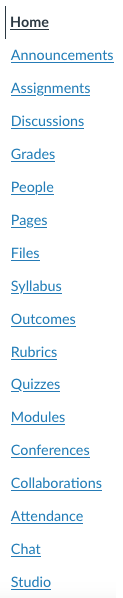
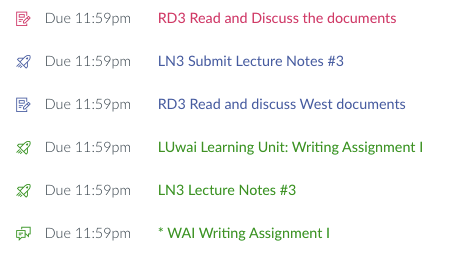


 I remember this exercise from grade school. We were given a list of terms, and told to use them in a paragraph. Not define them, but use them.


 All the books I’ve used, including works by


 I can also be cynical and patriotic at the same time. This was a huge American achievement — why is the


 We all have stories, usually told while shaking ones head, of how students do things at the last minute.